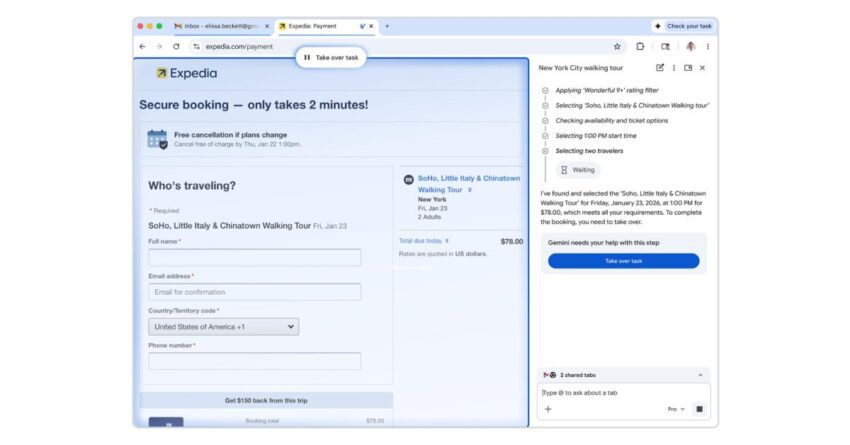
chrome rolling out gemini 3-powered auto browse Google has unveiled a new feature called “Chrome auto browse,” powered by its Gemini 3 AI, designed to streamline multi-step tasks for users.
chrome rolling out gemini 3-powered auto browse
Overview of Chrome Auto Browse
In an era where efficiency and convenience are paramount, Google’s latest innovation, Chrome auto browse, aims to redefine how users interact with their web browsers. This feature is described as a “powerful agentic experience” that automates complex, multi-step tasks, allowing users to focus on more critical aspects of their work or personal projects. By leveraging the capabilities of Gemini 3, Google’s advanced AI model, Chrome auto browse promises to enhance productivity and user experience significantly.
What is Gemini 3?
Gemini 3 is the latest iteration of Google’s AI technology, designed to understand and process natural language more effectively than its predecessors. This model incorporates machine learning techniques that enable it to perform a variety of tasks, from answering questions to generating content. With the introduction of Chrome auto browse, Gemini 3’s capabilities are being applied in a practical context, allowing users to automate repetitive tasks that typically require manual input.
Key Features of Chrome Auto Browse
Chrome auto browse is built to handle a range of tasks that users often find tedious. Some of the key features include:
- Task Automation: Users can set up multi-step tasks that the browser will execute automatically. This could include filling out forms, navigating through websites, or gathering information from multiple sources.
- Contextual Understanding: The AI can comprehend the context of tasks, allowing it to make decisions based on user preferences and previous interactions.
- Seamless Integration: Chrome auto browse integrates smoothly with existing Chrome features, ensuring that users do not have to learn a new interface or workflow.
- Customization Options: Users can customize the tasks they want to automate, tailoring the experience to their specific needs.
Implications for Users
The introduction of Chrome auto browse has significant implications for users across various sectors. From students to professionals, the ability to automate tasks can lead to increased productivity and reduced cognitive load.
Benefits for Students
For students, Chrome auto browse can be a game-changer. Tasks such as researching topics, compiling notes, or even managing schedules can be automated. This allows students to dedicate more time to understanding the material rather than getting bogged down by administrative tasks. Furthermore, the contextual understanding of Gemini 3 means that the AI can assist in a more personalized manner, adapting to the individual learning styles of students.
Advantages for Professionals
In the professional realm, the benefits are equally compelling. Employees often juggle multiple tasks that require switching between different applications and websites. Chrome auto browse can streamline these processes, allowing for more efficient workflows. For instance, a marketing professional could automate the process of gathering analytics data from various platforms, freeing up time for strategic planning and creative work.
Potential Drawbacks
While the advantages are clear, there are also potential drawbacks to consider. One concern is the reliance on AI for task completion. Users may become overly dependent on automated processes, potentially leading to a decline in critical thinking and problem-solving skills. Additionally, there are privacy concerns associated with AI technologies. Users must be cautious about the data they share and the tasks they automate, as this information could be misused if not adequately protected.
Stakeholder Reactions
The announcement of Chrome auto browse has elicited a range of reactions from stakeholders, including tech experts, educators, and privacy advocates.
Tech Community Response
Members of the tech community have largely welcomed the innovation. Many see it as a natural progression in the evolution of web browsers, where AI plays an increasingly central role. Experts argue that features like auto browse can significantly enhance user experience by reducing the time spent on mundane tasks. However, some caution against the potential for over-reliance on AI, emphasizing the importance of maintaining a balance between automation and human oversight.
Educators’ Perspectives
Educators have expressed mixed feelings about the feature. While many acknowledge the potential benefits for students, there are concerns about the implications for learning. Some educators worry that automation could lead to a superficial understanding of subjects, as students may rely on AI to complete assignments rather than engaging deeply with the material. They advocate for a balanced approach that encourages students to use AI as a tool for enhancement rather than a crutch.
Privacy Advocates’ Concerns
Privacy advocates have raised alarms about the data handling practices associated with AI technologies. With Chrome auto browse processing user data to perform tasks, there are questions about how this information will be stored, used, and protected. Advocates stress the importance of transparency from Google regarding data usage policies and urge users to be vigilant about their privacy settings.
Future Developments
As Google rolls out Chrome auto browse, the company is likely to continue refining the feature based on user feedback and technological advancements. Future updates may include enhanced customization options, improved contextual understanding, and expanded capabilities for handling more complex tasks.
Integration with Other Google Services
One area of potential growth is the integration of Chrome auto browse with other Google services. For instance, linking the feature with Google Calendar could allow users to automate scheduling tasks, while integration with Google Drive could facilitate document management. Such enhancements would create a more cohesive ecosystem, further boosting productivity.
Potential for Cross-Platform Functionality
Another exciting possibility is the development of cross-platform functionality. If Chrome auto browse could be utilized across different devices and operating systems, it would provide users with a seamless experience, regardless of where they are working. This would be particularly beneficial for professionals who switch between devices throughout the day.
Conclusion
Chrome auto browse represents a significant step forward in the integration of AI within web browsers. By automating multi-step tasks, Google aims to enhance productivity and user experience. While the feature offers numerous benefits, it also raises important questions about reliance on technology and data privacy. As stakeholders continue to react to this development, it will be crucial for Google to address these concerns while refining the feature to meet user needs effectively.
Source: Original report
Was this helpful?
Explore more: AI Automation Services More AI & Automation Tech News
Last Modified: January 29, 2026 at 4:58 am
10 views