gemini in chrome gets side panel ui Google has unveiled several significant updates to its Gemini feature in Chrome, including the introduction of a new side panel user interface, inline Gmail composition, and other enhancements aimed at improving user experience.
gemini in chrome gets side panel ui
Overview of Gemini Updates
Gemini, Google’s advanced AI tool, has been gaining traction since its initial rollout. The latest updates are designed to make the browsing experience more intuitive and efficient. By integrating a side panel UI, users can access various functionalities without navigating away from their current web pages. This feature is particularly beneficial for multitaskers who need to manage multiple tasks simultaneously.
New Side Panel User Interface
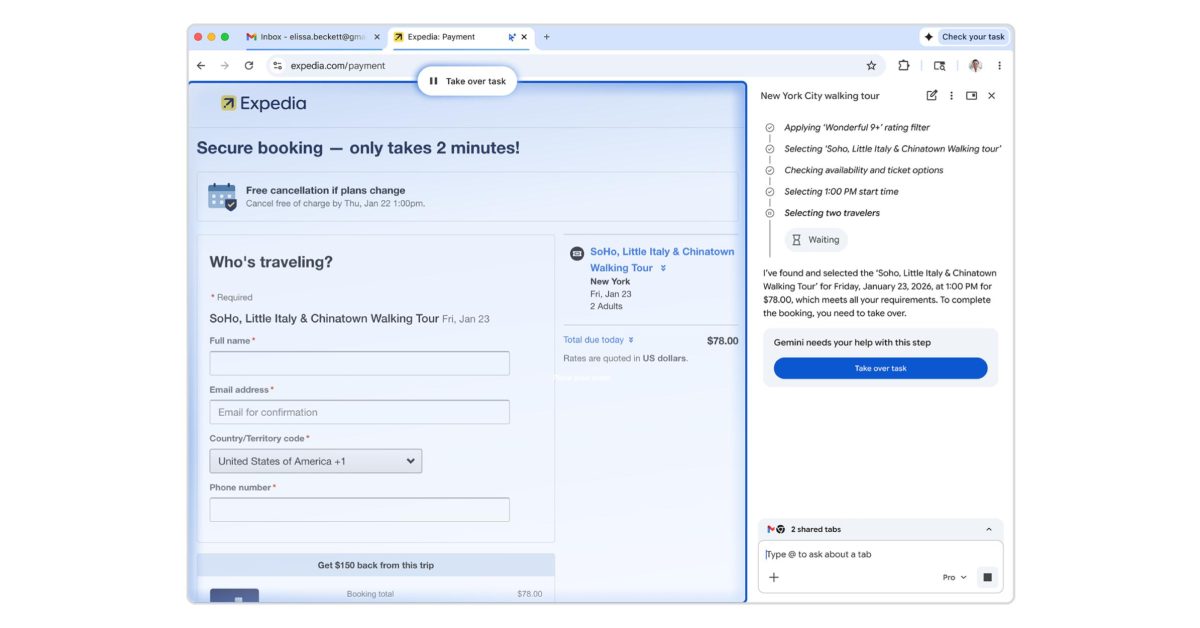
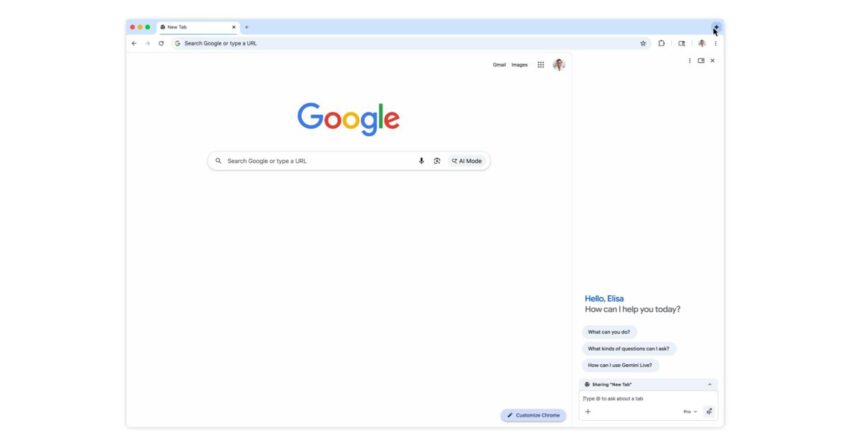
The most notable addition to Gemini is the side panel user interface. This new feature allows users to access Gemini’s capabilities without disrupting their browsing flow. The side panel can be opened with a simple click, providing a seamless transition between tasks.
Within the side panel, users can engage with various tools, including search functionalities, document editing, and more. This integration is particularly useful for those who often switch between different applications and web pages, as it minimizes the need for constant tab switching.
Enhanced Inline Gmail Composition
Another significant update is the inline Gmail composition feature. This allows users to draft emails directly within the side panel without needing to open a separate window or tab. By streamlining the email composition process, Google aims to reduce distractions and improve productivity.
The inline composition tool is designed to be user-friendly, offering suggestions and auto-completion features that can help users craft their emails more efficiently. This integration is particularly advantageous for professionals who rely heavily on email communication and need to manage their time effectively.
Additional Features and Improvements
In addition to the side panel and inline Gmail features, Google has introduced several other enhancements to Gemini that aim to improve overall functionality and user experience.
Auto Browse Functionality
One of the standout features is the auto browse functionality. This feature allows Gemini to automatically navigate through web pages based on user preferences and browsing history. By learning from user behavior, Gemini can suggest relevant content and streamline the browsing experience.
This capability is particularly useful for users who often find themselves overwhelmed by the sheer volume of information available online. By curating content based on individual preferences, Gemini aims to make the browsing experience more personalized and efficient.
Improved Search Capabilities
Gemini’s search capabilities have also seen significant enhancements. The AI tool can now provide more accurate and contextually relevant search results, making it easier for users to find the information they need quickly. This improvement is particularly important in an era where information overload is a common challenge.
By leveraging advanced algorithms and machine learning techniques, Gemini can understand user queries better and deliver results that are not only relevant but also timely. This feature is expected to save users valuable time and enhance their overall browsing experience.
Implications for Users
The updates to Gemini in Chrome have several implications for users, particularly in terms of productivity and efficiency. The introduction of the side panel UI and inline Gmail composition are likely to resonate well with professionals who juggle multiple tasks throughout the day.
Impact on Multitasking
With the new side panel, users can easily switch between tasks without losing focus. This is particularly beneficial for those who need to reference information while composing emails or conducting research. The ability to access tools and functionalities in a single interface can significantly reduce the cognitive load associated with multitasking.
Enhanced Communication
The inline Gmail composition feature is expected to streamline communication for users. By allowing users to draft emails without navigating away from their current tasks, Google is addressing a common pain point in professional environments. This enhancement can lead to quicker response times and improved collaboration among teams.
Stakeholder Reactions
The response from stakeholders, including users and industry experts, has been largely positive. Many have praised the updates for their potential to enhance productivity and streamline workflows. The side panel UI, in particular, has been highlighted as a game-changer for users who often find themselves toggling between multiple tabs and applications.
Industry analysts have noted that these updates position Google as a leader in the AI-driven productivity space. By continuously improving Gemini’s capabilities, Google is not only enhancing user experience but also setting a benchmark for competitors in the market.
User Feedback
Initial user feedback has indicated that the new features are intuitive and easy to use. Many users have expressed appreciation for the seamless integration of tools within the side panel, noting that it has made their browsing experience more efficient. The inline Gmail composition feature has also received positive reviews, with users highlighting its convenience and time-saving benefits.
Future Developments
As Google continues to refine Gemini, there are expectations for further enhancements and features. The company has a history of iterating on its products based on user feedback, and it is likely that future updates will focus on additional functionalities that cater to user needs.
Potential for Customization
One area where users have expressed interest is customization. The ability to tailor the side panel to individual preferences could further enhance the user experience. Features such as customizable shortcuts, preferred tools, and personalized layouts could make Gemini even more versatile.
Integration with Other Google Services
There is also potential for deeper integration with other Google services. For instance, incorporating Google Calendar or Google Drive functionalities within the side panel could provide users with a more comprehensive toolset for managing their tasks and communications.
Conclusion
The recent updates to Gemini in Chrome mark a significant step forward in enhancing user experience and productivity. With the introduction of the side panel UI, inline Gmail composition, and improved search capabilities, Google is positioning Gemini as a vital tool for professionals and everyday users alike. As the company continues to innovate and refine its offerings, it will be interesting to see how these developments shape the future of browsing and productivity.
Source: Original report
Was this helpful?
Explore more: AI Automation Services More AI & Automation Tech News
Last Modified: January 29, 2026 at 4:57 am
19 views