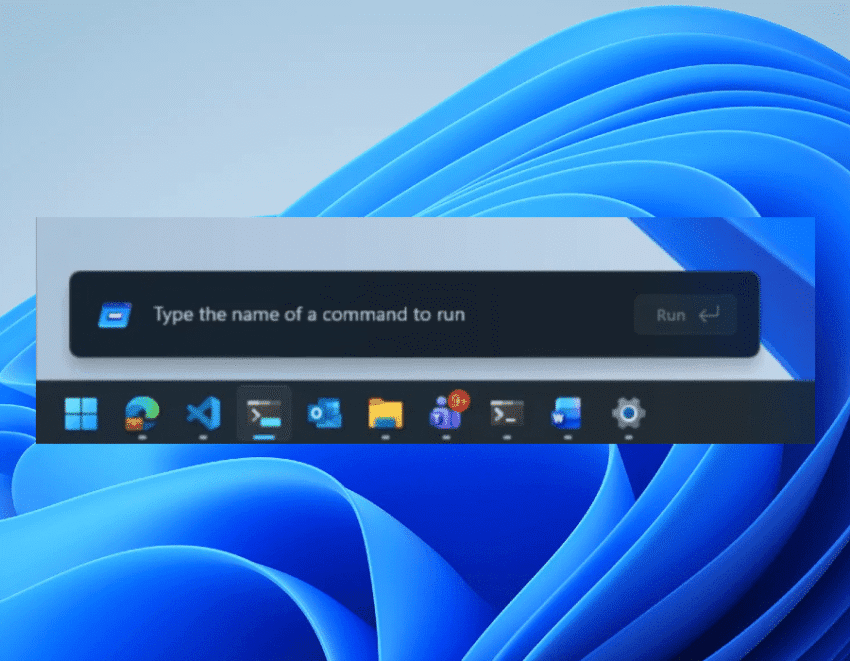
microsoft tests redesigned windows 11 run menu Microsoft is currently testing a significant redesign of the Windows 11 Run menu, introducing a modern interface that promises enhanced speed and support for dark mode.
microsoft tests redesigned windows 11 run menu
Overview of the Redesign
The Windows 11 Run menu has long been a staple feature for users seeking quick access to applications and system commands. As part of its ongoing efforts to improve user experience, Microsoft has initiated a rollout of a revamped version of this menu to Windows 11 Insiders in the new Experimental Channel. This redesign aims to modernize the interface while also addressing user feedback regarding functionality and usability.
Key Features of the New Run Menu
In its blog post detailing the changes, Microsoft highlighted several key features of the redesigned Run menu:
- Modern Interface: The new design aligns with the overall aesthetic of Windows 11, featuring a cleaner and more intuitive layout.
- Dark Mode Support: Users can now utilize the Run menu in dark mode, which is particularly beneficial for those who prefer a darker interface for reduced eye strain.
- Removal of the “Browse” Button: Microsoft has decided to eliminate the “Browse” button, which provided a shortcut to user files. This decision was based on data indicating very low usage of this feature among users.
- Introduction of the “~” Command: A new command has been added that directs users to their user directory, streamlining access to personal files and folders.
Implications of the Redesign
The redesign of the Run menu is not just a cosmetic change; it reflects Microsoft’s broader strategy to enhance user experience across its operating system. By focusing on speed and efficiency, the company aims to cater to the needs of both casual users and power users who rely on the Run menu for quick access to system functions.
User Experience Enhancements
One of the primary goals of the redesign is to improve the overall user experience. The modern interface is designed to be more intuitive, allowing users to navigate the menu more easily. The inclusion of dark mode is particularly relevant in today’s computing environment, where many users prefer darker themes to reduce glare and improve focus.
The removal of the “Browse” button may initially raise concerns among users who relied on it for quick access to files. However, Microsoft’s decision is backed by usage data, suggesting that the majority of users did not find it necessary. Instead, the introduction of the “~” command offers a more efficient way to access user directories, potentially improving workflow for many users.
Feedback from Windows Insiders
As the redesign is currently being tested among Windows 11 Insiders, feedback from this group will be crucial in shaping the final version of the Run menu. Insiders often provide valuable insights that can lead to further refinements and enhancements. Microsoft has a history of incorporating user feedback into its products, and this redesign is likely to be no exception.
Technical Aspects of the Redesign
Microsoft has leveraged existing technology to build the new Run menu. The company utilized code from the Command Palette, a utility available through PowerToys. This approach not only streamlines development but also ensures that the new Run menu benefits from the functionality and performance optimizations already present in the Command Palette.
Command Palette Integration
The Command Palette is a powerful tool that allows users to execute commands quickly without navigating through multiple menus. By integrating this technology into the Run menu, Microsoft is enhancing the speed and responsiveness of the feature. Users can expect a more fluid experience when entering commands, which is particularly beneficial for those who frequently use the Run menu for tasks such as launching applications or executing system commands.
Broader Context: Microsoft’s Ongoing Updates
The redesign of the Run menu is part of a larger trend within Microsoft to continually update and improve Windows 11. Since its launch, the operating system has received numerous updates aimed at enhancing performance, security, and user experience. Microsoft has been proactive in addressing user concerns and implementing features that align with modern computing needs.
Recent Updates and Features
In addition to the Run menu redesign, Microsoft has introduced several other features and updates to Windows 11:
- Virtual Desktops: Enhancements to virtual desktops allow users to organize their workspace more effectively, catering to both work and personal tasks.
- Improved Gaming Features: Microsoft has focused on gaming performance, introducing features such as DirectStorage and Auto HDR to enhance the gaming experience.
- Widgets and Taskbar Customization: The introduction of widgets and improved taskbar customization options allows users to tailor their desktop environment to better suit their preferences.
Stakeholder Reactions
The response from the tech community and users has been largely positive regarding the initial rollout of the redesigned Run menu. Many users appreciate the focus on modernizing the interface and improving functionality. However, some have expressed concerns about the removal of the “Browse” button, indicating that they found it useful for quick access to files.
Community Feedback
Online forums and social media platforms have seen discussions about the changes, with users sharing their thoughts and experiences. Some users have praised the introduction of dark mode, citing its benefits for prolonged use. Others have expressed curiosity about the “~” command and how it will impact their workflow.
Looking Ahead: Future Developments
As Microsoft continues to test the redesigned Run menu, it is expected that further refinements will be made based on user feedback. The company has a history of iterating on its products, and the insights gathered from Windows Insiders will likely play a significant role in shaping the final version of the Run menu.
Potential for Additional Features
Looking ahead, there is potential for additional features to be integrated into the Run menu. For instance, Microsoft could consider adding more command shortcuts or enhancing the menu’s integration with other Windows features. The goal would be to create a more cohesive experience that aligns with the overall vision for Windows 11.
Conclusion
The testing of the redesigned Windows 11 Run menu marks an important step in Microsoft’s ongoing efforts to enhance user experience. With a modern interface, dark mode support, and new command functionalities, the updated Run menu aims to meet the evolving needs of users. As feedback from Windows Insiders continues to shape the final product, it will be interesting to see how Microsoft further refines this essential feature in the coming months.
Source: Original report
Was this helpful?
Explore more: Software Development More Software Development Tech News
Last Modified: May 2, 2026 at 11:39 am
21 views