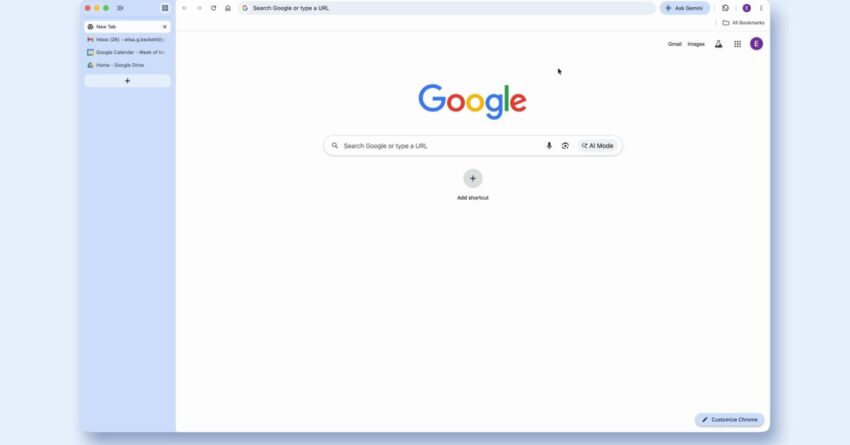
google chrome rolling out vertical tabs and Google is set to enhance the desktop experience of its Chrome browser with the introduction of two significant updates: vertical tabs and an immersive reading mode.
google chrome rolling out vertical tabs and
Introduction of Vertical Tabs
One of the most anticipated features in the latest update is the vertical tabs functionality. This feature aims to provide users with a more organized and efficient way to manage their open tabs. Traditionally, tabs in Chrome are displayed horizontally at the top of the browser window, which can become cumbersome as users open multiple tabs. The vertical tabs option allows users to shift their tab management to the left side of the screen, making it easier to view and navigate through numerous tabs without overwhelming the horizontal space.
Benefits of Vertical Tabs
The vertical tabs feature is designed with usability in mind. Here are some key benefits:
- Improved Visibility: Users can see more of their open tabs at once, as the vertical layout allows for longer tab names to be displayed without truncation.
- Enhanced Organization: Users can group tabs by category or project, making it easier to switch between related tasks without losing track of their workflow.
- Better Accessibility: The vertical layout is particularly beneficial for users with larger screens, as it utilizes the available space more effectively.
As users increasingly rely on multiple tabs for research, work, and leisure, the vertical tabs feature addresses a common pain point in tab management. This update is expected to appeal to power users who often juggle numerous tabs simultaneously.
How to Enable Vertical Tabs
For users eager to try out the vertical tabs feature, enabling it is straightforward. Users can access this feature through the Chrome settings menu. Here’s a step-by-step guide:
- Open Chrome and click on the three-dot menu in the upper right corner.
- Select “Settings” from the dropdown menu.
- Navigate to the “Appearance” section.
- Look for the “Enable vertical tabs” option and toggle it on.
Once activated, users will notice a significant change in their tab management experience. The transition is designed to be seamless, allowing users to adapt quickly to the new layout.
Immersive Reading Mode
Alongside vertical tabs, Google is also introducing an immersive reading mode. This feature aims to enhance the reading experience by minimizing distractions and providing a more focused environment for users. The reading mode strips away unnecessary elements from web pages, such as ads and sidebars, allowing users to concentrate on the content itself.
Key Features of Immersive Reading Mode
The immersive reading mode comes with several features designed to improve user engagement:
- Distraction-Free Environment: By removing ads and other non-essential elements, users can read articles and documents without interruptions.
- Customizable Text Settings: Users can adjust font size, background color, and text spacing to suit their reading preferences, making it easier for individuals with visual impairments to read comfortably.
- Text-to-Speech Functionality: For users who prefer auditory learning, the reading mode includes a text-to-speech feature that can read articles aloud, enhancing accessibility.
This feature is particularly relevant in an age where digital content consumption is at an all-time high. With the rise of online articles, e-books, and educational resources, the immersive reading mode aims to cater to diverse reading habits and preferences.
How to Activate Immersive Reading Mode
Activating the immersive reading mode is also a simple process. Users can follow these steps:
- Open a web page that contains an article or text content.
- Look for the reading mode icon in the address bar (it typically resembles an open book).
- Click on the icon to enter immersive reading mode.
Once activated, users will experience a cleaner, more focused reading environment that enhances their ability to absorb information.
Implications of the Updates
The introduction of vertical tabs and immersive reading mode represents a significant shift in how Google approaches user experience in Chrome. These updates are not merely cosmetic; they reflect a deeper understanding of user behavior and the need for enhanced productivity tools in an increasingly digital world.
Impact on User Productivity
As remote work and online learning continue to be prevalent, the demand for efficient tools has never been higher. The vertical tabs feature is poised to improve productivity by allowing users to manage their workflow more effectively. By grouping related tabs and reducing clutter, users can navigate their tasks with greater ease.
Similarly, the immersive reading mode caters to users who consume large volumes of content daily. By providing a distraction-free environment, this feature can help users retain information better and improve their overall reading comprehension.
Stakeholder Reactions
Initial reactions from stakeholders, including tech enthusiasts and productivity experts, have been largely positive. Many users have expressed excitement about the vertical tabs feature, noting that it addresses a long-standing issue in tab management. The immersive reading mode has also garnered attention, particularly among educators and content creators who recognize its potential to enhance learning experiences.
However, some users have raised concerns about the potential for these features to complicate the user interface. As Chrome continues to evolve, striking a balance between adding new functionalities and maintaining simplicity will be crucial. Google will need to ensure that these updates do not overwhelm users who prefer a more straightforward browsing experience.
Conclusion
Google’s rollout of vertical tabs and immersive reading mode marks a significant advancement in the Chrome browser’s functionality. By addressing common user pain points and enhancing the overall browsing experience, these updates are set to improve productivity and engagement for a diverse range of users. As the digital landscape continues to evolve, features like these will play a vital role in shaping how individuals interact with online content.
As users begin to explore these new features, it will be interesting to observe how they adapt to the changes and whether these updates lead to a shift in user behavior and preferences. Google’s commitment to enhancing user experience is evident, and these updates are just the beginning of what could be a transformative period for the Chrome browser.
Source: Original report
Was this helpful?
Explore more: Software Development More Software Development Tech News
Last Modified: April 7, 2026 at 10:43 pm
19 views