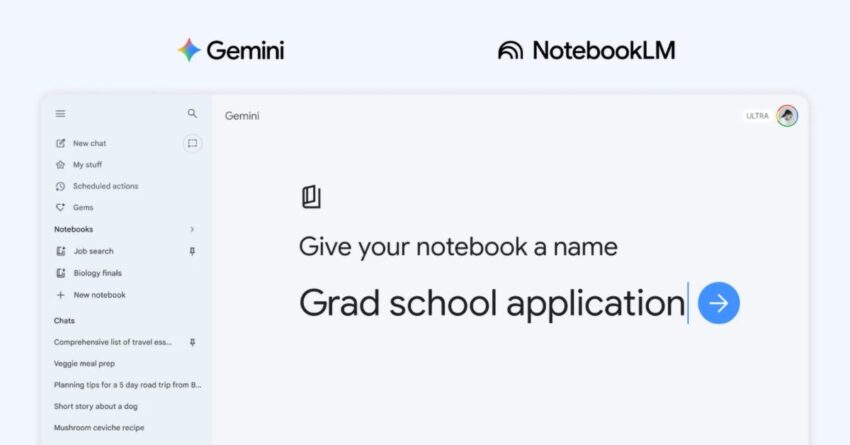
gemini app rolling out notebooks to organize The Gemini app is set to enhance its functionality with the introduction of a new feature called “notebooks,” which will allow users to better organize their chats and files while integrating seamlessly with NotebookLM.
gemini app rolling out notebooks to organize
Overview of the Gemini App
Launched as part of Google’s suite of productivity tools, the Gemini app aims to streamline communication and collaboration among users. Initially introduced as a platform for messaging and file sharing, the app has evolved significantly since its inception. The addition of notebooks is a strategic move to enhance user experience by providing a structured way to manage conversations and documents.
Initial Features and Capabilities
When Gemini first launched, it included basic messaging features, file sharing capabilities, and integration with other Google services. Users could send messages, share documents, and collaborate in real-time. However, as the demand for more organized and efficient communication tools grew, Google recognized the need for a more sophisticated approach.
Introduction of Notebooks
The introduction of notebooks represents a significant shift in how users can interact with the Gemini app. Notebooks will serve as a digital workspace where users can categorize their chats and files based on specific topics or projects. This feature aims to reduce clutter and enhance productivity by allowing users to easily locate relevant information.
Functionality of Notebooks
Notebooks will allow users to:
- Organize Chats: Users can group conversations by themes, projects, or teams, making it easier to track discussions over time.
- Store Files: Important documents can be saved within specific notebooks, ensuring that all related materials are easily accessible.
- Collaborate Effectively: Teams can work together within shared notebooks, facilitating better communication and collaboration on projects.
This structured approach is expected to enhance user engagement and improve overall productivity, particularly for teams working on complex projects that require constant communication and file sharing.
Integration with NotebookLM
One of the most notable aspects of the Gemini app’s update is its deeper integration with NotebookLM. This integration is designed to enhance the functionality of both platforms, allowing users to leverage the strengths of each tool.
What is NotebookLM?
NotebookLM is a digital note-taking application that allows users to create, organize, and manage notes efficiently. It has gained popularity for its user-friendly interface and robust features, making it a preferred choice for individuals and teams alike. The integration with Gemini means that users can now access their notes directly within the Gemini app, creating a seamless workflow.
Benefits of Integration
The integration of NotebookLM into the Gemini app offers several advantages:
- Streamlined Access: Users can access their notes without switching between applications, saving time and reducing distractions.
- Enhanced Collaboration: Teams can share notes and collaborate in real-time, ensuring that everyone is on the same page.
- Improved Organization: By combining notes and chats in one place, users can maintain a more organized digital workspace.
This integration is particularly beneficial for professionals who rely on both communication and note-taking tools to manage their work effectively.
Implications for Users
The rollout of notebooks and the integration with NotebookLM have significant implications for users of the Gemini app. As organizations increasingly adopt digital tools for collaboration, the need for effective organization becomes paramount. The introduction of notebooks addresses this need by providing a structured method for managing information.
Impact on Productivity
Research has shown that organized workspaces can lead to increased productivity. By allowing users to categorize their chats and files, the Gemini app aims to reduce the time spent searching for information. This can lead to more efficient workflows and ultimately better outcomes for teams and individuals.
User Feedback and Reactions
Early feedback from users who have tested the notebooks feature has been largely positive. Many users appreciate the ability to organize their conversations and files in a more structured manner. Some have noted that the integration with NotebookLM has made it easier to keep track of important notes and discussions.
However, some users have expressed concerns about the potential for information overload. With the introduction of new features, there is always a risk that users may feel overwhelmed by the amount of information they need to manage. Google will need to ensure that the user interface remains intuitive and user-friendly to mitigate these concerns.
Future Developments
As Google continues to develop the Gemini app, it is likely that additional features will be introduced to enhance user experience further. The company has a history of iterating on its products based on user feedback, and the success of the notebooks feature will likely influence future updates.
Potential Features to Look For
Some potential features that could be introduced in future updates include:
- Advanced Search Capabilities: Enhancements to search functions could allow users to find specific chats or files more easily.
- Customization Options: Users may benefit from the ability to customize their notebooks, such as changing colors or adding tags for better organization.
- Integration with Other Tools: Further integration with other Google services or third-party applications could enhance the overall functionality of the Gemini app.
These potential developments could further solidify the Gemini app’s position as a leading tool for communication and collaboration.
Conclusion
The introduction of notebooks in the Gemini app marks a significant advancement in how users can organize their chats and files. By integrating with NotebookLM, Google is providing a comprehensive solution that addresses the needs of modern users who require efficient communication and organization tools. As the app continues to evolve, it will be interesting to see how these changes impact user experience and productivity.
Source: Original report
Was this helpful?
Explore more: AI Automation Services More AI & Automation Tech News
Last Modified: April 9, 2026 at 12:48 pm
17 views