windows 11 tests an adjustable taskbar and Microsoft is rolling out a significant update for Windows 11 that introduces an adjustable taskbar and a resizable Start menu, enhancing user customization options.
windows 11 tests an adjustable taskbar and
Overview of the Update
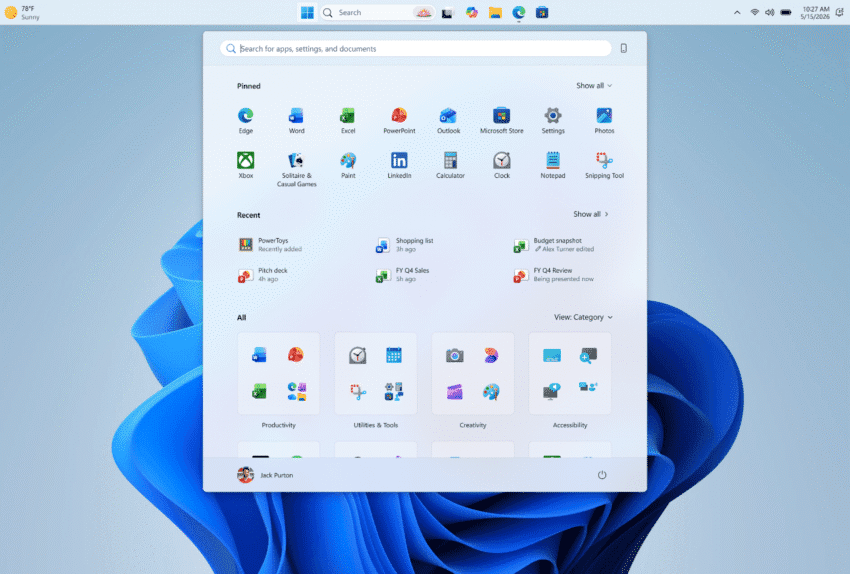
The latest test build of Windows 11, currently available to Insiders in the Experimental channel, allows users to reposition the taskbar and modify the size of the Start menu. This update marks a notable shift in Microsoft’s approach to user interface design, as it aims to provide more flexibility and personalization for its users. The taskbar can now be placed at the bottom, top, left, or right side of the screen, catering to diverse user preferences and workflows.
Features of the Movable Taskbar
One of the most anticipated features of this update is the ability to move the taskbar. Previously, Windows 11 users were limited to a fixed taskbar position at the bottom of the screen. The new functionality allows for greater adaptability, particularly for users with multi-monitor setups or those who prefer a specific layout for their applications. Users can now choose to position the taskbar where it best fits their workflow, whether that be at the top for a more traditional desktop experience or on the sides for a more modern look.
Start Menu Resizing
In addition to the movable taskbar, the update introduces a resizable Start menu. This feature allows users to adjust the size of the Start menu according to their needs, which can be particularly beneficial for those using devices with smaller screens. The ability to resize the Start menu can enhance accessibility and improve the overall user experience by allowing for a more tailored interface.
Background and Context
Microsoft first hinted at the concept of a movable taskbar back in March as part of its broader strategy to rebuild trust among users. This initiative comes in response to various criticisms regarding the rigidity of Windows 11’s interface compared to previous versions of the operating system. By introducing features that prioritize user customization, Microsoft aims to address these concerns and foster a more positive relationship with its user base.
User Feedback and Trust Rebuilding
The introduction of these new features is a direct response to user feedback, which has highlighted the desire for greater control over the operating system’s interface. Microsoft has been actively engaging with its community of users through forums and feedback channels, seeking to understand their needs and preferences. The ability to move the taskbar and resize the Start menu is a clear indication that Microsoft is listening and willing to adapt its offerings based on user input.
Implications for Users
The implications of this update are significant for Windows 11 users. The added flexibility in taskbar positioning and Start menu resizing can lead to improved productivity and a more personalized computing experience. Users who frequently switch between tasks or work with multiple applications will likely find the new features beneficial in streamlining their workflows.
Potential Impact on Multi-Monitor Setups
For users with multi-monitor setups, the ability to relocate the taskbar can be particularly advantageous. Many professionals use multiple screens to enhance their productivity, and having the taskbar positioned optimally can reduce the time spent navigating between applications. This feature could also benefit gamers and content creators who often utilize multiple displays for their work.
Accessibility Considerations
The resizable Start menu also has important accessibility implications. Users with visual impairments or those who prefer larger icons and text will appreciate the ability to adjust the size of the Start menu to better suit their needs. This move aligns with Microsoft’s ongoing commitment to making its products more accessible to a wider audience.
Stakeholder Reactions
The response from the tech community and Windows 11 users has been largely positive. Many users have expressed excitement over the new features, viewing them as a step in the right direction for Microsoft. The ability to customize the taskbar and Start menu is seen as a long-overdue enhancement that aligns with user expectations for modern operating systems.
Developer Insights
Developers and tech enthusiasts have also weighed in on the update, noting that it reflects a growing trend in software design toward user-centric customization. The flexibility offered by the new features could inspire other software developers to consider similar approaches in their products. As user customization becomes increasingly important in software design, Microsoft’s update may set a precedent for future operating systems.
Future Updates and Expectations
As the update is currently being tested by Windows 11 Insiders, it is expected that Microsoft will continue to refine these features based on user feedback before a wider rollout. The company has a history of using the Insider program to gather insights and make improvements, and this update is likely to follow that same trajectory.
Looking Ahead
Future updates may include additional customization options, such as more themes, icon packs, or even further enhancements to the taskbar and Start menu. Microsoft may also explore integrating these features with other aspects of Windows 11, such as virtual desktops or the new Snap layouts, to create a more cohesive and user-friendly experience.
Conclusion
The introduction of a movable taskbar and resizable Start menu in Windows 11 represents a significant evolution in Microsoft’s approach to user interface design. By prioritizing flexibility and customization, Microsoft is not only addressing user feedback but also positioning itself as a leader in user-centric software development. As the update rolls out to Insiders, it will be interesting to see how these features are received and what further enhancements may be on the horizon for Windows 11 users.
Source: Original report
Was this helpful?
Explore more: Software Development More Software Development Tech News
Last Modified: May 16, 2026 at 2:38 am
17 views