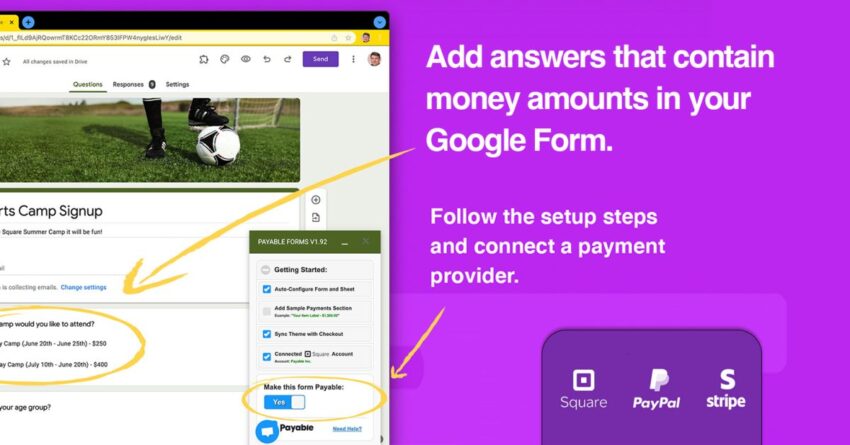
payable is the best way to accept Payable’s integration with Google Forms introduces a streamlined method for accepting payments through popular platforms like PayPal, Stripe, and Square, enhancing the functionality of this widely-used tool.
payable is the best way to accept
Understanding Google Forms
Google Forms is a versatile tool that allows users to create surveys, quizzes, and forms for various purposes. From educational institutions gathering student feedback to businesses collecting customer information, Google Forms has become a go-to solution for data collection. Its user-friendly interface and seamless integration with other Google Workspace applications make it accessible for users of all skill levels.
However, while Google Forms excels at data collection, it traditionally lacks built-in payment processing capabilities. This limitation has prompted users to seek alternative methods for collecting payments alongside their data collection efforts. This is where Payable comes into play, bridging the gap between data collection and payment processing.
Introducing Payable
Payable is a payment processing solution designed to integrate with various platforms, including Google Forms. By adding Payable’s extension to Google Forms, users can accept payments directly through their forms, making it easier than ever to collect both information and funds in one streamlined process.
Key Features of Payable
Payable offers several features that enhance the payment collection process within Google Forms:
- Multiple Payment Options: Users can accept payments through major platforms such as PayPal, Stripe, and Square, providing flexibility for customers who may have a preferred payment method.
- Secure Transactions: Payable ensures that all transactions are secure, utilizing encryption and compliance with industry standards to protect sensitive information.
- User-Friendly Interface: The integration is designed to be intuitive, allowing users to set up payment options without requiring extensive technical knowledge.
- Customizable Forms: Users can tailor their forms to meet specific needs, including setting prices, adding descriptions, and customizing the look and feel of the payment section.
How to Set Up Payable with Google Forms
Setting up Payable with Google Forms is a straightforward process that can be completed in just a few steps. Here’s a detailed guide on how to get started:
Step 1: Install the Payable Extension
The first step is to install the Payable extension for Google Forms. This can typically be done through the Google Workspace Marketplace. Users should search for “Payable” and follow the prompts to add the extension to their Google Forms account.
Step 2: Create a New Form
Once the extension is installed, users can create a new Google Form or edit an existing one. This is where the data collection process begins. Users can add various fields such as text boxes, multiple-choice questions, and checkboxes to gather the necessary information from respondents.
Step 3: Add Payment Options
After setting up the form, users can navigate to the Payable extension within the form editor. Here, they can configure payment options, including:
- Choosing which payment platforms to accept (PayPal, Stripe, Square).
- Setting the amount to be charged for each submission.
- Adding a description or purpose for the payment, which can help clarify to users what they are paying for.
Step 4: Customize the Form
Customization is key to ensuring that the form aligns with the user’s branding and messaging. Users can adjust colors, fonts, and layouts to create a cohesive look that resonates with their audience. This step is crucial for maintaining professionalism and trust.
Step 5: Test the Form
Before sharing the form with respondents, it’s essential to test it to ensure everything functions as intended. Users can simulate a submission to verify that the payment process works smoothly and that all data is collected accurately.
Step 6: Share the Form
Once testing is complete, users can share the form through various channels, including email, social media, or embedding it on a website. The ease of sharing Google Forms makes it an efficient tool for reaching a wide audience.
Use Cases for Payable in Google Forms
The integration of Payable with Google Forms opens up numerous possibilities for various sectors. Here are some practical use cases:
1. Event Registrations
Organizations can use Google Forms to collect registrations for events, workshops, or webinars. By integrating Payable, they can charge attendees a registration fee directly through the form, simplifying the process and ensuring secure payments.
2. Product Orders
Businesses can create order forms for products or services, allowing customers to select items and pay for them in one seamless transaction. This is particularly useful for small businesses or freelancers who may not have a dedicated e-commerce platform.
3. Donations
Nonprofits can utilize Google Forms to collect donations. By integrating Payable, they can provide donors with a simple way to contribute financially, making it easier to support their causes.
4. Membership Fees
Clubs and organizations can manage membership applications and fees through Google Forms. With Payable, they can automate the payment process, ensuring that new members can join quickly and efficiently.
Benefits of Using Payable with Google Forms
The combination of Payable and Google Forms offers several advantages:
- Streamlined Processes: Users can collect data and payments in one place, reducing the need for multiple tools and simplifying administrative tasks.
- Increased Efficiency: Automating payment collection allows organizations to focus on their core activities rather than managing payment logistics.
- Improved User Experience: Customers appreciate the convenience of being able to fill out a form and make a payment in one step, leading to higher completion rates.
Challenges and Considerations
While the integration of Payable with Google Forms presents many benefits, there are also challenges and considerations to keep in mind:
1. Transaction Fees
Each payment platform has its own fee structure, which can impact the overall cost for users. Organizations should be aware of these fees when setting prices and budgeting for their projects.
2. Security Concerns
Although Payable prioritizes security, users must still ensure they are following best practices for data protection. This includes using secure connections and being transparent about how customer data will be used.
3. Limited Customization Options
While Payable offers customization features, there may be limitations compared to dedicated e-commerce platforms. Users should evaluate whether the available options meet their specific needs.
Conclusion
Payable’s integration with Google Forms is a significant advancement for users looking to streamline their data collection and payment processes. By providing a secure and efficient way to accept payments through popular platforms, Payable enhances the functionality of Google Forms, making it an even more valuable tool for businesses, nonprofits, and individuals alike. As the digital landscape continues to evolve, solutions like Payable will play a crucial role in simplifying transactions and improving user experiences.
Source: Original report
Was this helpful?
Explore more: Software Development More Software Development Tech News
Last Modified: March 22, 2026 at 12:44 am
15 views