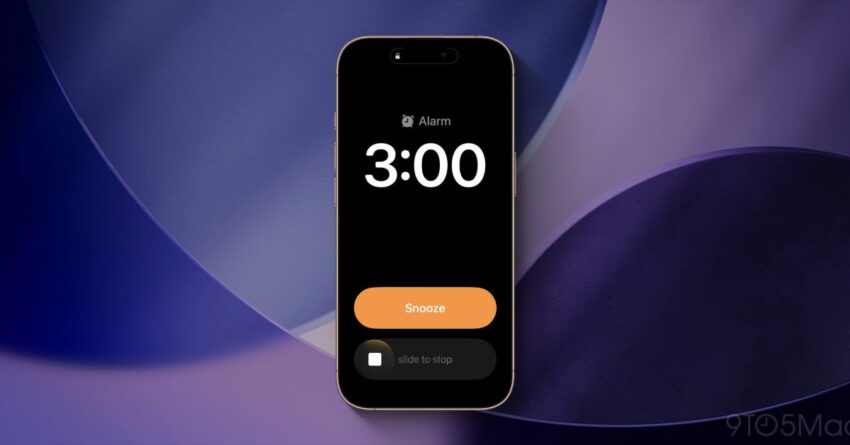
ios 26 1 makes alarms use a iOS 26.1 has introduced a significant change to the way users interact with alarms and timers, replacing the familiar ‘Stop’ button with a new ‘Slide to stop’ action, prompting many users to seek ways to restore the traditional button functionality.
ios 26 1 makes alarms use a
Overview of the Change in iOS 26.1
With the release of iOS 26.1, Apple has made a notable adjustment to its alarm and timer interface. Users accustomed to the straightforward ‘Stop’ button will now find that it has been replaced by a slider mechanism. This change has sparked a variety of reactions among users, with some appreciating the new design and others expressing frustration over the loss of a familiar feature.
The New ‘Slide to Stop’ Feature
The ‘Slide to stop’ feature requires users to physically slide a button across the screen to turn off alarms and timers. This design choice appears to be aimed at enhancing user engagement and reducing accidental dismissals of alarms. By requiring a deliberate action, Apple may be attempting to ensure that users are more awake and aware when they turn off their alarms, which could be beneficial for those who struggle with waking up in the morning.
User Reactions
The response to this change has been mixed. Some users have welcomed the new feature, citing that it adds a layer of interaction that was previously absent. They argue that the slider mechanism is more modern and aligns with other touch-based interactions on the iPhone. However, a significant number of users have expressed dissatisfaction, particularly those who relied on the simplicity of the ‘Stop’ button. Many have taken to social media and forums to voice their concerns, with some describing the change as unnecessary and cumbersome.
Restoring the ‘Stop’ Button
For users who prefer the traditional ‘Stop’ button, there is a workaround to restore this functionality. While Apple has not provided an official method to revert to the old system, users can employ a few strategies to mitigate the impact of the change.
Using Accessibility Features
One of the most effective ways to regain some control over alarm interactions is through the accessibility settings on the iPhone. Users can adjust settings that may help them manage their alarms more effectively. Here’s how to do it:
- Open the Settings app on your iPhone.
- Scroll down and select Accessibility.
- Look for the Touch option and tap on it.
- Enable AssistiveTouch. This feature creates a floating button on your screen that can be customized to perform various actions.
- Once AssistiveTouch is enabled, you can configure it to include a shortcut for stopping alarms.
While this does not restore the original ‘Stop’ button, it provides an alternative method for users who may find the slider inconvenient.
Feedback to Apple
Another avenue for users dissatisfied with the change is to provide feedback directly to Apple. The company has a long history of listening to user feedback and making adjustments based on customer input. Users can submit their thoughts through the Feedback Assistant app or the Apple website. Here’s how:
- Visit the Apple Feedback page.
- Select the appropriate product category, in this case, iPhone.
- Fill out the form, detailing your concerns about the new alarm feature.
- Submit your feedback.
While there is no guarantee that Apple will revert the change, user feedback can influence future updates and features.
Contextualizing the Change
Understanding the broader context of this change is essential for grasping its implications. Apple frequently updates its software to enhance user experience, improve security, and introduce new features. The decision to replace the ‘Stop’ button with a slider may reflect a trend in user interface design that emphasizes touch interactions over traditional button presses.
Trends in User Interface Design
In recent years, many tech companies have shifted towards more interactive and engaging user interfaces. The move from buttons to sliders and other touch-based controls is part of a larger trend aimed at making devices more intuitive. This shift can be seen in various applications and operating systems, where gestures and touch interactions are increasingly favored over static buttons.
While this trend can enhance user engagement, it also poses challenges for users who prefer simplicity and familiarity. The balance between innovation and usability is a delicate one, and Apple’s decision to implement the slider mechanism may reflect their commitment to modernizing the user experience, even at the cost of some user comfort.
Implications for Future Updates
The introduction of the ‘Slide to stop’ feature may set a precedent for future updates to iOS. If Apple continues to prioritize touch-based interactions, users may need to adapt to more changes in how they interact with their devices. This could lead to a reevaluation of how users engage with alarms, notifications, and other time-sensitive features.
Conclusion
The transition to a ‘Slide to stop’ mechanism in iOS 26.1 represents a significant shift in how users manage alarms and timers on their devices. While some users appreciate the modernized interaction, many others find the change frustrating and inconvenient. For those who prefer the traditional ‘Stop’ button, there are workarounds available, including accessibility features and direct feedback to Apple.
As Apple continues to evolve its software, users will need to navigate these changes while advocating for features that enhance their experience. The balance between innovation and user comfort will remain a critical consideration as the company moves forward with future updates.
Source: Original report
Was this helpful?
Explore more: Mobile App Development More Mobile Technology Tech News
Last Modified: December 12, 2025 at 2:37 am
21 views