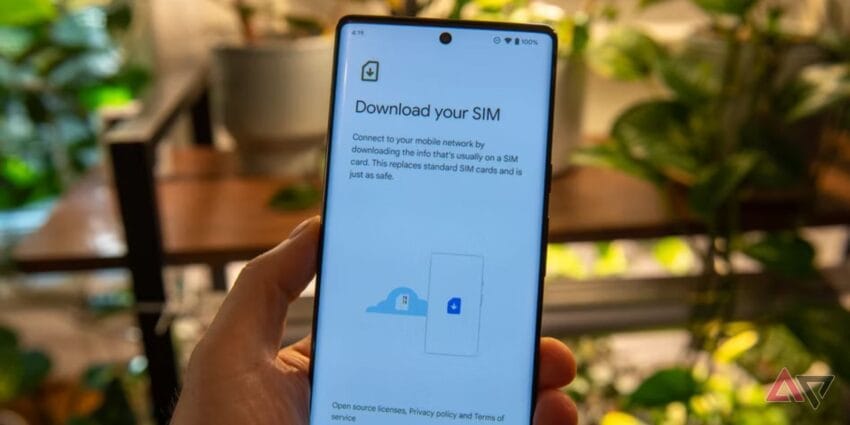
how to transfer an esim from one Transferring an eSIM from one Android device to another can be a complex process, but understanding the steps involved can simplify the transition.
how to transfer an esim from one
Understanding eSIM Technology
eSIMs, or embedded SIMs, represent a significant advancement in mobile connectivity. Unlike traditional SIM cards, which are physical cards that must be inserted into a device, eSIMs are integrated directly into the device’s hardware. This digital format offers several advantages, including the ability to switch carriers without needing to obtain a new physical SIM card, reduced space requirements within devices, and enhanced security features.
Despite these benefits, eSIM technology can present challenges, particularly when it comes to transferring service between devices. Users may find the process daunting due to the varying procedures employed by different carriers and the lack of uniformity in device interfaces. Understanding the steps required to transfer an eSIM can help alleviate some of these concerns.
Prerequisites for eSIM Transfer
Before initiating the transfer process, there are several prerequisites that users should ensure are met:
- Compatible Devices: Both the old and new Android devices must support eSIM technology. Most modern smartphones, especially flagship models, come equipped with this feature.
- Carrier Support: Not all carriers support eSIM transfers. It is essential to verify that your carrier allows eSIM transfers and to understand their specific procedures.
- Active eSIM Profile: The eSIM profile on the old device must be active and functioning correctly. If there are issues with the current eSIM, they should be resolved before attempting a transfer.
- Backup Data: While transferring an eSIM typically does not affect personal data, it is always a good practice to back up your device before making significant changes.
Steps to Transfer eSIM from One Android Phone to Another
Step 1: Prepare the Old Device
Begin by accessing the settings on your old Android device. The exact path may vary slightly depending on the manufacturer and Android version, but generally, you will follow these steps:
- Open the Settings app.
- Navigate to Network & Internet or Connections.
- Select Mobile Network.
- Look for an option labeled Advanced or Carrier Settings.
- Find the option to Remove eSIM or Delete Profile. This may be necessary to clear the eSIM from the old device before transferring it.
Note that some carriers may require you to contact customer support to deactivate the eSIM on the old device instead of doing it through the settings.
Step 2: Obtain a QR Code or Activation Code
Once the eSIM has been removed from the old device, the next step is to obtain a new QR code or activation code for the eSIM profile. This can usually be done through the carrier’s app or website. Here’s how:
- Log into your carrier account via their official app or website.
- Navigate to the section for eSIM management.
- Request a new eSIM activation code or QR code. Some carriers may send this code via email or provide it directly within the app.
Keep in mind that some carriers may have specific requirements or limitations regarding how often you can transfer your eSIM, so it’s advisable to check their policies.
Step 3: Set Up the New Device
With the QR code or activation code in hand, you can now proceed to set up the new Android device. Follow these steps:
- Open the Settings app on the new device.
- Go to Network & Internet or Connections.
- Select Add Mobile Plan or Mobile Network.
- Choose the option to Scan QR Code or Enter Activation Code.
- Follow the prompts to complete the setup process.
After scanning the QR code or entering the activation code, the device should automatically download the eSIM profile, and you will receive a confirmation once the process is complete.
Step 4: Verify the eSIM Activation
Once the eSIM has been added to the new device, it is crucial to verify that it is functioning correctly. To do this:
- Return to the Settings app.
- Navigate to Network & Internet or Connections.
- Select Mobile Network and check that the eSIM profile is listed and active.
- Make a test call or send a text message to ensure that the service is working as expected.
Troubleshooting Common Issues
While the process of transferring an eSIM is generally straightforward, users may encounter some common issues. Here are a few troubleshooting tips:
- eSIM Not Recognized: If the new device does not recognize the eSIM, ensure that the QR code or activation code was entered correctly. If problems persist, restarting the device may help.
- Service Not Available: If you cannot make calls or access mobile data, check that the eSIM profile is active and that there are no outages reported by your carrier.
- Carrier Support: If you encounter persistent issues, contacting your carrier’s customer support can provide additional assistance and guidance.
Implications of eSIM Technology
The rise of eSIM technology is reshaping the mobile telecommunications landscape. Its advantages, such as ease of switching carriers and the potential for more compact device designs, are compelling. However, the complexity of transferring eSIMs can be a barrier for some users. As more consumers adopt eSIM technology, it is likely that carriers will streamline their processes and improve user interfaces to facilitate easier transfers.
Moreover, the transition to eSIMs may have broader implications for the industry, including:
- Increased Competition: With the ability to switch carriers more easily, consumers may be more inclined to seek better deals, leading to increased competition among service providers.
- Device Design Innovation: As eSIMs eliminate the need for physical SIM card slots, manufacturers may explore new designs that enhance device functionality and aesthetics.
- Enhanced Security: eSIMs can offer improved security features, making it more difficult for unauthorized users to access mobile networks.
Stakeholder Reactions
The introduction of eSIM technology has elicited a range of reactions from stakeholders in the telecommunications sector. Manufacturers, carriers, and consumers all have vested interests in how this technology evolves.
Manufacturers have generally welcomed eSIMs as a means to innovate and differentiate their products. By reducing the need for physical components, they can create slimmer and lighter devices. However, they also face the challenge of ensuring compatibility across various carriers and regions.
Carriers have had mixed reactions. While eSIM technology can lead to increased customer retention and satisfaction, it also poses challenges in terms of customer support and managing the transition for users unfamiliar with the technology. Some carriers have invested heavily in educating their customers about eSIMs, while others have been slower to adapt.
Consumers, on the other hand, are often excited about the convenience that eSIMs offer. However, the complexity of transferring eSIMs can lead to frustration, particularly for those who are not tech-savvy. As awareness and understanding of eSIM technology grow, consumer expectations for seamless transfers and user-friendly processes will likely increase.
Conclusion
Transferring an eSIM from one Android phone to another may seem daunting, but by following the outlined steps and understanding the prerequisites, users can navigate the process more easily. As eSIM technology continues to evolve, it is essential for both consumers and carriers to adapt to the changing landscape of mobile connectivity.
Source: Original report
Was this helpful?
Explore more: Mobile App Development More Mobile Technology Tech News
Last Modified: September 24, 2025 at 12:51 am
16 views