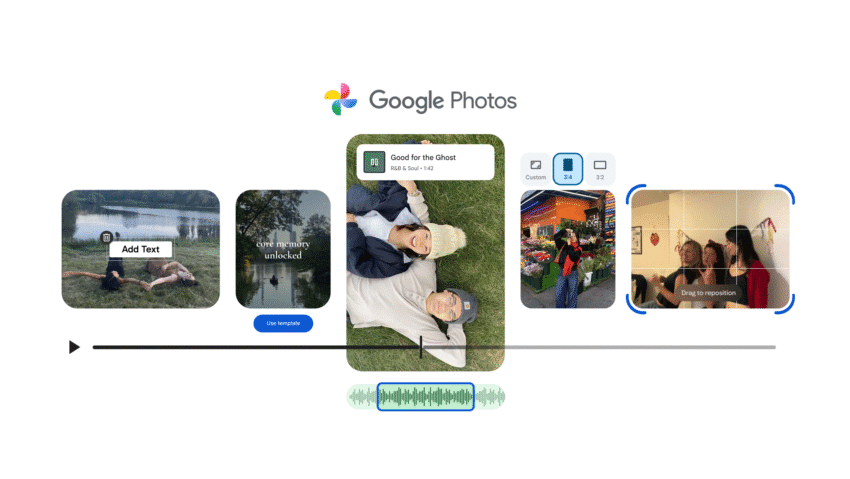
google photos new video editor makes it Google Photos is enhancing its video editing capabilities, making the app more competitive with dedicated video editing platforms like Capcut.
google photos new video editor makes it
Overview of the New Features
The Google Photos app, available on both Android and iOS, is undergoing a significant transformation in its video editing functionality. This overhaul includes a redesigned video editor, new templates for highlight reels, and enhanced options for adding custom text overlays and music to individual videos. These updates aim to provide users with a more robust and user-friendly experience when creating and editing videos.
Redesigned Video Editor
The revamped video editor in Google Photos is designed to streamline the editing process, making it more intuitive for users. The interface has been updated to facilitate easier navigation and quicker access to essential editing tools. Users can expect a more visually appealing layout that allows for seamless transitions between different editing functions.
Key features of the redesigned editor include:
- Improved User Interface: The new layout prioritizes user experience, allowing for a smoother editing process.
- Enhanced Editing Tools: Users can now access a wider array of editing options, including trimming, cropping, and adjusting video speed.
- Real-Time Preview: The ability to preview changes in real-time helps users make more informed decisions during the editing process.
Highlight Reels: A Step Forward
Highlight reels have been a feature of Google Photos for some time, allowing users to automatically compile selected photos and videos into a cohesive video presentation. However, the previous iteration of this feature was limited in terms of editing and stylistic options. The new update significantly expands these capabilities.
With the introduction of themed templates, users can now create highlight reels that are not only visually appealing but also tailored to specific occasions or themes. These templates come with built-in music and text overlays, enhancing the storytelling aspect of the videos.
Templates for Every Occasion
The new templates are designed to cater to various events and moods, making it easier for users to create personalized videos. Whether it’s a birthday celebration, a family vacation, or a simple day out, there’s likely a template that fits the occasion.
Some notable features of the templates include:
- Variety of Themes: Users can choose from a range of themes, each designed to evoke specific emotions or highlight particular aspects of the content.
- Integrated Music: Each template comes with curated music tracks that complement the visuals, enhancing the overall viewing experience.
- Customizable Text Overlays: Users can add personalized messages or captions to their videos, allowing for greater expression and creativity.
Implications for Users
The enhancements to Google Photos’ video editing capabilities are likely to have several implications for users:
- Increased Engagement: With more options for customization, users may find themselves more engaged in the video creation process, leading to a higher likelihood of sharing their creations.
- Accessibility for Non-Professionals: The user-friendly interface and templates make video editing accessible to those without prior experience, democratizing the art of video creation.
- Competition with Dedicated Apps: As Google Photos evolves, it positions itself as a serious competitor to dedicated video editing apps like Capcut, which have gained popularity for their robust features and ease of use.
Stakeholder Reactions
The response to the updates has been generally positive among users and industry experts alike. Many users have expressed excitement over the new features, particularly the templates and enhanced editing tools. Social media platforms have seen an uptick in discussions around the updates, with users sharing their experiences and creations.
Industry experts have noted that these changes could significantly impact the landscape of mobile video editing. The ability to create polished videos directly from a photo storage app could encourage more users to explore video editing, potentially leading to an increase in content creation across various platforms.
Potential Drawbacks
While the updates are largely seen as beneficial, some potential drawbacks have been noted:
- Learning Curve: Although the new interface is designed to be user-friendly, some users may still experience a learning curve as they adapt to the changes.
- Dependence on Templates: While templates can enhance creativity, they may also limit users who prefer a more hands-on approach to editing.
- Performance Issues: As with any app update, there may be initial performance issues or bugs that need to be addressed.
Contextualizing the Updates
The updates to Google Photos come at a time when video content is becoming increasingly important in digital communication. With platforms like TikTok and Instagram leading the charge in short-form video content, the demand for user-friendly video editing tools has never been higher. Google Photos’ enhancements are a strategic move to capture a share of this growing market.
Moreover, as more users turn to their smartphones for both photography and videography, having a comprehensive tool that combines storage and editing capabilities is a significant advantage. Google Photos aims to be a one-stop solution for users, allowing them to store, edit, and share their memories seamlessly.
Future Developments
Looking ahead, it will be interesting to see how Google continues to evolve its video editing features. The company has a history of integrating user feedback into its updates, which could lead to further enhancements based on user experiences with the new features.
Additionally, as competition in the video editing space intensifies, Google may introduce more advanced features, such as AI-driven editing suggestions or collaborative editing options, allowing multiple users to contribute to a single project.
Conclusion
The recent updates to Google Photos’ video editing capabilities mark a significant step forward for the app, making it more competitive with dedicated video editing platforms like Capcut. With a redesigned editor, themed templates, and enhanced customization options, users are now better equipped to create engaging and personalized videos. As the demand for video content continues to grow, Google Photos is positioning itself as a versatile tool for both casual users and content creators alike.
Source: Original report
Was this helpful?
Explore more: Software Development More Software Development Tech News
Last Modified: December 9, 2025 at 11:42 pm
18 views