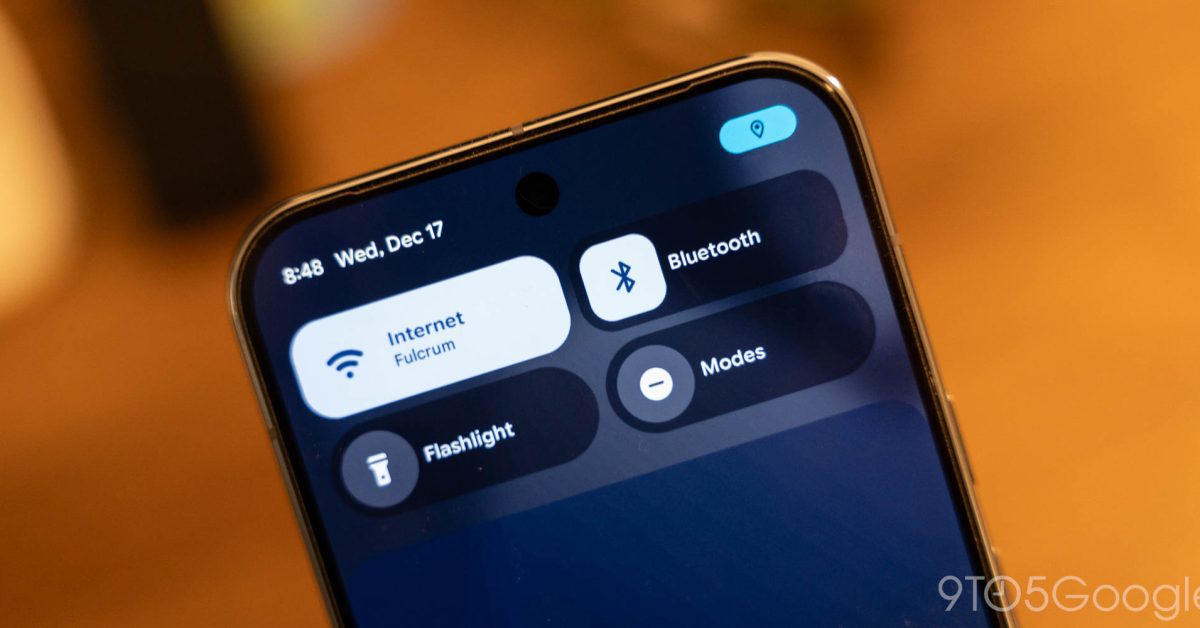
android 16 qpr3 lets you adjust flashlight Google’s Android 16 QPR3 update introduces a highly anticipated feature that allows users to adjust the brightness of their Pixel device’s flashlight directly from the Quick Settings Tile.
android 16 qpr3 lets you adjust flashlight
Overview of Android 16 QPR3
Android 16 QPR3, the latest quarterly platform release from Google, focuses on enhancing user experience through various updates and new features. This update is particularly significant for Pixel users, as it addresses a long-standing request: the ability to control flashlight brightness. The Quick Settings Tile, a central hub for quick access to essential settings and features, now includes this functionality, making it easier for users to customize their device settings on the fly.
Significance of Flashlight Brightness Control
The flashlight feature on smartphones has become a staple for many users, serving various purposes from illuminating dark spaces to providing light during emergencies. However, the brightness level of the flashlight has often been fixed, which can be limiting in certain situations. The introduction of adjustable brightness in Android 16 QPR3 is a welcome enhancement that allows users to tailor the intensity of the light to their specific needs.
For instance, users may prefer a dimmer light for reading at night or a brighter setting for outdoor activities. This flexibility not only improves usability but also enhances the overall user experience, making the Pixel devices more versatile in everyday scenarios.
How to Access the New Feature
With the rollout of Android 16 QPR3, accessing the new flashlight brightness control is straightforward. Users can follow these steps:
- Swipe down from the top of the screen to open the Quick Settings menu.
- Locate the flashlight icon within the Quick Settings Tile.
- Long-press the flashlight icon to access the brightness slider.
- Adjust the brightness level according to your preference.
This intuitive approach ensures that users can quickly make adjustments without navigating through multiple menus, thereby enhancing the overall efficiency of the device.
User Experience Improvements
The ability to adjust flashlight brightness is not just a minor tweak; it represents a significant improvement in user experience. Users often find themselves in situations where the fixed brightness of the flashlight is either too harsh or too dim. By allowing for adjustments, Google is addressing a common pain point among smartphone users.
Moreover, this feature aligns with the broader trend in smartphone design, where customization and user control are increasingly prioritized. As consumers become more tech-savvy, their expectations for device functionality continue to rise. Features like adjustable flashlight brightness cater to these evolving demands, ensuring that Pixel devices remain competitive in a crowded market.
Implications for Future Updates
The introduction of adjustable flashlight brightness in Android 16 QPR3 may set a precedent for future updates and features. As Google continues to refine the Android operating system, it is likely that user feedback will play a crucial role in shaping subsequent releases. This update could pave the way for more customizable features across various aspects of the operating system.
For instance, users may see similar adjustments in other system settings, such as volume controls, screen brightness, or even camera settings. The trend towards personalization is evident in many tech products, and Google appears to be embracing this shift with the latest update.
Stakeholder Reactions
The response from the tech community and Pixel users has been overwhelmingly positive. Many users have expressed their excitement on social media platforms, noting that this feature has been a long time coming. Tech reviewers have also highlighted the significance of this update, emphasizing how it enhances the practicality of the device.
Industry analysts suggest that this move could strengthen Google’s position in the smartphone market, particularly among users who prioritize functionality and ease of use. By listening to user feedback and implementing changes that directly address their needs, Google is fostering a loyal customer base that values innovation and responsiveness.
Comparative Analysis with Other Devices
While adjustable flashlight brightness is a new feature for Pixel devices, it is worth noting that other smartphone manufacturers have offered similar functionalities for some time. For example, Apple’s iPhone has allowed users to adjust flashlight brightness through the Control Center for several generations. Samsung and other Android manufacturers have also incorporated this feature into their devices.
This comparative analysis highlights the competitive landscape in which Google operates. As consumers weigh their options, features like adjustable flashlight brightness can be a deciding factor in their purchasing decisions. By finally introducing this capability, Google is not only enhancing the Pixel experience but also ensuring that it remains relevant in a rapidly evolving market.
Potential Challenges Ahead
Despite the positive reception of the adjustable flashlight brightness feature, challenges remain. As with any software update, there is the potential for bugs or issues that could affect user experience. Early adopters of Android 16 QPR3 may encounter glitches or performance issues that could detract from the overall functionality of the device.
Additionally, while this feature is a step in the right direction, users may have additional requests for further customization options. For example, some users may want to set specific brightness levels for different scenarios or create shortcuts for quick access to preferred settings. Addressing these requests will be crucial for Google as it seeks to enhance the user experience further.
Conclusion
The introduction of adjustable flashlight brightness in Android 16 QPR3 marks a significant advancement for Pixel users, enhancing the practicality and usability of the device. By allowing users to customize their flashlight settings directly from the Quick Settings Tile, Google is responding to user feedback and reinforcing its commitment to improving the Android experience.
As the tech landscape continues to evolve, features like these will play an essential role in shaping consumer preferences and expectations. Google’s willingness to adapt and innovate will be critical in maintaining its competitive edge in the smartphone market.
Source: Original report
Was this helpful?
Explore more: Mobile App Development More Mobile Technology Tech News
Last Modified: December 18, 2025 at 10:57 am
23 views