Microsoft used the opening keynote of its Build developer conference to push further into AI, but the company also announced a few developer-focused changes that may matter to people building software for Windows and Linux. The most notable non-AI reveal was a new compact desktop called the Surface RTX Spark Dev Box, alongside planned updates to Windows Subsystem for Linux (WSL), developer setup tools, and a sandboxing system for AI agents.
A new compact developer PC
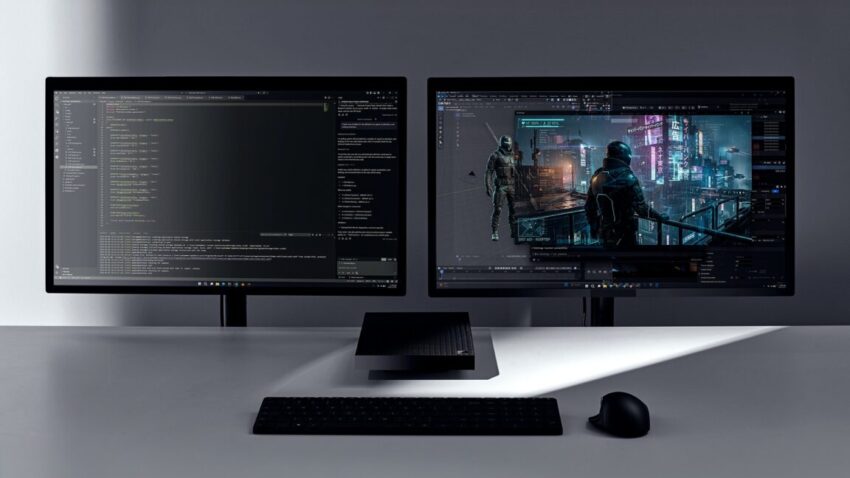
On the hardware side, Microsoft introduced the Surface RTX Spark Dev Box, which it described as “a compact developer PC” based on Nvidia’s RTX Spark chip and equipped with up to 128GB of built-in memory. The company did not provide pricing or full specifications, but the machine appears aimed at developers who want a powerful local Windows system for testing, building, and running modern software workflows.
The design is intentionally dense and unusual. Microsoft said the aluminum casing was built “to double as a heatsink,” and the preloaded Windows 11 Pro installation will ship with a “purposeful” set of developer-centric default settings and preinstalled tools. Visually, the system was described as resembling a flattened mix of an anvil, a piano, and an Xbox Series X.
The Dev Box is a follow-up of sorts to the Windows Dev Kit 2023, also known as “Project Volterra.” That earlier machine used a Qualcomm Snapdragon 8cx Gen 3 processor and was essentially the system board from a Surface Pro tablet placed into a plastic enclosure. Microsoft launched it together with Arm-native versions of several developer tools, helping set the stage for the Arm-based Surface devices that arrived the following year.
Those later Surface systems benefited from two key improvements: a more capable and faster x86-to-Arm translation layer called Prism, and a larger pool of third-party apps that already had native Arm builds, reducing the need for translation in the first place. Microsoft did not announce how the new RTX Spark Dev Box fits into that broader hardware strategy, but it clearly continues the company’s push to offer specialized machines for developers.
Pricing remains unknown
Microsoft did not say how much the Surface RTX Spark Dev Box will cost. Still, based on the hardware class, it is likely to be significantly more expensive than the $600 Windows Dev Kit 2023. It may also aim below Nvidia’s similarly positioned DGX Spark box, which carries a $4,699 asking price.
Linux tooling gets a Windows-native boost
Microsoft also announced a series of Windows 11 changes that should be of particular interest to developers who use WSL or need to move scripts and commands between Linux and Windows environments. One of the most practical changes is a Windows-native version of the coreutils command-line tools. Microsoft says this should help Linux-oriented commands or scripts run within Windows, and make them work in the opposite direction as well.
Another notable update is support for running WSL inside containers, which Microsoft says is coming in “the coming months.” That could make Linux development setups easier to isolate, replicate, and manage, especially for teams that already work with containers as part of their workflow.
Microsoft is also introducing Windows Developer Configurations, a WinGet-based setup option intended to create “a distraction-free dev environment” with a single command on any Windows 11 device. The configuration includes VS Code, GitHub Copilot, WSL, PowerShell 7, and developer-optimized settings, giving Windows machines a faster path from fresh install to usable development environment.
Sandboxing AI agents with Microsoft Execution Containers
For developers experimenting with AI agents but worried about what those agents can access, Microsoft announced Microsoft Execution Containers, or MXC. The company describes MXC as “enterprise-grade sandboxed environments” for AI agents such as OpenClaw on Windows. The idea is to let administrators assign specific instructions and then have Windows continuously enforce them.
In practical terms, Microsoft says this could help prevent an agent from accessing personal accounts on a work PC, or from vice versa crossing into work data from a personal context. It could also stop an agent from deleting files or taking other actions without permission.
Microsoft’s GitHub repository for MXC also says the system offers “multiple containment backends” that can be used to contain other kinds of plugins and tools, not just AI agents. That suggests the technology may have broader uses for developers who want to isolate software components or limit access for third-party extensions.
What stands out from Build
AI dominated Microsoft’s Build keynote, as expected. The company highlighted Microsoft Scout, an OpenClaw-based “Autopilot” agent that can tap Microsoft 365 data to perform tasks for users. It also announced several new AI models and an expanded preview of “Codename MDASH,” a “multi-model agentic scanning system” designed to find and fix software vulnerabilities.
Even so, the non-AI announcements may prove more immediately useful for developers working in Windows-heavy environments. The RTX Spark Dev Box gives Microsoft another dedicated local development machine, while the WSL and coreutils changes look like a straightforward attempt to reduce friction for people moving between Linux and Windows toolchains. MXC, meanwhile, reflects the reality that AI agents are becoming powerful enough to need serious guardrails.
None of these announcements address Microsoft’s broader efforts to make Windows faster, more reliable, or less annoying, but they do show the company continuing to court developers with new hardware, new setup tools, and more controlled ways to run code and agents. For teams already invested in Windows, the changes could make both local development and Linux interoperability a little easier.
Source: Original report
Was this helpful?
Explore more: More Hardware & Devices Tech News Blog
Last Modified: July 7, 2026 at 9:25 pm
8 views