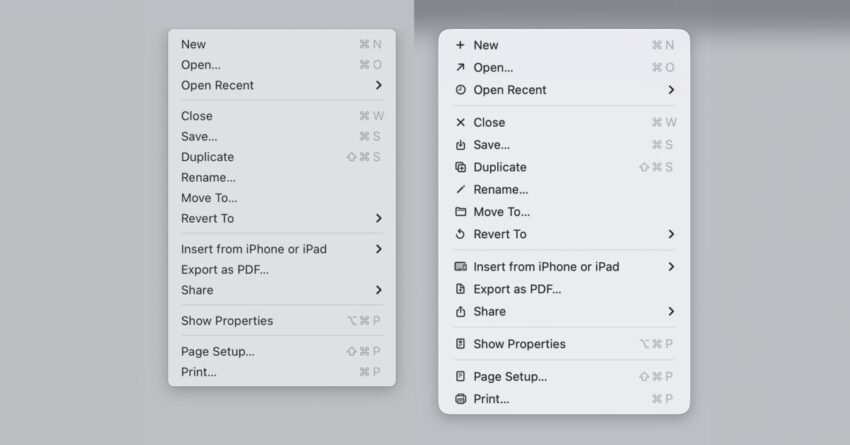
macos tahoe icons do exactly what apple Recent criticism has emerged regarding the app icons in macOS Tahoe, with many users expressing dissatisfaction and highlighting a significant departure from Apple’s design principles.
macos tahoe icons do exactly what apple
Background on macOS Tahoe
macOS Tahoe, the latest iteration of Apple’s operating system for Mac computers, was introduced with a variety of new features and enhancements aimed at improving user experience. However, one of the most contentious aspects of this release has been its app icons. As the software rolled out to users, feedback began to surface almost immediately, revealing a stark divide in opinions regarding the aesthetic choices made by Apple’s design team.
Initial Reactions and Criticism
Late last year, as users began to familiarize themselves with macOS Tahoe, a wave of criticism swept through online forums and social media platforms. Commenters described the new icons as “terrible” and “objectively bad,” indicating a strong negative sentiment. This backlash prompted 9to5Mac to conduct a poll among its readers to gauge their opinions on the new design. The results were mixed, with a significant number of users expressing disappointment while others defended the new look.
The divergence in opinions highlights a broader trend in design discussions, where personal preferences can vary widely. Some users appreciate the fresh take on iconography, while others feel that the new designs lack the elegance and functionality that Apple is known for.
Design Principles and Guidelines
To understand the criticism surrounding macOS Tahoe’s icons, it is essential to consider Apple’s long-standing design philosophy. The company has historically emphasized clarity, simplicity, and consistency in its user interface design. These principles are encapsulated in the Macintosh Human Interface Guidelines, which were first published in 1992. These guidelines serve as a foundational document for designers, outlining best practices for creating intuitive and user-friendly interfaces.
Historical Context of the Guidelines
The Macintosh Human Interface Guidelines were revolutionary at the time of their release, setting a standard for software design that prioritized user experience. They advocated for a design approach that avoided unnecessary complexity and focused on making software accessible to a broad audience. Key principles include the use of recognizable metaphors, consistent visual language, and a clear hierarchy of information.
Over the years, Apple has reiterated the importance of these guidelines, emphasizing that designers should avoid cluttered interfaces and overly complex visual elements. This historical context is crucial when evaluating the new icons in macOS Tahoe, as they appear to contradict many of the principles laid out in these guidelines.
Specific Issues with macOS Tahoe Icons
Software engineer Nikita Prokopov has brought attention to the specific design choices made in macOS Tahoe, particularly regarding the icons used within menus. Prokopov noted that these icons closely mirror the very approach that Apple’s Human Interface Guidelines advised against. This observation has sparked further debate among designers and users alike.
Examples of Design Flaws
Critics have pointed out several specific issues with the macOS Tahoe icons:
- Lack of Clarity: Many icons are criticized for being overly complex and not immediately recognizable, which goes against the principle of clarity.
- Inconsistent Visual Language: The new icons do not maintain a consistent style, leading to a disjointed user experience.
- Overly Decorative Elements: Some icons incorporate unnecessary decorative elements that detract from their functionality, making it harder for users to quickly identify their purpose.
These design flaws have led to a growing sentiment that the new icons do not align with Apple’s commitment to user-centric design. The backlash has raised questions about the decision-making processes within Apple’s design team and whether they have strayed too far from the foundational principles that have guided the company for decades.
Stakeholder Reactions
The reactions to the macOS Tahoe icons have not been limited to casual users. Industry professionals, designers, and tech commentators have weighed in on the discussion, providing a range of perspectives on the implications of these design choices.
Design Community Response
Members of the design community have expressed concern that the new icons could set a troubling precedent for future software releases. Many designers believe that deviating from established guidelines could lead to a decline in overall design quality across the industry. Some have called for Apple to re-evaluate its design choices and return to its roots, emphasizing the importance of clarity and simplicity.
User Feedback and Engagement
In addition to professional critiques, user feedback has played a significant role in shaping the conversation around macOS Tahoe’s icons. Many users have taken to social media to express their dissatisfaction, sharing screenshots and engaging in discussions about potential improvements. This grassroots feedback has highlighted the importance of user engagement in the design process and the need for companies to listen to their customers.
Implications for Future Releases
The controversy surrounding macOS Tahoe’s icons raises important questions about the future direction of Apple’s design philosophy. As the company continues to innovate and evolve its software offerings, it will need to carefully consider how it balances creativity with adherence to established design principles.
Potential for Change
Given the strong reactions from both users and designers, it is possible that Apple may take steps to address the concerns raised about the macOS Tahoe icons. This could involve revisiting the design choices made in this release and implementing changes in future updates. Apple has a history of responding to user feedback, and the current situation may prompt the company to reassess its approach to icon design.
Long-Term Considerations
In the long term, the backlash against macOS Tahoe’s icons could serve as a reminder of the importance of maintaining a strong design philosophy. As technology continues to advance and user expectations evolve, companies must remain vigilant in ensuring that their design choices align with the principles that have garnered user trust and loyalty.
Conclusion
The criticism surrounding macOS Tahoe’s app icons highlights a significant disconnect between Apple’s design intentions and user expectations. As the company navigates this feedback, it faces the challenge of balancing innovation with adherence to its foundational design principles. The outcome of this situation could have lasting implications for Apple’s design philosophy and its relationship with users. Moving forward, it will be essential for Apple to engage with its user base and ensure that its design choices reflect the clarity and simplicity that have long been hallmarks of its brand.
Source: Original report
Was this helpful?
Explore more: More Big Tech & Platforms Tech News Blog
Last Modified: January 6, 2026 at 7:52 pm
14 views