
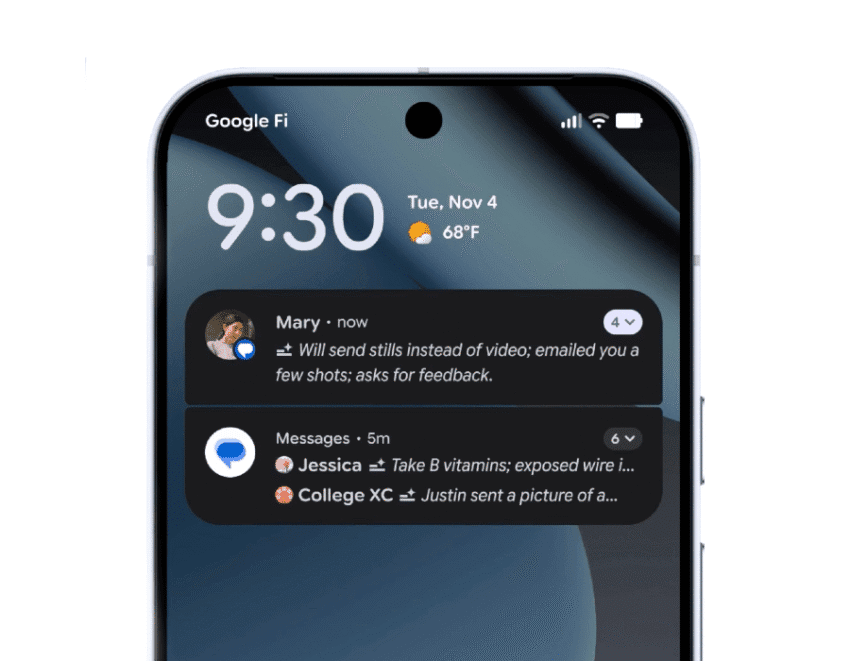
google is bringing ai-powered notification summaries to Google is expanding its AI-powered notification summaries feature to a wider range of Android devices, enhancing user experience and streamlining communication.
google is bringing ai-powered notification summaries to
Introduction to AI-Powered Notification Summaries
With the latest update to Android 16, Google is introducing AI-powered notification summaries that aim to simplify how users interact with their notifications. Initially rolled out on Pixel devices last month, this feature is now set to be available on a broader array of Android smartphones, including those from manufacturers like Samsung. This move signifies Google’s commitment to enhancing user experience across its ecosystem.
Functionality of AI Notification Summaries
The AI notification summaries feature is designed to condense lengthy messages and group conversations into concise snippets. This allows users to quickly grasp the essence of communications without wading through extensive text. Unlike Apple’s implementation of a similar feature on iOS, which includes various types of content, Google is focusing this functionality specifically on chat applications. This means that users will not encounter AI-generated summaries for news articles or other non-chat notifications, at least for the time being.
By limiting the scope of this feature, Google aims to ensure that users receive relevant and contextually appropriate summaries. This approach could potentially lead to a more streamlined and less overwhelming notification experience, particularly for those who frequently engage in group chats or receive lengthy messages.
Additional Features in Android 16
In addition to AI notification summaries, Android 16 introduces several other noteworthy features aimed at improving the overall user experience.
Notification Organizer
One of the significant enhancements is the new notification organizer, which automatically groups and silences “lower-priority” notifications. These notifications typically include promotions, news alerts, and updates from social media platforms. By organizing notifications in this manner, users can focus on more critical alerts without the distraction of less important messages. This feature is particularly beneficial for users who find themselves inundated with notifications throughout the day.
Personalization Options
Android 16 also allows users to personalize their home screens more extensively. Users can now customize icon shapes and themes, enabling a more tailored aesthetic that reflects individual preferences. This level of personalization is increasingly important in a world where users seek to make their devices uniquely their own.
Expanded Dark Mode
Another notable addition is the expanded dark mode feature. This new capability automatically darkens apps even if they do not natively support dark themes. This is particularly useful for users who prefer a darker interface, as it can reduce eye strain and save battery life on OLED screens.
Parental Controls and Family Features
Google is also consolidating its parental controls within the Android Settings menu. This update allows parents to manage screen time, control app usage, and create downtime schedules from a single location. The consolidation of these features is designed to make it easier for parents to monitor and manage their children’s device usage, promoting healthier digital habits.
Scam Detection and Communication Features
In an effort to enhance security, Android 16 includes a feature called Circle to Search, which helps users identify potential scams. This tool is part of a broader initiative to protect users from fraudulent communications and ensure a safer online experience.
Moreover, an update to the Phone by Google app introduces a new feature that allows users to alert family members or friends when a call is urgent. However, both the caller and recipient must be using Android devices with Phone by Google set as their default calling app for this feature to function effectively. This could prove invaluable in situations where immediate communication is necessary.
Accessibility Enhancements
Accessibility is a crucial focus for Google, and Android 16 brings several updates aimed at making devices more user-friendly for individuals with disabilities.
Expressive Captions
One of the standout features is the availability of Expressive Captions on YouTube. This feature attempts to capture the intensity of real-time speech, providing users with a richer viewing experience. Expressive Captions will be available on videos in English that were uploaded after October, making it a timely addition for content creators and viewers alike.
On Android devices, Expressive Captions will also detect and display emotions during live streams. For instance, viewers may see tags like “[joyful]” or “[sad]” accompanying the captions, adding an emotional layer to the content being viewed. This feature could significantly enhance the experience for users who rely on captions for comprehension.
Voice Dictation and Voice Access
Additional accessibility updates include the ability to activate voice dictation using Android’s TalkBack screen reader with a simple two-finger double-tap gesture in Gboard. This enhancement streamlines the process for users who may have difficulty using traditional input methods.
Furthermore, users can now initiate Voice Access by saying, “Hey Google, start Voice Access,” eliminating the need to tap the screen. This hands-free option is particularly beneficial for individuals with mobility challenges, allowing them to navigate their devices more easily.
Fast Pair for Hearing Aids
In a significant move towards inclusivity, Google is launching Fast Pair for hearing aids. This feature enables users to connect Bluetooth LE hearing aids to their Android devices with a single tap. Initially, this feature will be available for Demant hearing aids, with plans to roll out to Starkey devices in early 2026. This development underscores Google’s commitment to making technology accessible to all users, including those with hearing impairments.
Conclusion and Future Implications
The rollout of AI-powered notification summaries and other features in Android 16 reflects Google’s ongoing efforts to enhance user experience and accessibility across its platform. By focusing on relevant functionalities, such as notification organization and personalization, Google aims to create a more streamlined and user-friendly environment for Android users.
As more manufacturers adopt these features, the implications for user interaction with mobile devices could be significant. The emphasis on AI-driven solutions may pave the way for future innovations in how we manage notifications and communicate through our devices. Furthermore, the accessibility updates highlight the importance of inclusivity in technology, ensuring that all users can benefit from advancements in mobile operating systems.
As Android continues to evolve, users can expect ongoing enhancements that prioritize both functionality and accessibility, making it an increasingly versatile platform for a diverse range of users.
Source: Original report
Was this helpful?
Explore more: Mobile App Development More Mobile Technology Tech News
Last Modified: December 3, 2025 at 1:42 am
10 views














