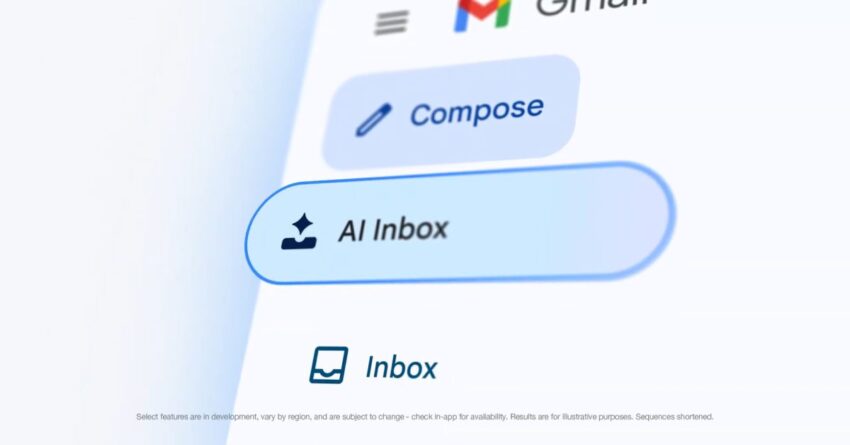
gmail adds ai inbox to the bottom Gmail has expanded its AI capabilities by introducing the AI Inbox feature to its mobile applications for Android and iOS, enhancing user experience with more personalized assistance.
gmail adds ai inbox to the bottom
Introduction of AI Inbox
Initially launched on the web, the AI Inbox feature is now making its way to Gmail’s mobile platforms. This development signifies a strategic move by Google to integrate artificial intelligence more deeply into its suite of productivity tools. The AI Inbox aims to streamline email management, making it easier for users to navigate their messages and prioritize important communications.
Location and Accessibility
In the mobile app, users will find the “AI Inbox” option located in the navigation drawer, positioned just below the traditional Inbox. This placement mirrors its location on the desktop version, ensuring consistency across platforms. However, the most significant enhancement is the addition of the AI Inbox to the bottom bar of the Gmail app. This prominent placement is designed to provide users with quick and easy access to AI-driven features, making it a focal point for those seeking assistance in managing their emails.
Features of AI Inbox
The AI Inbox is designed to leverage machine learning algorithms to help users manage their emails more efficiently. Here are some of the key features that users can expect:
- Email Prioritization: The AI Inbox uses algorithms to analyze user behavior and prioritize emails based on urgency and importance. This means that critical messages are more likely to appear at the top of the list, allowing users to respond promptly.
- Smart Categorization: The feature can automatically categorize emails into different folders, such as Promotions, Social, and Updates. This helps users quickly locate specific types of messages without sifting through their entire inbox.
- Personalized Suggestions: The AI Inbox can provide tailored suggestions for responding to emails, making it easier for users to craft replies. This feature is particularly useful for busy professionals who need to manage a high volume of correspondence.
- Spam Detection: Enhanced spam detection capabilities are also part of the AI Inbox, which can identify and filter out unwanted messages more effectively than traditional methods.
Integration with Help Me Write
Another significant aspect of this update is the enhancement of the “Help Me Write” feature. This functionality has been designed to assist users in drafting emails more efficiently. With the integration of AI, “Help Me Write” becomes more personalized, adapting to individual writing styles and preferences.
How Help Me Write Works
The “Help Me Write” feature utilizes natural language processing to understand the context of the email being drafted. Users can input a few keywords or phrases, and the AI will generate a draft that aligns with the user’s intent. This capability not only saves time but also helps users maintain a professional tone in their correspondence.
Personalization and User Experience
The personalization aspect of “Help Me Write” is particularly noteworthy. As users interact with the feature, the AI learns from their writing habits, allowing it to offer increasingly relevant suggestions over time. This continuous learning process enhances the overall user experience, making email composition less of a chore and more of a streamlined task.
Implications for Users
The introduction of the AI Inbox and the enhanced “Help Me Write” feature has several implications for Gmail users:
- Increased Efficiency: By automating email management and drafting processes, users can save significant time, allowing them to focus on more critical tasks.
- Improved Communication: With personalized suggestions and prioritized emails, users are likely to communicate more effectively, reducing the chances of missed messages or delayed responses.
- Enhanced User Engagement: The integration of AI features may encourage users to engage more with the Gmail app, as they experience the benefits of a more intuitive and responsive interface.
Stakeholder Reactions
The rollout of the AI Inbox and the improvements to “Help Me Write” have garnered mixed reactions from stakeholders in the tech community. While many users express enthusiasm about the potential for increased productivity, some experts raise concerns about privacy and data security.
User Enthusiasm
Many users have welcomed the new features, citing the convenience of having AI tools at their fingertips. The ability to prioritize emails and receive personalized writing suggestions has been particularly praised. Users appreciate the time-saving aspect, especially those who manage a high volume of emails daily.
Privacy Concerns
On the flip side, privacy advocates have voiced concerns regarding the data collection practices associated with AI features. As the AI Inbox and “Help Me Write” rely on user data to function effectively, questions arise about how this data is stored, used, and protected. Users are encouraged to review their privacy settings and understand the implications of using AI-driven features.
Future Developments
As Google continues to refine its AI capabilities, users can expect further enhancements to the Gmail platform. The company has indicated that it will continue to invest in AI technology to improve user experience across its products.
Potential Enhancements
Future updates may include:
- Advanced Machine Learning: Continued improvements in machine learning algorithms could lead to even more accurate email prioritization and categorization.
- Integration with Other Google Services: Enhanced integration with other Google services, such as Google Calendar and Google Drive, could provide a more cohesive user experience.
- Customizable AI Features: Users may have the option to customize AI features according to their specific needs, allowing for a more tailored experience.
Conclusion
The introduction of the AI Inbox and enhancements to the “Help Me Write” feature represent a significant step forward in Gmail’s evolution. By leveraging artificial intelligence, Google aims to provide users with a more efficient and personalized email experience. While the benefits are clear, it is essential for users to remain aware of privacy considerations as they navigate these new features. As Google continues to innovate, the future of email management looks promising, with AI playing a central role in shaping how we communicate.
Source: Original report
Was this helpful?
Explore more: AI Automation Services More AI & Automation Tech News
Last Modified: May 8, 2026 at 3:37 pm
15 views