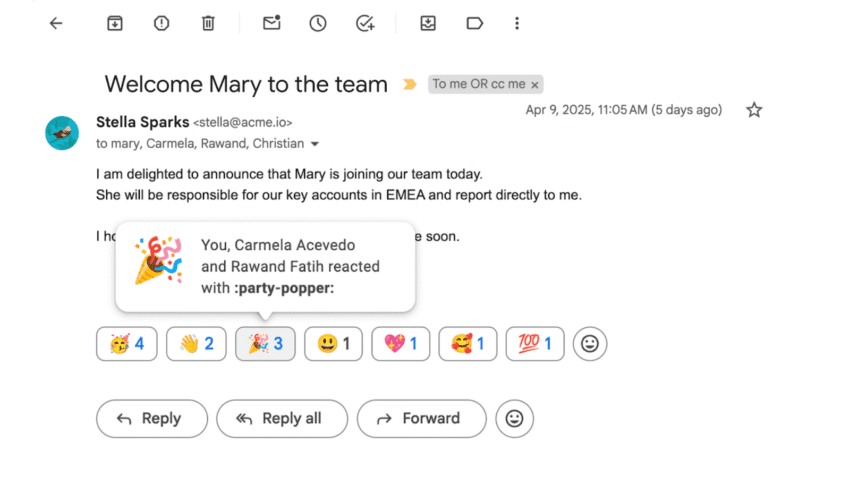
did you know that gmail has emoji Google is set to enhance user interaction in Gmail by rolling out emoji reactions to all Workspace users by default on February 9th, a feature that has been available to personal Gmail accounts for over two years.
did you know that gmail has emoji
Introduction to Emoji Reactions in Gmail
In the fast-paced world of digital communication, brevity often reigns supreme. The introduction of emoji reactions in Gmail serves as a testament to this trend, allowing users to convey emotions and sentiments without the need for lengthy text responses. While this feature has been quietly available to personal Gmail users since its rollout over two years ago, its upcoming availability to all Workspace users marks a significant step in enhancing collaboration and communication within professional environments.
The Functionality of Emoji Reactions
How to Access Emoji Reactions
Accessing emoji reactions in Gmail is straightforward, albeit somewhat hidden. Users can find the emoji option by clicking on a small smiley face icon located next to the Forward button in the email interface. Once clicked, a selection of emojis appears, offering a variety of options ranging from thumbs-up and heart emojis to more expressive faces. This feature allows users to respond to emails quickly and efficiently, making it easier to acknowledge messages without drafting a full reply.
Visibility of Reactions
When a Gmail user sends an emoji reaction to another Gmail user, the recipient will see the reaction displayed at the bottom of the email thread. This visibility ensures that the sender’s sentiment is communicated effectively, fostering a more engaging and interactive email experience. The simplicity of this feature can significantly reduce the time spent on email exchanges, allowing users to focus on more critical tasks.
Implications for Workspace Users
The integration of emoji reactions into Gmail for Workspace users has several implications for workplace communication. As organizations increasingly rely on digital tools for collaboration, the ability to use emoji reactions can enhance team dynamics and improve overall communication efficiency.
Enhancing Team Communication
In many workplaces, email remains a primary mode of communication. However, lengthy email threads can often lead to misunderstandings or misinterpretations. By incorporating emoji reactions, teams can convey their feelings or agreement more succinctly. For instance, a simple thumbs-up emoji can indicate approval or acknowledgment without the need for a detailed response. This can help streamline conversations, making them more efficient and less cluttered.
Fostering a Positive Work Culture
Emoji reactions can also contribute to fostering a positive work culture. By allowing employees to express their emotions in a light-hearted manner, organizations can create a more approachable and friendly communication environment. This can be particularly beneficial in remote work settings, where face-to-face interactions are limited. The use of emojis can help bridge the emotional gap that often exists in digital communication, making interactions feel more personal and engaging.
Stakeholder Reactions
User Feedback
Initial feedback from users who have experienced emoji reactions in personal Gmail accounts has been largely positive. Many users appreciate the ability to respond quickly and the added layer of expressiveness that emojis provide. For some, the feature has become an integral part of their email communication, allowing them to convey sentiments that words alone may not fully capture.
Concerns and Criticisms
However, not all feedback has been entirely favorable. Some users express concerns that the use of emojis in professional communication may lead to misunderstandings or be perceived as unprofessional. The balance between maintaining professionalism and embracing a more casual communication style is a topic of ongoing debate among users and organizations alike. As with any new feature, the effectiveness of emoji reactions will largely depend on the context in which they are used and the culture of the organization.
Comparative Analysis with Other Communication Tools
Emoji Reactions in Other Platforms
The introduction of emoji reactions in Gmail aligns with a broader trend across various communication platforms. Many messaging and collaboration tools, such as Slack, Microsoft Teams, and Facebook Messenger, have long incorporated emoji reactions to facilitate quick responses and enhance user engagement. By adopting similar features, Gmail is positioning itself as a more competitive player in the digital communication landscape.
Benefits of Emoji Reactions Across Platforms
Across different platforms, emoji reactions have proven to be beneficial in several ways:
- Quick Acknowledgment: Users can acknowledge messages without the need for a lengthy reply.
- Emotional Expression: Emojis allow users to express feelings that may be difficult to convey through text alone.
- Reduced Email Clutter: By using emojis, users can minimize the number of emails exchanged, leading to a cleaner inbox.
Future Developments and Considerations
Potential Enhancements
As Google continues to evolve its suite of productivity tools, the introduction of emoji reactions may pave the way for further enhancements in Gmail and other Workspace applications. Future updates could include additional emoji options, customization features, or even the integration of animated reactions to make communication even more dynamic.
Best Practices for Using Emoji Reactions
For organizations looking to implement emoji reactions effectively, establishing best practices is essential. Consider the following guidelines:
- Know Your Audience: Understand the communication preferences and culture of your team before adopting emoji reactions.
- Use Sparingly: While emojis can enhance communication, overuse may lead to confusion or dilute their impact.
- Encourage Feedback: Foster an open dialogue about the use of emojis in communication to ensure that all team members feel comfortable.
Conclusion
The upcoming rollout of emoji reactions to all Workspace users on February 9th represents a significant development in Gmail’s functionality. By enabling users to express sentiments quickly and efficiently, Google is enhancing the way individuals communicate within professional settings. While the feature has garnered positive feedback, it is essential for organizations to navigate the balance between professionalism and expressiveness in their communication practices. As digital communication continues to evolve, the integration of features like emoji reactions will likely play a crucial role in shaping the future of workplace interactions.
Source: Original report
Was this helpful?
Explore more: More General Technology Tech News Blog
Last Modified: January 10, 2026 at 12:41 pm
33 views