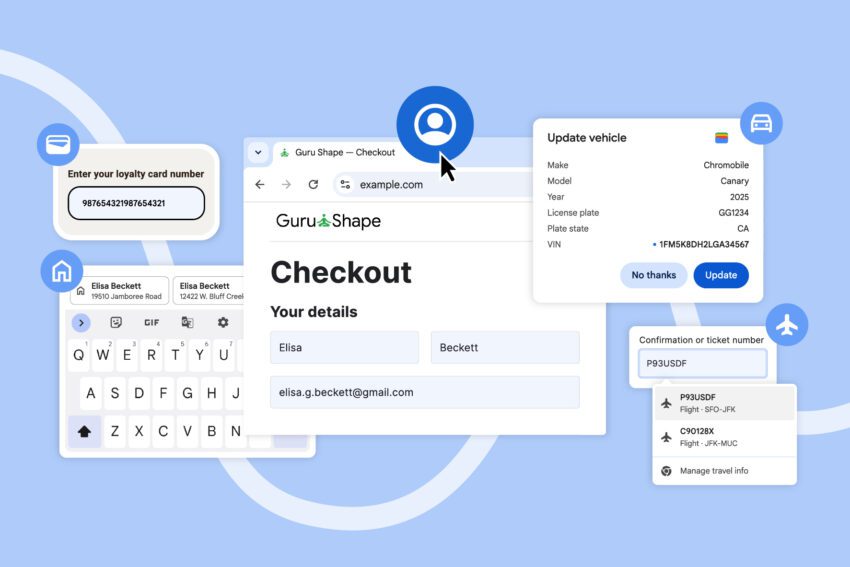
chrome can now autofill details from your Google has announced several autofill improvements being rolled out to the mobile and desktop versions of Chrome.
chrome can now autofill details from your
Overview of Autofill Enhancements
In a bid to streamline user experience, Google is enhancing the autofill capabilities of its Chrome browser across various platforms, including desktop, iOS, and Android. These updates aim to provide users with more comprehensive access to their stored data, making it easier to fill out online forms accurately and efficiently. The enhancements are particularly significant for users who frequently engage in online transactions, travel bookings, and other activities that require the input of personal information.
Expanded Data Access
One of the most notable improvements is the expanded access to user data stored in Google Accounts. Autofill can now retrieve essential information such as:
- Name
- Email address
- Saved work and home addresses
This feature is available to users who are signed into their Google Accounts while using Chrome on desktop, iOS, and Android devices. By integrating more personal data into the autofill function, Google aims to reduce the time and effort users spend filling out forms, thereby enhancing overall productivity.
Contextual Suggestions on Mobile
For users on Android, Google is making significant changes to how autofill suggestions are displayed. The suggestions that appear above the on-screen keyboard will now be less condensed, allowing for easier differentiation between options. This change is particularly beneficial in scenarios where multiple suggestions may arise, such as when two contacts share the same name. The new format will display two lines of information, providing additional context to help users make informed choices.
For example, if a user has two contacts named “John Smith,” the autofill suggestions may display their respective addresses or other distinguishing details. This added context aims to minimize errors and enhance the user experience, particularly in high-stakes situations where accurate information is crucial.
International Address Support
Another significant enhancement is the improved handling of international addresses. Google recognizes that address formats can vary widely across different countries, and this update aims to accommodate those differences. For instance, in Mexico, addresses often reference two cross-streets, which can complicate the autofill process. The new system will be better equipped to handle such nuances, ensuring that users can input their addresses accurately, regardless of their location.
Additionally, Google plans to introduce support for “phonetic names in Japan” in the near future. This feature will further enhance the autofill experience for Japanese users, allowing them to input names and addresses that may not conform to standard Romanization practices. By addressing these specific regional needs, Google is demonstrating its commitment to providing a more inclusive and user-friendly experience across its platforms.
Enhanced Autofill for Travel and Identification
Last month, Google introduced a significant update that allows Chrome users to autofill a range of identification details. This includes:
- Passport numbers
- Driver’s license information
- Loyalty card details
- Vehicle information, including VIN and license plate numbers
This feature is particularly useful for users who frequently travel or engage in activities that require identification. By enabling autofill for such sensitive information, Google aims to simplify the process of filling out forms related to travel, vehicle registration, and other identification-related tasks.
Integration with Google Wallet
Furthermore, both the desktop and Android versions of Chrome will now have the capability to access data from travel bookings saved in Google Wallet. This integration is particularly advantageous for users booking airport rental cars online. With this feature, users can autofill details such as:
- Time and date of flight arrival
- Rental car pickup location
- Personal identification details
This seamless integration not only saves time but also reduces the likelihood of errors during the booking process. Users can rest assured that their information is accurate and up-to-date, making for a smoother travel experience.
Implications for Users and Stakeholders
The enhancements to Chrome’s autofill capabilities are likely to have far-reaching implications for users and various stakeholders, including businesses and developers. For users, the ability to autofill a wider range of information can lead to increased efficiency and reduced frustration when navigating online forms. This is especially crucial in a digital landscape where users are often required to input personal information across multiple platforms.
For businesses, these improvements can enhance customer satisfaction. By streamlining the checkout and booking processes, companies can reduce cart abandonment rates and improve conversion rates. A smoother user experience can lead to increased customer loyalty, as users are more likely to return to platforms that prioritize ease of use.
Developer Considerations
From a development perspective, these changes may necessitate updates to existing web forms to ensure compatibility with Chrome’s enhanced autofill features. Developers may need to consider how their forms are structured and whether they are optimized for the new autofill capabilities. This could involve implementing best practices for form design, such as using appropriate HTML attributes to guide autofill behavior.
Privacy and Security Concerns
While the enhancements to autofill functionality offer numerous benefits, they also raise important questions about privacy and security. Users must be aware of the information they are sharing and how it is being used. Google has made strides in improving security measures, but users should remain vigilant about their data privacy.
It is crucial for users to regularly review their Google Account settings and manage the information they choose to store. Understanding the implications of autofill features can empower users to make informed decisions about their data, ensuring that they are comfortable with the level of information being shared.
Conclusion
Google’s recent updates to Chrome’s autofill capabilities represent a significant step forward in enhancing user experience across multiple platforms. By expanding access to personal data, improving the display of suggestions, and accommodating international address formats, Google is making it easier for users to navigate online forms. The integration with Google Wallet further streamlines the process for travel-related bookings, providing users with a more efficient way to manage their information.
As these enhancements roll out, users, businesses, and developers alike will need to adapt to the new features and consider their implications. While the benefits are clear, ongoing attention to privacy and security will be essential in ensuring a safe and user-friendly experience.
Source: Original report
Was this helpful?
Explore more: More Big Tech & Platforms Tech News Blog
Last Modified: December 6, 2025 at 12:40 am
16 views