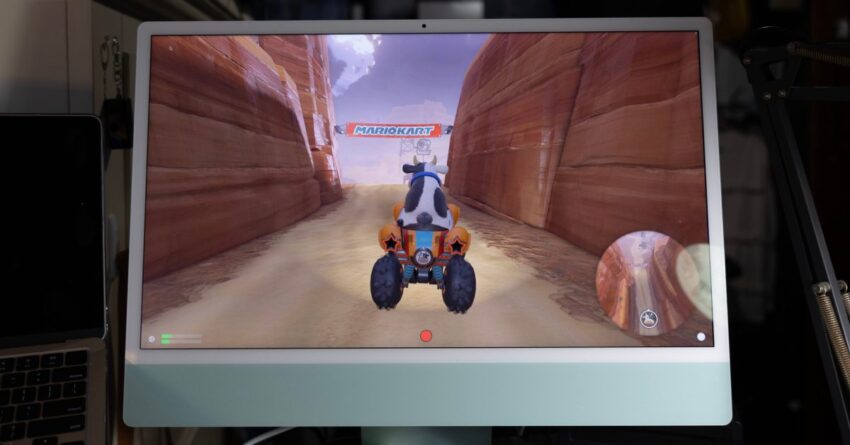
this accessory lets you play switch 2 Recent developments have unveiled a new way for gamers to utilize their iMacs and iPads as high-resolution displays for gaming consoles like the Switch 2, thanks to a 4K capture card and a compatible app.
this accessory lets you play switch 2
Background on iMac Displays
Apple has long been recognized for its commitment to high-quality display technology. The iMac, in particular, has been equipped with impressive Retina displays that offer vibrant colors and sharp resolutions. However, for many years, users have found themselves limited to using these displays solely for macOS applications. This restriction has left a gap for those looking to leverage the iMac’s capabilities for gaming or other HDMI input devices.
The Discontinuation of Target Display Mode
One of the features that once allowed users to utilize their iMacs as external displays was Target Display Mode. Introduced in earlier versions of the iMac, this feature enabled users to connect their iMacs to other devices, such as laptops or gaming consoles, and use the iMac’s screen as a display. Unfortunately, Apple discontinued this feature, leaving many users disappointed and seeking alternatives.
Introducing the 4K Capture Card Solution
Fortunately, a viable solution has emerged that allows users to bypass the limitations imposed by the absence of Target Display Mode. The introduction of a 4K capture card has opened up new possibilities for iMac and iPad users. This device can capture HDMI input from various gaming consoles, including the Switch 2, PlayStation 5, and Xbox Series X, and display it on the iMac or USB-C iPad.
How the 4K Capture Card Works
The 4K capture card functions by receiving HDMI signals from a gaming console. It then processes this signal and sends it to the iMac or iPad via USB. This allows users to enjoy their favorite games on a high-resolution display, taking advantage of the superior visual quality that Apple’s devices offer. The setup is relatively straightforward, requiring minimal technical expertise.
Required Components
To utilize this solution, users will need a few essential components:
- 4K Capture Card: This device is crucial for capturing the HDMI signal from the gaming console.
- Compatible App: An application available on the Mac App Store is necessary to facilitate the display of the captured video on the iMac or iPad.
- HDMI Cable: This cable connects the gaming console to the capture card.
- USB Cable: This cable connects the capture card to the iMac or iPad.
Setting Up the System
Setting up the system is a straightforward process that can be completed in a few simple steps:
- Connect the HDMI Cable: Plug one end of the HDMI cable into the gaming console and the other end into the 4K capture card.
- Connect the Capture Card to the iMac/iPad: Use a USB cable to connect the capture card to the iMac or USB-C iPad.
- Install the App: Download and install the necessary app from the Mac App Store.
- Launch the App: Open the app, and it should automatically detect the input from the capture card, allowing you to start gaming.
Performance and Quality
One of the standout features of this setup is the ability to play games at 4K resolution. The 4K capture card ensures that the video quality remains high, providing an immersive gaming experience. Users have reported minimal latency, which is crucial for fast-paced gaming scenarios. This setup not only enhances the visual quality but also allows for a more comfortable gaming experience, as players can take advantage of the larger screen size of the iMac or iPad.
Implications for Gamers
This new capability has significant implications for gamers who own an iMac or iPad. Many gamers prefer to play on larger screens for a more immersive experience, and this solution allows them to do just that without needing to invest in a separate monitor. Additionally, the ability to use existing devices for gaming can be a cost-effective alternative for those who may not want to purchase a dedicated gaming monitor.
Broader Use Cases
Beyond gaming, this setup can also be beneficial for various other applications. For instance, content creators can use the capture card to stream gameplay or create video content directly from their iMacs or iPads. This versatility makes the 4K capture card a valuable accessory for a wide range of users, from gamers to content creators and beyond.
Stakeholder Reactions
The response from the gaming community has been largely positive. Many users have expressed excitement over the prospect of utilizing their iMacs and iPads for gaming, especially given the high-quality displays that Apple offers. Social media platforms and gaming forums have seen a surge in discussions surrounding this new capability, with users sharing their experiences and setups.
Concerns and Limitations
Despite the enthusiasm, some concerns have been raised regarding the potential limitations of this setup. For instance, while the 4K capture card allows for high-resolution gaming, it may not support all features of the gaming consoles, such as VRR (Variable Refresh Rate) or HDR (High Dynamic Range). Users are advised to research the specific capabilities of the capture card they choose to ensure it meets their gaming needs.
Conclusion
The introduction of a 4K capture card, combined with a compatible app, has revolutionized the way iMac and iPad users can engage with their gaming consoles. By enabling high-resolution gaming on Apple’s impressive displays, this solution not only enhances the gaming experience but also provides a cost-effective alternative for users looking to maximize their existing devices. As the gaming landscape continues to evolve, innovations like this will undoubtedly play a crucial role in shaping the future of gaming.
Source: Original report
Was this helpful?
Explore more: More Consumer Technology Tech News Blog
Last Modified: April 12, 2026 at 5:36 pm
28 views