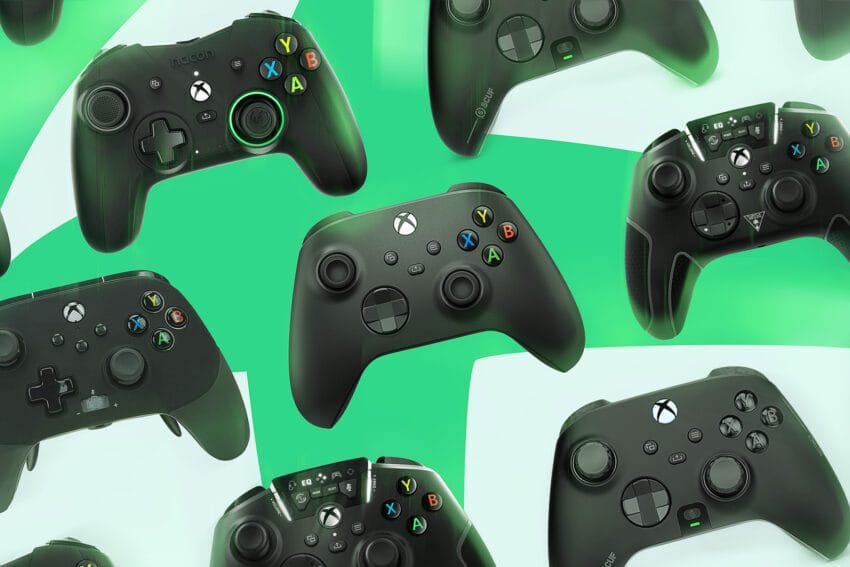
the best xbox controller to buy right The current landscape of Xbox controllers offers a diverse range of options, catering to various gaming preferences and budgets.
the best xbox controller to buy right
Introduction to the Controller Landscape
We live in a golden age of controllers. The gamepads on the market now are of higher quality, more versatile, and more customizable than anything from even one console generation ago. If you play games on an Xbox Series X or Series S (or a Windows PC), you have the unenviable task of choosing between several high-quality controllers from Microsoft as well as a plethora of great options from the likes of 8BitDo, PowerA, Razer, Scuf, GameSir, Nacon, and Turtle Beach. Some of them feature drift-resistant Hall effect or TMR-based joysticks for improved longevity, yet all of them are good for one reason or another. The days of the cheap “little sibling” controller that looked cool but barely worked are over.
We’ve spent a considerable amount of time playing various games—first-person shooters, fighters, third-person action-adventure, racing, indie roguelikes, and more—to test a wide array of Xbox controllers. It may not be surprising that the standard Xbox Wireless Controller emerges as the best option for most gamers. It also serves as an excellent controller for PC and Steam Deck users. The default Xbox gamepad strikes the right balance of quality, comfort, versatility, and price, but there are several alternatives worth considering.
Featured Controllers
- Best overall: Xbox Wireless Controller
- Best budget option: 8BitDo Ultimate Wired Controller for Xbox
- Best “pro” Xbox controller: Xbox Elite Wireless Controller Series 2
- A formidable alternative to the Elite: Razer Wolverine V3 Pro
- An affordable alternative to the Elite: GameSir G7 Pro
- Other Xbox controllers we tested
- What’s coming next?
The Best Xbox Controller for Most People
Xbox Wireless Controller
Pros: Incredible value for Xbox, wireless support, great ergonomic design, satisfying buttons and triggers.
Cons: Lacks customization, requires AA batteries (or an optional rechargeable cell).
Where to Buy: $64.99, often discounted to $49.95 at Amazon and Walmart, $59.99 at GameStop.
Connectivity: Xbox wireless, Bluetooth, wired / Connector type: USB-C / Mappable rear buttons: No / Software customization: No / Power: AA batteries or add-on rechargeable.
Okay, I already know what you’re thinking: “The best controller for Xbox is the one that comes with the Xbox?” While it may seem like a no-brainer, this standard controller truly earns its title as the best. It lacks some extras found on pricier options, but this controller is the distillation of all that has made the last 20 years of Xbox gamepads great, and it shows.
Thanks to Microsoft’s proprietary wireless protocol, this is the only affordable wireless Xbox controller available. While some gamers dislike the standard Xbox wireless controller for its use of AA batteries instead of a built-in rechargeable cell, this design choice offers flexibility, allowing for rechargeable AAs or a battery pack. User-replaceable batteries mean you’re not stuck with a controller that doesn’t hold its charge after years of use. It also works over a USB-C wired connection.
The hardware itself is excellent for the controller’s $65 (and often less) asking price. The sticks, buttons, triggers, and the sunken dish-shaped D-pad all feel impeccably tight, with the latter having a satisfying clickiness. For hardcore fighting game fans, a dedicated fight stick or a controller geared toward that genre may be more suitable, but the Xbox Wireless Controller is otherwise an extraordinary jack-of-all-trades.
The only things it really lacks compared to pricier options are extra, customizable buttons and software tuning for things like stick sensitivity (button remapping is available). However, Microsoft does offer cosmetic customization through its Xbox Design Lab, which can increase the price from $79.99 to $124.93 depending on the configuration. There’s a lot to love about these controllers, whether you design your own or pick one from the many colors that Microsoft offers.
The Best Cheap Xbox Controller
8BitDo Ultimate Wired Controller for Xbox
Pros: Inexpensive, lightweight and comfortable, satisfying buttons and Hall effect components, programmable back buttons are easy to press.
Cons: Lacks trigger stops.
Where to Buy: $44.99, often discounted to $29.99 at 8BitDo, $33.74 at Amazon, and $35.99 at Best Buy.
Connectivity: Wired / Connector type: USB-C / Mappable rear buttons: Two / Software customization: Yes / Power: Wired.
The 8BitDo Ultimate Wired Controller for Xbox is a fantastic budget model that typically retails for $44.99 but can often be found for as little as $29.99. The shape is reminiscent of Nintendo’s Switch Pro Controller, only a bit smaller, with hints of Xbox influence and a curvaceous design that feels great to hold.
On the hardware front, the Ultimate Wired Controller features Hall effect sticks with satisfying tension. It also uses Hall effect triggers with dedicated vibration motors, though it lacks trigger stops, unlike previous budget picks. Its D-pad, face buttons, and bumpers are nice and clicky, despite being smaller than typically preferred. It has two rear paddles, remappable buttons, and the ability to save up to three profiles, which you can switch between on the fly using a dedicated button. There’s even a built-in mute switch for audio, which isn’t common on cheaper controllers. You can download the 8BitDo Ultimate Software X app on PC or Xbox to fully customize this controller.
The 8BitDo Ultimate Wired works as a wired controller with your PC, but if you prefer wireless connectivity, the company also offers a three-mode wireless version for $69.99, supporting both Bluetooth and 2.4GHz wireless (via a dongle). However, the wireless version is a bit more expensive and is still limited to wired connectivity on Xbox consoles.
The Best “Pro” Xbox Controller
Xbox Elite Wireless Controller Series 2
Score: 8.5
Pros: Extensive modular customization, premium look and feel, rechargeable battery lasts an incredible 40 hours.
Cons: Pricey, questionable quality control, no Hall effect components.
Where to Buy: $179.99, often discounted to $153 at Walmart, $157.95 at Microsoft.
Connectivity: Xbox wireless, Bluetooth, wired / Connector type: USB-C / Mappable rear buttons: Up to four / Software customization: Yes / Power: Built-in rechargeable.
The Xbox Elite Wireless Controller Series 2 is Microsoft’s fanciest controller, boasting numerous extras like better build quality, extra buttons, user-swappable sticks and D-pad, a built-in rechargeable battery, and extensive software customization. While the standard Xbox controller is constructed entirely of unassuming plastic, the Elite mixes higher quality soft-touch plastic, rubberized grips, and metallic touches for a superior fit and finish. This makes it heftier than the stock controller, providing a more premium feel.
It also comes with a charging dock and zip-up case with passthrough charging, completing a really nice package for $199.99 (or sometimes less, if it’s on sale). There’s also a stripped-down Elite Series 2 “Core” version with an MSRP of $149.99, which ditches the add-ons but remains equally customizable. You can buy them separately in a $59.99 accessories pack, but you’ll end up paying more that way, barring sales or discounts.
A pricey controller like the Xbox Elite is a bit of a splurge purchase. Most gamers are not competing at e-sports levels that require its high-end features. Nevertheless, it’s enjoyable to use something that feels nicer, offers ways to custom-tailor it to your liking, and may provide a slight competitive edge due to features like hair triggers and removable rear paddles. In theory, you may be able to get shots off faster in an online shooter with the hair triggers, and you can map the paddles to functions like jump, crouch, reload, etc., while keeping your thumb on the right stick.
While the Elite is still a great controller, it’s worth noting that it has been around since 2019, and a Series 3 revision is feeling long overdue. The Series 2 also has a reputation for lackluster quality control, with reports from users about going through multiple replacements under warranty. Microsoft extended the controller’s warranty from 90 days to a year in late 2020 to help address concerns, but purchasing an Elite Series 2 may still feel like a slightly risky proposition. It also predates the current-gen implementation of a dedicated Share button, and its potentiometer-based sticks run the risk of stick drift after long-term use, something third parties are addressing with controllers that use drift-free Hall effect sticks.
Even so, the Elite 2 remains by far the most well-rounded option for a step-up Xbox controller, thanks in large part to its impressive build and expansive software experience.
A Formidable Alternative to the Elite
Razer Wolverine V3 Pro
Pros: Supports Xbox Wireless protocol, Hall effect sticks use replaceable tops, four rear buttons smartly positioned for comfort, two extra shoulder buttons add unique versatility, trigger stops and back buttons offer a satisfying mouse-like click.
Cons: Expensive, requires a USB dongle, Razer Synapse software needs work.
Where to Buy: $199.99 at Amazon, Best Buy, and GameStop.
Connectivity: Wireless USB dongle (Xbox / PC), wired / Connector type: USB-C / Mappable rear buttons: Four / Software customization: Yes / Power: Built-in rechargeable.
At $199.99, Razer’s Wolverine V3 Pro controller is as expensive (or more, depending on available deals) than the Elite Series 2, but it’s worth the cost if you want a high-end controller with drift-free sticks. Not only is the V3 Pro Razer’s first foray into using Hall effect sticks, but it’s also the company’s first fully wireless Xbox gamepad. It features some of the best hair-trigger lockouts around, yielding a mouse-like click usually found on even pricier Scuf controllers.
Other than that, the V3 Pro is similar to the previous V2 Pro, with six remappable buttons—four rear paddles in new, angled orientations and two extra shoulder buttons—and some RGB lighting. The buttons and D-pad still have that satisfying micro-switch tactility and audible clickiness like the previous-gen V2 Pro, but the RGB lighting is more subtle this time around.
The Wolverine V3 Pro’s biggest shortcomings compared to Microsoft’s Elite Series 2 are its more basic software customization, its lack of Bluetooth, and the fact that it needs a USB dongle to work wirelessly. The V3 Pro is otherwise the better pick if you can justify its high price, which, unlike the Series 2, is rarely subjected to discounts. Luckily, if you can’t, there’s also the $99.99 Wolverine V3 Pro Tournament Edition that has a nearly identical set of features in a wired configuration.
An Affordable Alternative to the Elite
GameSir G7 Pro
GameSir’s G7 Pro is a wired Xbox controller with remappable rear buttons, adjustable triggers, and TMR joysticks. It can also be connected wirelessly to a PC (via a 2.4GHz dongle) or Android (via Bluetooth).
Where to Buy: $79.99 at Amazon, Best Buy, and Walmart.
Connectivity: Wired (Xbox), wireless USB dongle (PC), Bluetooth (Android) / Connector type: USB-C / Mappable rear buttons: Two / Software customization: Yes / Power: Built-in rechargeable.
If you don’t mind using a wired controller, GameSir’s G7 Pro offers some features of the splurge-worthy Xbox Elite Controller 2 for under $100. It has remappable buttons, smooth-feeling drift-resistant TMR control sticks, a satisfying weight, and textured grips that make it comfortable to hold even with sweaty palms.
The G7 Pro is actually a battery-powered wireless controller, but its cable-free connectivity is limited to PC (via an included 2.4GHz dongle) and Android (via Bluetooth). You’ll need to plug the controller into the Xbox with a cable, and GameSir provides a lengthy USB-C to USB-A cord. The cable is long enough that you can play games from your
Was this helpful?
Explore more: More Consumer Technology Tech News Blog
Last Modified: September 16, 2025 at 3:37 am
20 views