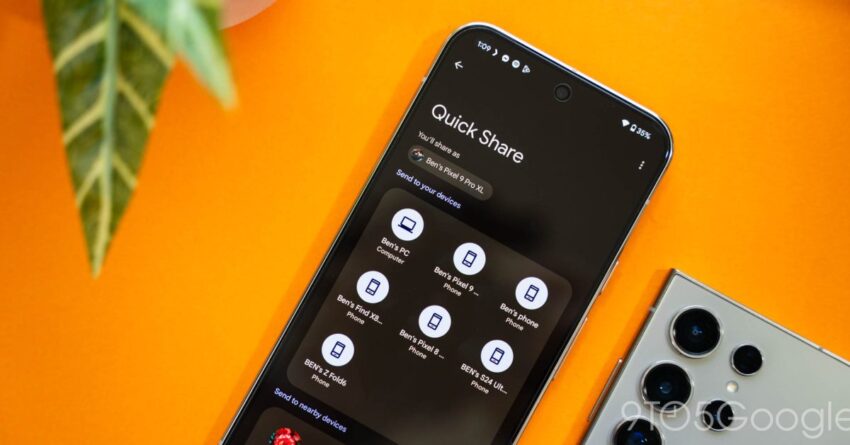
quick share s little-known shortcut lets you Google’s Quick Share feature has introduced a convenient way for Android users to share files, but many are unaware of its hidden shortcut that allows sharing by simply tapping two devices together.
quick share s little-known shortcut lets you
Understanding Quick Share
Quick Share is a file-sharing feature integrated into Android devices, designed to facilitate seamless sharing of files, photos, and other content between devices. Launched as part of the Android ecosystem, it has evolved to become a critical tool for users who frequently exchange information. The feature leverages Bluetooth and Wi-Fi Direct technology to create a fast and efficient sharing experience.
How Quick Share Works
At its core, Quick Share operates by establishing a connection between two devices. When a user wants to share a file, they can select the content and choose Quick Share from the sharing options. The system then scans for nearby devices that are compatible with Quick Share. Once a connection is established, the file transfer begins, typically at a speed much faster than traditional Bluetooth sharing.
Key Features of Quick Share
- Multiple File Types: Quick Share supports various file formats, including images, videos, documents, and more.
- Ease of Use: The interface is user-friendly, allowing even those unfamiliar with technology to share files effortlessly.
- Privacy Controls: Users can manage their visibility and control who can send them files, enhancing privacy.
- Cross-Device Compatibility: Quick Share works across different Android devices, making it versatile for users with multiple devices.
The Tap-to-Share Shortcut
One of the lesser-known features of Quick Share is the ability to initiate sharing by simply tapping two devices together. This functionality is particularly useful in social settings, where users can quickly exchange files without navigating through menus. The tap-to-share feature is designed to streamline the sharing process, making it faster and more intuitive.
How to Use the Tap-to-Share Feature
To utilize the tap-to-share feature, users must ensure that both devices have Quick Share enabled. Here’s a step-by-step guide on how to use this feature:
- Enable Quick Share: Go to the settings on your Android device and ensure that Quick Share is turned on.
- Select the File: Open the file you wish to share and select the Quick Share option from the sharing menu.
- Tap Devices Together: Bring the two devices close together, ensuring that they are within a few inches of each other.
- Confirm the Transfer: A prompt will appear on both devices to confirm the transfer. Accept the prompt to begin the sharing process.
This method not only saves time but also eliminates the need for users to search for nearby devices manually, making it a highly efficient way to share files.
Implications of Tap-to-Share
The introduction of the tap-to-share feature has significant implications for how users interact with their devices. In a world where instant communication and sharing are paramount, this feature enhances the user experience by making file sharing as effortless as possible.
Social Interactions
In social settings, the ability to share files quickly can foster greater connectivity among users. Whether at a gathering, conference, or casual meet-up, users can exchange photos, videos, and documents without the hassle of complicated procedures. This ease of sharing can lead to more spontaneous interactions and a more connected social experience.
Business Applications
In a professional context, the tap-to-share feature can streamline workflows. Employees can quickly share presentations, reports, and other essential documents during meetings or collaborative sessions. This efficiency can enhance productivity and reduce the time spent on file transfers, allowing teams to focus on their core tasks.
Stakeholder Reactions
The introduction of Quick Share and its tap-to-share feature has garnered attention from various stakeholders, including users, tech analysts, and industry competitors.
User Feedback
Users have generally responded positively to the Quick Share feature, appreciating its simplicity and effectiveness. Many have highlighted the convenience of the tap-to-share functionality, noting that it significantly reduces the time and effort required to share files. However, some users have expressed concerns about the potential for accidental sharing, especially in crowded environments.
Industry Analysts
Tech analysts have pointed out that Quick Share positions Google favorably against competitors like Apple, which has its AirDrop feature. By offering a similar yet distinct functionality, Google is enhancing its ecosystem and encouraging users to remain within the Android platform. Analysts believe that features like tap-to-share could be pivotal in attracting new users and retaining existing ones.
Competitor Responses
Competitors in the tech industry are likely to take note of Quick Share’s success and may seek to enhance their own file-sharing capabilities. As the demand for seamless sharing solutions continues to grow, companies may invest in developing similar features or improving existing ones to maintain their competitive edge.
Future Developments
As technology continues to evolve, it is likely that Quick Share will see further enhancements. Google may explore additional features that could improve the user experience, such as:
- Enhanced Security: Implementing stronger encryption methods to ensure that shared files remain secure during transfer.
- Integration with Other Services: Allowing users to share files directly to cloud services or social media platforms through Quick Share.
- Expanded Compatibility: Ensuring that Quick Share works seamlessly across a broader range of devices, including those outside the Android ecosystem.
Conclusion
Google’s Quick Share feature, particularly the tap-to-share shortcut, represents a significant advancement in the way users share files on Android devices. By simplifying the sharing process, Google is enhancing user experience and fostering greater connectivity among individuals. As the demand for efficient file-sharing solutions continues to rise, Quick Share is well-positioned to remain a vital tool for Android users.
Source: Original report
Was this helpful?
Last Modified: April 1, 2026 at 12:45 am
2 views