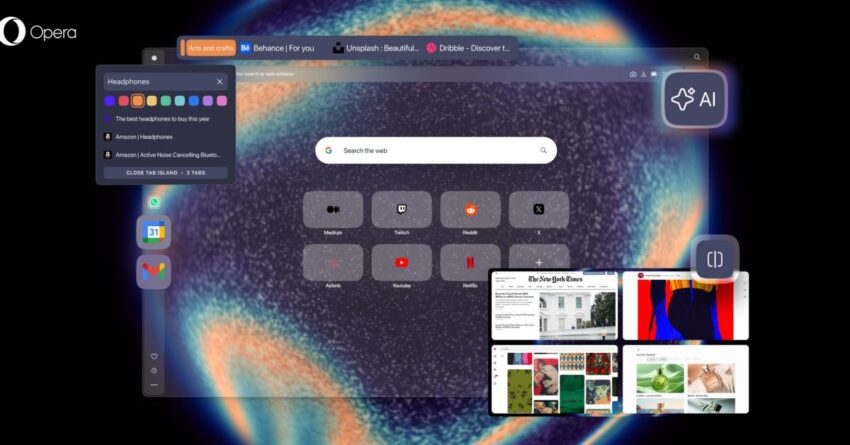
opera one r3 rolls out with color-coded The latest update to the Opera One browser introduces significant enhancements, including color-coded Tab Islands, a revamped AI assistant, and unique soundscapes tailored to specific themes.
opera one r3 rolls out with color-coded
Overview of Opera One R3
Opera One R3 marks a notable advancement in the Opera browser’s evolution, focusing on user experience and personalization. This version aims to streamline browsing while providing users with innovative features that enhance both functionality and enjoyment. The introduction of color-coded Tab Islands and dedicated soundscapes reflects Opera’s commitment to creating a more immersive and organized browsing environment.
Color-Coded Tab Islands
One of the standout features of Opera One R3 is the enhancement of the Tab Islands functionality. Initially introduced in earlier versions, Tab Islands allow users to group related tabs together, making it easier to manage multiple open pages. With the R3 update, these Tab Islands are now color-coded, providing a visual cue that helps users quickly identify and navigate between different groups of tabs.
Benefits of Color-Coding
The implementation of color-coded Tab Islands serves several purposes:
- Improved Organization: Users can categorize their tabs by theme or project, making it easier to locate specific pages.
- Enhanced Productivity: By reducing the time spent searching for tabs, users can focus more on their tasks, leading to increased efficiency.
- Visual Appeal: The aesthetic enhancement adds a layer of personalization to the browsing experience, allowing users to customize their workspace.
How It Works
When users create a Tab Island, they can assign a specific color to that group. For instance, a user working on a research project might use blue for academic tabs, green for related articles, and red for sources. This visual differentiation not only aids in organization but also enhances the overall user experience by making the browser feel more intuitive.
Re-Engineered AI Assistant
Another significant update in Opera One R3 is the re-engineered AI assistant. This feature aims to provide users with a more intelligent and responsive browsing experience. The AI assistant is designed to understand user preferences better and offer personalized recommendations based on browsing habits.
Key Features of the AI Assistant
The AI assistant in Opera One R3 includes several key features:
- Contextual Recommendations: The assistant can suggest relevant websites, articles, or resources based on the user’s current activity.
- Task Automation: Users can automate repetitive tasks, such as filling out forms or managing bookmarks, making the browsing experience smoother.
- Learning Capabilities: The AI assistant learns from user interactions, continuously improving its suggestions and functionality over time.
Implications for Users
The enhanced AI assistant is expected to significantly improve user engagement. By providing tailored recommendations and automating mundane tasks, users can enjoy a more efficient browsing experience. This could lead to increased satisfaction and loyalty among Opera users, as the browser becomes more attuned to individual needs.
Theme-Specific Soundscapes
Opera One R3 also introduces an innovative feature: theme-specific soundscapes. This addition aims to create a more immersive browsing experience by incorporating audio elements that align with the user’s current activity or tab group.
Exploring Soundscapes
The soundscapes are designed to enhance the emotional and psychological aspects of browsing. For example, a user researching nature might experience calming sounds of a forest, while someone working on a creative project could enjoy ambient music that stimulates creativity.
Benefits of Soundscapes
Integrating soundscapes into the browsing experience offers several benefits:
- Enhanced Focus: Background sounds can help users concentrate, reducing distractions from their environment.
- Emotional Connection: The right audio can evoke emotions and enhance the overall experience, making tasks feel less tedious.
- Personalization: Users can select soundscapes that resonate with their preferences, further customizing their browsing environment.
Stakeholder Reactions
The release of Opera One R3 has garnered mixed reactions from users and industry experts alike. Many users appreciate the new features, particularly the color-coded Tab Islands and AI assistant, which they believe will enhance their productivity. However, some users have expressed concerns about the potential for distraction from the soundscapes.
User Feedback
Initial user feedback has highlighted several positive aspects of the update:
- Increased Efficiency: Users report that the color-coded Tab Islands have made it easier to manage their tabs, leading to a more organized workflow.
- Personalized Experience: Many users enjoy the tailored recommendations from the AI assistant, finding them relevant and helpful.
Conversely, some users have voiced concerns regarding the soundscapes. While many appreciate the idea, others feel that audio elements could be distracting, especially in professional settings. Opera has indicated that users can customize their soundscape experience, allowing them to enable or disable audio as needed.
Industry Expert Opinions
Industry experts have also weighed in on the update. Some have praised Opera’s innovative approach to enhancing user experience, noting that the combination of visual and auditory elements sets Opera apart from other browsers. Others, however, caution that the effectiveness of these features will depend on user adoption and the ability to customize the experience to individual preferences.
Future Implications for Browsing
The introduction of features like color-coded Tab Islands, a re-engineered AI assistant, and theme-specific soundscapes signals a shift in how web browsers are evolving. As competition among browsers intensifies, companies are increasingly focusing on personalization and user experience.
Potential Trends in Browser Development
Opera’s latest update may set a precedent for future browser developments. Key trends to watch include:
- Increased Personalization: As users seek more tailored experiences, browsers may continue to implement features that adapt to individual preferences.
- Integration of AI: The use of AI to enhance browsing experiences is likely to become more prevalent, with browsers offering smarter recommendations and automation.
- Multisensory Experiences: The incorporation of sound and other sensory elements may become a standard feature, as developers seek to create more immersive environments.
Conclusion
Opera One R3 represents a significant step forward in the evolution of web browsers. With its innovative features, including color-coded Tab Islands, a re-engineered AI assistant, and theme-specific soundscapes, Opera is positioning itself as a leader in enhancing user experience. As users continue to seek more personalized and efficient browsing solutions, Opera’s latest update may pave the way for future developments in the industry.
Source: Original report
Was this helpful?
Last Modified: January 15, 2026 at 8:51 pm
4 views