new google app for windows brings spotlight-esque Google has introduced a new experimental application for Windows that aims to enhance user experience by integrating various search functionalities.
new google app for windows brings spotlight-esque
Overview of the Google App for Windows
The newly launched Google app for Windows marks a significant shift in Google’s approach to desktop applications. Historically, Google has focused on web-based solutions, with most of its services accessible through browsers. The introduction of this app indicates a strategic move to provide a more integrated and seamless experience for Windows users.
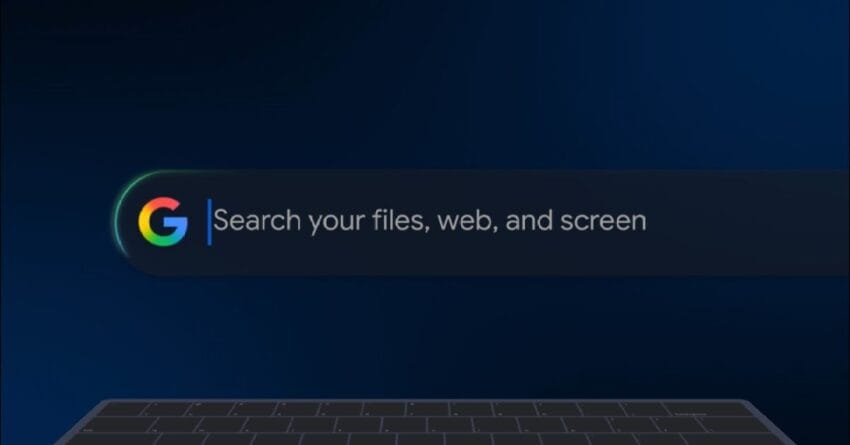
This app is designed to function similarly to Apple’s Spotlight feature, offering users a unified search interface that encompasses local files, Google Drive documents, web searches, and Google Lens capabilities. By consolidating these functionalities into a single application, Google aims to streamline the way users interact with their digital content.
Key Features of the Google App
Unified Search Interface
One of the standout features of the Google app for Windows is its unified search interface. Users can initiate searches for local files, documents stored in Google Drive, and web content all from one place. This eliminates the need to switch between different applications or browser tabs, thereby enhancing productivity.
Integration with Google Drive
The app’s integration with Google Drive is particularly noteworthy. Users can easily access their cloud-stored documents without having to navigate through the Drive website. This feature is expected to be a game-changer for professionals and students who rely heavily on cloud storage for their work and studies.
Web Search Capabilities
In addition to local and Drive searches, the app also allows users to conduct web searches directly from the application. This feature is designed to make information retrieval faster and more efficient, as users can access the web without needing to open a separate browser window.
Google Lens Functionality
Another innovative aspect of the app is its incorporation of Google Lens. This feature enables users to search for information using images. For instance, users can take a picture of an object or text and use the app to find related information online. This functionality is particularly useful for students, researchers, and anyone needing quick access to visual data.
Implications for Users
The introduction of the Google app for Windows has several implications for users. First and foremost, it enhances productivity by reducing the time spent switching between applications. The unified search interface allows users to find what they need more quickly, which is especially beneficial in a fast-paced work environment.
Moreover, the app’s integration with Google Drive may encourage more users to adopt cloud storage solutions. As remote work becomes increasingly common, having easy access to cloud documents can facilitate collaboration and information sharing among team members.
Stakeholder Reactions
The reaction to the Google app for Windows has been largely positive among early users and tech analysts. Many have praised the app for its intuitive design and functionality. Users have reported that the app significantly improves their workflow, particularly those who frequently juggle multiple tasks and applications.
However, some stakeholders have expressed concerns regarding the app’s experimental status. As with any new technology, there are uncertainties about its long-term viability and potential bugs that may arise during its initial rollout. Users have noted that they hope Google will continue to refine the app based on user feedback.
Comparison with Existing Solutions
While the Google app for Windows offers a unique set of features, it is essential to consider how it compares with existing solutions. Apple’s Spotlight feature has been a staple for macOS users, providing a similar unified search experience. However, Google’s app aims to expand on this by integrating cloud storage and web search capabilities, which are not as seamlessly combined in Spotlight.
Additionally, other third-party applications, such as Alfred for macOS and Launchy for Windows, offer similar functionalities. However, these applications often require additional setup and customization. In contrast, the Google app is designed to be user-friendly and straightforward, making it accessible to a broader audience.
Future Developments
As the Google app for Windows is still in its experimental phase, future developments are anticipated. Google has a history of iterating on its products based on user feedback, and this app is likely to undergo significant changes as more users engage with it.
Potential future features could include enhanced customization options, improved integration with other Google services, and additional functionalities that cater to specific user needs. For instance, incorporating AI-driven suggestions based on user behavior could further enhance the app’s utility.
Conclusion
The launch of the Google app for Windows represents a pivotal moment in Google’s strategy for desktop applications. By offering a unified search experience that integrates local files, Google Drive, web searches, and Google Lens, the app aims to enhance productivity and streamline workflows for Windows users.
As the app continues to evolve, it will be interesting to see how it competes with existing solutions and how users adapt to this new tool. The positive initial reactions indicate that Google is on the right track, but ongoing feedback will be crucial for its long-term success.
Source: Original report
Was this helpful?
Explore more: Software Development More Software Development Tech News
Last Modified: September 17, 2025 at 5:40 am
22 views