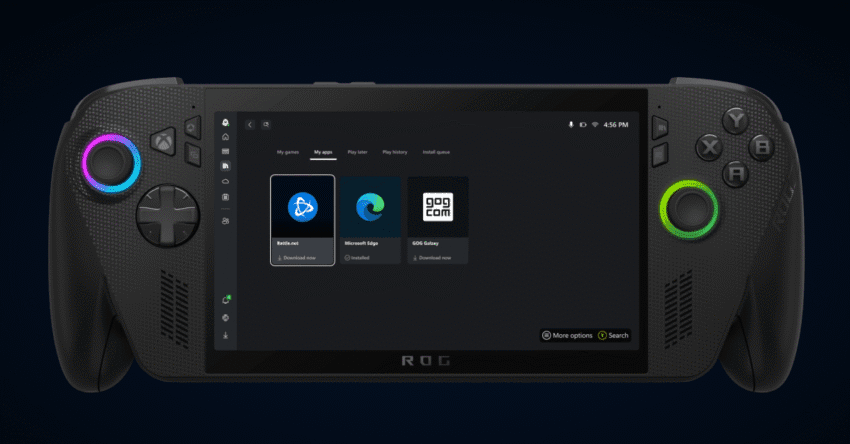
microsoft is bringing pc gaming apps and Microsoft is enhancing its Xbox app for Windows by integrating third-party gaming apps and stores, streamlining the gaming experience for PC users.
microsoft is bringing pc gaming apps and
Introduction to the New Feature
In a significant development for PC gaming, Microsoft has begun testing a new feature within its Xbox app on Windows 11, designed to facilitate the installation and launching of third-party applications. This feature, dubbed “My apps,” aims to provide gamers with a more convenient way to access various gaming utilities, browsers, and even rival storefronts without the need to navigate through the traditional Microsoft Store or the Windows desktop interface.
Details of the “My Apps” Feature
The “My apps” feature is a new tab within the Xbox PC app’s library that allows users to locate, view, and download third-party applications. According to Devin Dhaliwal, a product manager for Xbox experiences, this feature is intended to consolidate gaming applications into one location. “By consolidating gaming apps in one location, this feature supports the new aggregated gaming library, making it more straightforward to find, download, and launch games from multiple locations,” he explained.
Benefits for Handheld Gaming
This new functionality is particularly beneficial for gamers using handheld PCs, such as the ROG Ally, where the aim is to minimize reliance on the Windows desktop interface. “My apps enables players on an ROG Xbox Ally or other Windows 11 handhelds to more easily navigate between applications from the Xbox full-screen experience,” Dhaliwal added. This streamlined approach is expected to enhance the overall user experience, allowing for quicker access to a variety of gaming applications.
Integration with Existing Platforms
Microsoft has been actively working to create a unified gaming library within the Xbox app, incorporating popular platforms such as Steam, Battle.net, and Ubisoft Connect. This integration allows users to manage their gaming libraries more efficiently, eliminating the need to switch between multiple applications. The introduction of the “My apps” feature is a logical extension of this effort, further solidifying the Xbox app as a central hub for PC gaming.
Testing Phase and User Experience
Currently, Microsoft is testing the “My apps” feature with a tailored selection of applications. During initial testing, users have reported that the feature lists popular applications such as Battle.net, Chrome, and GOG Galaxy. For those who already have Chrome and Battle.net installed, the Xbox app simply launches these applications directly. However, for GOG Galaxy, the app attempts to download and install it within the Xbox interface, although some users have encountered issues during this process. It is important to note that this feature is still in beta, and users can expect bugs and glitches as Microsoft refines the functionality.
Implications for the Gaming Community
The introduction of the “My apps” feature has several implications for the gaming community. First and foremost, it represents a shift towards a more integrated gaming experience. By allowing users to access multiple gaming platforms from a single application, Microsoft is positioning the Xbox app as a comprehensive solution for PC gamers.
Potential Impact on Rival Platforms
This development may also have repercussions for rival gaming platforms. As Microsoft continues to enhance the Xbox app, it could attract users from other storefronts who are looking for a more streamlined experience. The ability to access various gaming applications in one place may encourage gamers to explore titles they might not have considered otherwise, potentially increasing competition among gaming platforms.
Feedback from the Gaming Community
Initial feedback from users has been mixed but generally positive. Many gamers appreciate the convenience of having multiple applications accessible from the Xbox app. However, some have expressed concerns about the reliability of the installation process for third-party applications, particularly given the issues encountered during testing. As Microsoft continues to gather user feedback, it is likely that they will make adjustments to improve the overall functionality of the “My apps” feature.
Future Plans for the Xbox App
Microsoft has indicated that it plans to expand support for additional applications over time. This could include a wider range of gaming utilities, social media platforms, and other tools that enhance the gaming experience. By continually updating and improving the Xbox app, Microsoft aims to solidify its position as a leader in the PC gaming space.
Long-Term Vision
Last year, Microsoft articulated its vision of making the Xbox app the home of PC gaming. The introduction of the “My apps” feature is a step toward realizing that vision. By merging the best aspects of Windows and Xbox, Microsoft is working to create a seamless gaming environment that caters to the needs of modern gamers.
Conclusion
The testing of the “My apps” feature within the Xbox app on Windows 11 marks a significant advancement in Microsoft’s efforts to enhance the PC gaming experience. By consolidating third-party applications and storefronts into a single interface, Microsoft is making it easier for gamers to access their favorite titles and utilities. As the feature continues to evolve, it will be interesting to see how it impacts the broader gaming landscape and the competitive dynamics among various platforms.
Source: Original report
Was this helpful?
Explore more: More Gaming Tech News Blog
Last Modified: September 6, 2025 at 9:08 am
12 views