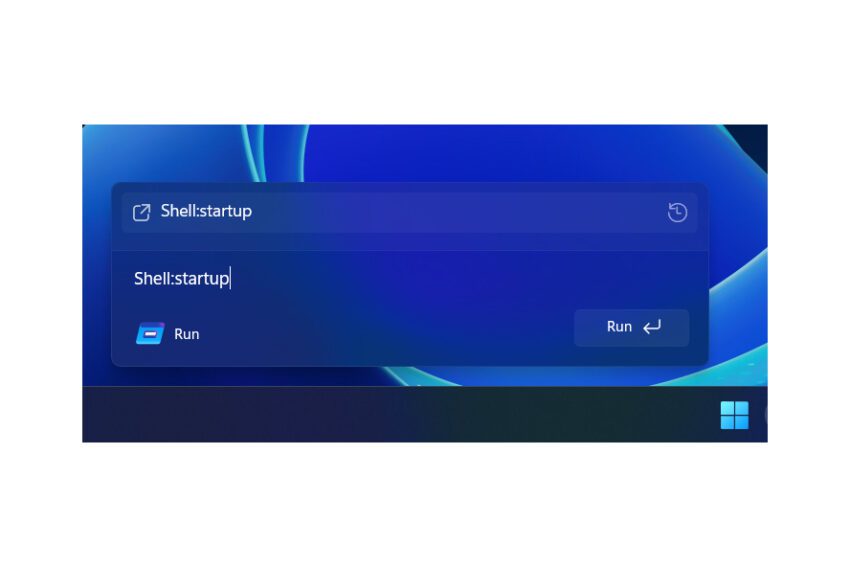
microsoft finally has a better looking run Microsoft is finally updating the design of the Run dialog prompt in Windows after more than 30 years.
microsoft finally has a better looking run
Introduction to the Run Dialog Update
For many users, the Run dialog has been a staple feature in Windows operating systems since its introduction in Windows 95. This utility allows users to quickly launch applications and access system tools by typing commands directly into a small text box. However, the design of this feature has remained largely unchanged for decades, until now. Microsoft is testing a modernized version of the Run dialog that aligns with the aesthetic principles of Windows 11, a move that reflects the company’s commitment to enhancing user experience.
The Evolution of the Run Dialog
The Run command has been a powerful tool for power users, enabling them to bypass traditional navigation methods and access applications directly. Commands such as “mspaint” for Microsoft Paint, “calc” for the calculator, and “dxdiag” for the DirectX Diagnostic Tool have become second nature for many. Despite its utility, the visual design of the Run dialog has remained static, leading to a disconnect between this feature and the modern interface of Windows 11.
Modern Aesthetics
The newly designed Run dialog, discovered by X user Phantomofearth in the latest preview builds of Windows 11, showcases a more contemporary look that is in line with the overall design language of the operating system. The updated dialog features rounded corners, a cleaner interface, and a dark mode option, making it visually appealing and more user-friendly. This design overhaul is part of a broader trend within Microsoft to modernize its software offerings and enhance usability.
Functionality Remains Intact
Despite the aesthetic changes, the core functionality of the Run dialog remains unchanged. Users can still execute commands and launch applications in the same manner as before. This balance between modern design and traditional functionality is crucial, as it ensures that long-time users can adapt to the new interface without losing the efficiency they have come to rely on.
Dark Mode Integration
One of the most anticipated features of the new Run dialog is its compatibility with dark mode. As dark mode has gained popularity among users for its eye-friendly properties, integrating this feature into the Run dialog reflects Microsoft’s responsiveness to user preferences. The dark mode option can be toggled on and off in the advanced system settings of Windows 11, allowing users to customize their experience according to their needs.
User Control and Customization
For those who may not favor the updated design, Microsoft has provided an option to revert to the classic Run dialog. This flexibility is essential, as it acknowledges that not all users may appreciate the changes. By allowing users to toggle the modern Run dialog on and off, Microsoft demonstrates its commitment to user choice and satisfaction.
Anticipated Release and Community Reactions
While Microsoft has not officially announced the modern Run prompt, it is expected to be rolled out in upcoming builds of Windows 11. The anticipation surrounding this update has generated a positive response from the community, particularly among power users who have long awaited a refresh of this essential tool. The excitement is palpable, as users look forward to a more cohesive experience that aligns with the overall design of Windows 11.
Stakeholder Perspectives
Various stakeholders, including developers and tech enthusiasts, have expressed their views on the impending update. Many see this as a necessary step for Microsoft to remain competitive in the rapidly evolving tech landscape. With the recent launch of Raycast on Windows, which offers a powerful launcher, clipboard manager, and shortcut system, there is a growing expectation for Microsoft to innovate and enhance its own tools. The introduction of a modern Run dialog could be a significant move in this direction.
Comparative Analysis with Other Launchers
The emergence of third-party launchers like Raycast has highlighted the need for Microsoft to modernize its own utilities. Raycast provides a streamlined experience that allows users to access applications, files, and system commands quickly and efficiently. This has prompted discussions about the potential for Microsoft to transform the Run dialog into a more robust launcher, similar to the Command Palette and PowerToys Run that have been developed in recent years.
Command Palette and PowerToys Run
Both Command Palette and PowerToys Run have gained traction among users for their efficiency and ease of use. The Command Palette, popularized by various development environments, allows users to execute commands and navigate through options seamlessly. PowerToys Run, on the other hand, serves as a quick launcher for applications and files, enhancing productivity. The modernization of the Run dialog could position it as a competitive alternative to these tools, providing users with a familiar yet improved experience.
Implications for Future Windows Updates
The update to the Run dialog is indicative of Microsoft’s broader strategy to enhance user experience across its operating system. As Windows 11 continues to evolve, the integration of modern design elements and user-friendly features will likely remain a priority. This focus on aesthetics and functionality could pave the way for further updates that address user needs and preferences.
Potential for Further Enhancements
Looking ahead, there is potential for Microsoft to expand the capabilities of the Run dialog beyond simple command execution. Features such as customizable shortcuts, integration with cloud services, and enhanced search functionalities could significantly improve user experience. By embracing innovation, Microsoft can ensure that its tools remain relevant and competitive in an ever-changing technological landscape.
Conclusion
The upcoming update to the Run dialog in Windows 11 represents a significant step forward for Microsoft, aligning a long-standing feature with modern design principles. By incorporating dark mode and offering customization options, the company is responding to user preferences while maintaining the functionality that has made the Run command a staple for power users. As anticipation builds for the official release, the tech community is eager to see how this update will enhance productivity and user experience in Windows 11.
Source: Original report
Was this helpful?
Explore more: Software Development More Software Development Tech News
Last Modified: December 5, 2025 at 3:36 pm
25 views