logitech s mx master 3s is one Logitech’s MX Master 3S wireless mouse is currently available at a significant discount, making it an attractive option for both casual users and professionals alike.
logitech s mx master 3s is one
Overview of the Logitech MX Master 3S
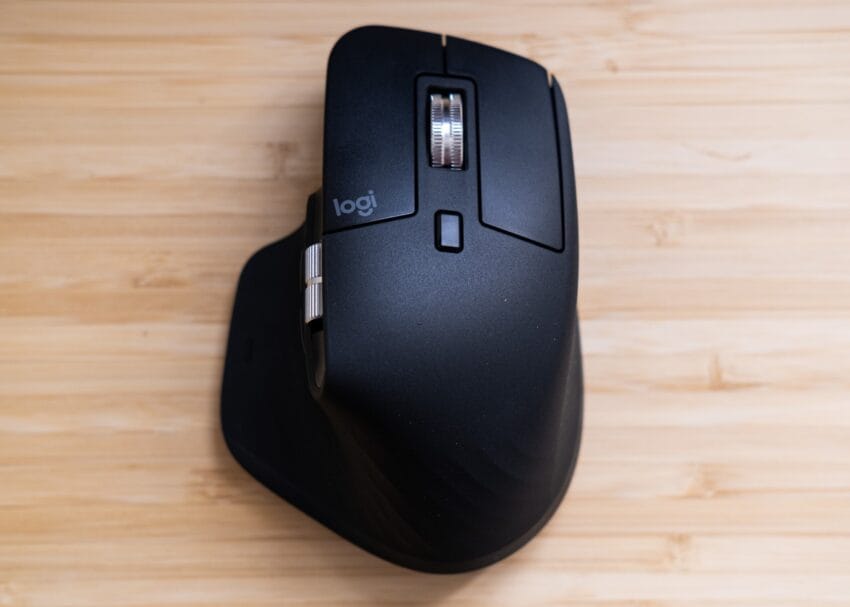
The Logitech MX Master 3S is a wireless mouse that has garnered attention for its ergonomic design and advanced features. Available in two color options—light grey and space grey—this mouse is designed to cater to the aesthetic preferences of Mac users while maintaining functionality. Although it lacks the haptic feedback found in the newer MX Master 4, the MX Master 3S remains a formidable choice for those seeking a reliable and efficient mouse.
Key Features
Building on the solid foundation established by its predecessors, the MX Master 3S introduces several enhancements that elevate its performance:
- Improved Sensor: The MX Master 3S features an upgraded sensor that provides precise tracking on various surfaces, including glass. This makes it suitable for a wide range of environments, from office desks to home workspaces.
- Silent Switches: One of the standout features of the MX Master 3S is its silent clicking mechanism. This is particularly beneficial in quiet environments, such as libraries or shared workspaces, where noise can be a distraction.
- Multidevice Bluetooth Pairing: The mouse can connect to multiple devices simultaneously, allowing users to switch between devices with ease. This feature is especially useful for professionals who work across different platforms, such as a laptop and a tablet.
Design and Comfort
The ergonomic design of the MX Master 3S is tailored for comfort during extended use. The mouse fits naturally in the hand, reducing strain and fatigue. The thumb rest and the overall shape are designed to promote a natural wrist position, making it suitable for long hours of work or gaming.
Additionally, the mouse features both horizontal and vertical scroll wheels. The scroll wheels are designed to provide a satisfying tactile experience, allowing users to navigate through documents and web pages with ease. The horizontal scroll wheel is particularly useful for editing wide documents or spreadsheets, enhancing productivity.
Pricing and Availability
As part of Amazon’s October Prime Day sale, the Logitech MX Master 3S is currently priced at $89.98, a 25% discount from its regular price of $119.99. This limited-time offer runs through October 8th, making it an opportune moment for potential buyers to invest in a high-quality wireless mouse. The price is just a few dollars shy of its best-ever price, which was last seen during the holiday season.
Where to Buy
The MX Master 3S can be purchased from various retailers, including:
- Amazon: $89.98
- Logitech: $99.99
While Amazon offers the best deal currently, it’s worth noting that prices may vary depending on the retailer and any ongoing promotions.
Comparison with Other Models
When comparing the MX Master 3S to its predecessor, the MX Master 3, the differences are subtle but significant. The MX Master 3S retains the same ergonomic design and functionality but introduces an improved sensor and silent switches. The newer MX Master 4, while offering haptic feedback, may not be necessary for all users, especially those who prioritize comfort and functionality over additional features.
Target Audience
The MX Master 3S is designed for a diverse audience, including:
- Professionals: Those who spend long hours working on computers will appreciate the ergonomic design and advanced features that enhance productivity.
- Gamers: While not specifically marketed as a gaming mouse, the precision and responsiveness of the MX Master 3S make it suitable for casual gaming.
- Creative Professionals: Graphic designers, video editors, and other creative professionals will find the mouse’s features beneficial for tasks that require precision and control.
Connectivity Options
The MX Master 3S offers versatile connectivity options. It can connect via Bluetooth, which is ideal for users who prefer a wireless setup without the need for a USB receiver. Additionally, it is compatible with the Logi Bolt USB transmitter, although it does not come with one in the box. This flexibility allows users to choose the connection method that best suits their needs.
Charging and Battery Life
Another advantage of the MX Master 3S is its efficient charging system. The mouse uses a USB-C to USB-C charging cable, which is included in the box. This modern charging method ensures quick and convenient recharging. The battery life is impressive, with Logitech claiming that a full charge can last up to 70 days, depending on usage. This means users can enjoy extended periods of use without the need for frequent recharging.
User Experience and Reviews
Initial reviews of the MX Master 3S have been largely positive. Users have praised its comfortable design, quiet operation, and seamless connectivity. The mouse’s ability to switch between devices effortlessly has been highlighted as a significant advantage for multitaskers. However, some users have noted that the lack of a Logi Bolt USB transmitter in the box may be a drawback for those who prefer a USB connection.
Implications for Logitech
The release of the MX Master 3S comes at a time when remote work and hybrid work models are becoming increasingly common. As more professionals seek tools that enhance productivity and comfort, Logitech’s focus on ergonomic design and advanced features positions the company well in a competitive market. The discount during the October Prime Day sale may also drive increased sales and brand loyalty among consumers.
Conclusion
The Logitech MX Master 3S is a compelling choice for anyone in need of a high-quality wireless mouse. With its ergonomic design, advanced features, and current discount, it represents excellent value for both casual users and professionals. As the demand for efficient and comfortable computing tools continues to rise, the MX Master 3S stands out as a reliable option that meets the needs of a diverse audience.
Source: Original report
Was this helpful?
Explore more: More Consumer Technology Tech News Blog
Last Modified: October 8, 2025 at 11:39 pm
14 views