ipados 26 gives apps a new mac-like iPadOS 26 introduces significant enhancements aimed at elevating productivity for professional users, particularly through its innovative Background Tasks feature.
ipados 26 gives apps a new mac-like
Overview of iPadOS 26 Enhancements
Apple’s iPadOS 26 marks a pivotal moment in the evolution of the iPad, especially for users who rely on their devices for professional tasks. The update not only refines existing functionalities but also introduces new features that enhance multitasking and overall productivity. Among these, the Background Tasks capability stands out, promising to transform how applications operate on the iPad.
New Windowing and Multitasking Features
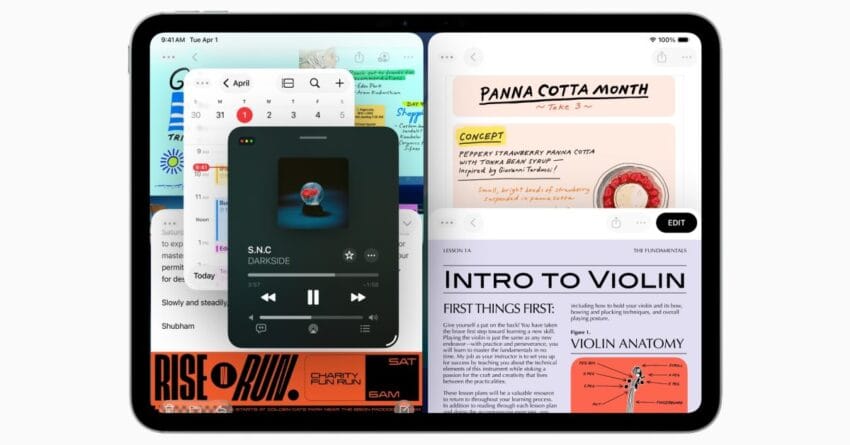
One of the most notable upgrades in iPadOS 26 is the enhanced windowing system. This update allows users to open multiple instances of the same app, a feature that many have long requested. For instance, users can now have two documents open in Pages or multiple spreadsheets in Numbers simultaneously. This flexibility is particularly beneficial for professionals who need to reference multiple sources of information while working on a single project.
The multitasking capabilities have also been improved. Users can now easily switch between apps and manage their workspace more efficiently. The introduction of a new Split View feature allows users to view two apps side by side, making it easier to drag and drop content between them. This is especially useful for tasks such as comparing documents or transferring data from one application to another.
Dock and Files Changes
iPadOS 26 also brings significant changes to the Dock and the Files app, further enhancing the user experience. The Dock now supports more apps, allowing users to pin their most-used applications for quick access. This change streamlines the workflow, enabling users to switch between tasks without navigating through multiple screens.
The Files app has received a facelift as well, with improved organization features. Users can now create folders and subfolders more intuitively, making it easier to manage documents and files. Additionally, the app now supports more file types, which broadens its usability for professionals who work with various formats.
Background Tasks: A Game Changer for Pro Users
Perhaps the most exciting feature introduced in iPadOS 26 is Background Tasks. This capability allows apps to perform tasks in the background without interrupting the user’s workflow. For professional users, this means that applications can continue to process data, download files, or sync information while the user focuses on other tasks.
How Background Tasks Work
Background Tasks operate seamlessly within the iPadOS environment. When an app is running a background task, users can continue to use other applications without experiencing lag or performance issues. For example, a user can download large files in the background while composing an email or editing a document. This multitasking capability is particularly advantageous for professionals who often juggle multiple responsibilities.
Developers can take advantage of this feature by integrating background task capabilities into their applications. This means that apps can be designed to handle updates, sync data, or perform computations without requiring the user to keep the app open. As a result, users can enjoy a more fluid and efficient experience, as they are no longer tethered to a single application.
Implications for Professional Workflows
The introduction of Background Tasks has significant implications for professional workflows. For instance, creative professionals who work with large media files can benefit immensely. Imagine a video editor who needs to render a project while simultaneously researching for the next one. With Background Tasks, the rendering process can occur in the background, allowing the editor to focus on other creative tasks without interruption.
Similarly, data analysts can run complex computations or data imports while continuing to analyze other datasets. This not only saves time but also enhances productivity, as users can maximize their efficiency by leveraging the power of multitasking.
Stakeholder Reactions
The response from the tech community and professional users has been overwhelmingly positive. Many users have expressed excitement about the new capabilities, particularly the Background Tasks feature. Professional users have noted that this enhancement aligns with their needs for efficiency and productivity in a fast-paced work environment.
Developers have also welcomed the opportunity to create more robust applications that can leverage the new multitasking capabilities. The ability to run tasks in the background opens up new possibilities for app functionality, allowing developers to innovate and enhance user experiences.
Potential Challenges
Despite the excitement surrounding iPadOS 26, there are potential challenges that users and developers may face. One concern is the management of background tasks. While the feature is designed to enhance productivity, it may also lead to increased resource consumption, which could affect battery life and device performance. Users will need to be mindful of how many background tasks are running simultaneously to avoid potential slowdowns.
Additionally, developers will need to ensure that their applications are optimized for background processing. This may require additional testing and adjustments to ensure that apps perform efficiently without draining resources. As developers adapt to these changes, there may be a learning curve involved in implementing background tasks effectively.
Conclusion
iPadOS 26 represents a significant leap forward for the iPad, particularly for professional users who rely on their devices for productivity. The new windowing and multitasking features, along with enhancements to the Dock and Files app, create a more efficient workspace. However, it is the Background Tasks capability that truly sets this update apart, allowing users to multitask like never before.
As the tech community continues to explore the implications of these changes, it is clear that iPadOS 26 is designed with the needs of professional users in mind. The ability to run tasks in the background not only enhances productivity but also opens up new possibilities for app development. As users adapt to these new features, the iPad is poised to become an even more powerful tool for professionals across various industries.
Source: Original report
Was this helpful?
Explore more: Mobile App Development More Mobile Technology Tech News
Last Modified: October 1, 2025 at 8:54 pm
10 views