Imessage gets a new drafts folder in — The upcoming release of iOS 26 introduces a significant enhancement to the iMessage platform, notably the addition of a dedicated Drafts folder designed to streamline user experience..
Imessage Gets A New Drafts Folder In
The upcoming release of iOS 26 introduces a significant enhancement to the iMessage platform, notably the addition of a dedicated Drafts folder designed to streamline user experience.
Overview of iOS 26 Enhancements
The iPhone Messages app is set to receive a comprehensive update with the introduction of iOS 26, focusing on enhancing user interaction and improving spam management. Among the various new features, the most notable addition is the Drafts folder, which is expected to change how users manage their messaging activities.
Introduction of the Drafts Folder
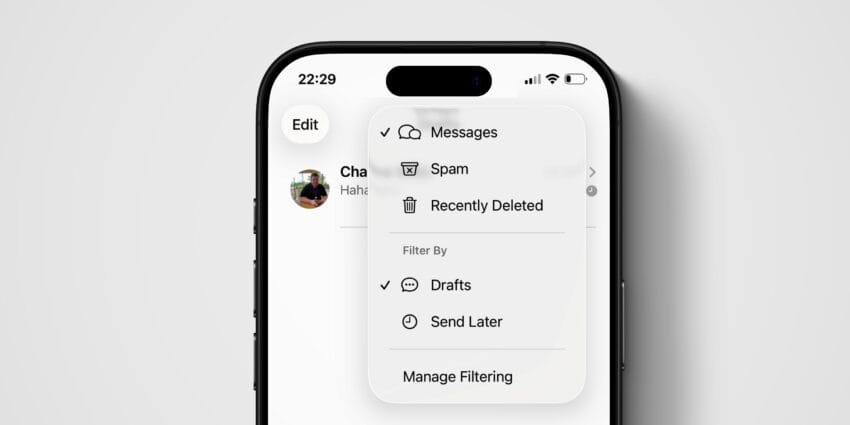
For the first time, iMessage will include a dedicated Drafts folder. This new feature is designed to filter the conversation list, displaying only those threads where users have partially written messages. The addition of the Drafts folder aims to improve productivity by allowing users to easily locate unfinished messages, reducing the frustration of scrolling through numerous conversations to find where they left off.
How the Drafts Folder Works
The Drafts folder will automatically compile messages that users have started but not yet sent. When a user begins typing a message and exits the conversation without sending it, the message will be saved in the Drafts folder. This feature is particularly useful for those who may be interrupted while composing messages or who prefer to draft messages before sending them. Users will be able to access their drafts quickly, making it easier to complete and send messages at their convenience.
Enhanced Filtering Features
In addition to the Drafts folder, iOS 26 brings a suite of new filtering features aimed primarily at combating spam and junk messages. These enhancements are crucial as users have increasingly expressed concerns about unsolicited texts, which can clutter their messaging experience.
Spam and Junk Text Management
The new filtering capabilities will allow users to manage unwanted messages more effectively. With the rise of spam texts, iMessage’s enhanced filtering features are designed to identify and segregate these messages from legitimate conversations. This functionality will not only improve the user experience but also enhance the overall security of the messaging platform.
General Utility Filters
Beyond spam management, iOS 26 will introduce filters that can be generally useful for all users. These filters will help users organize their messages based on various criteria, such as unread messages, messages from known contacts, and other customizable options. This added layer of organization aims to streamline the messaging process, allowing users to focus on important conversations without distraction.
Implications for Users
The addition of the Drafts folder and enhanced filtering features signifies a shift in how iMessage is evolving to meet user needs. These updates are particularly relevant as communication patterns continue to change, with users increasingly relying on messaging apps for both personal and professional correspondence.
Impact on User Productivity
The Drafts folder is expected to significantly enhance user productivity. By allowing users to save and revisit unfinished messages easily, iMessage caters to the needs of busy individuals who may not have the time to complete their thoughts in one sitting. This feature can be particularly beneficial for professionals who use iMessage for work-related communications, as it helps ensure that important messages are not lost or forgotten.
Addressing User Concerns
With the growing concern over spam messages, the new filtering features are likely to be well-received by users. The ability to manage unwanted texts effectively can lead to a more streamlined messaging experience, reducing the likelihood of missing important communications amidst a sea of spam. As users become more aware of privacy and security, these enhancements may also contribute to a greater sense of control over their messaging environment.
Comparison with Other Messaging Platforms
As iMessage continues to evolve, it is essential to consider how these new features compare to those offered by other messaging platforms. Competitors such as WhatsApp, Telegram, and Signal have long provided users with various organizational tools and spam management features.
Similar Features in Competitor Apps
- WhatsApp: Offers a “Starred Messages” feature that allows users to bookmark important messages for easy retrieval.
- Telegram: Includes a “Saved Messages” feature, which functions similarly to the Drafts folder, where users can save messages for later.
- Signal: Provides robust privacy features, including spam detection and reporting tools to enhance user security.
With the introduction of the Drafts folder and enhanced filtering features, iMessage is positioning itself to remain competitive in the messaging app landscape. Users can expect a more organized and efficient messaging experience, aligning with trends seen in other popular platforms.
Future Developments
As Apple continues to refine iMessage, it is likely that future updates will focus on further enhancing user experience and security. The introduction of the Drafts folder and improved filtering capabilities in iOS 26 may serve as a foundation for more advanced features in subsequent releases.
Potential for Further Enhancements
Looking ahead, Apple may explore additional organizational tools, such as enhanced search capabilities or integration with other Apple services. The ongoing development of artificial intelligence and machine learning could also play a role in improving spam detection and message organization, making iMessage an even more powerful communication tool.
Conclusion
The upcoming release of iOS 26 marks a significant step forward for the iMessage platform. With the introduction of the Drafts folder and enhanced filtering features, Apple is responding to user needs for better organization and spam management. As these features roll out, users can look forward to a more streamlined and efficient messaging experience, reinforcing iMessage’s position in the competitive landscape of messaging applications.
Source: Original reporting
Further reading: related insights.
Was this helpful?
Explore more: Mobile App Development More Mobile Technology Tech News
Last Modified: July 15, 2026 at 9:59 am
12 views