hp s new 49-inch curved ultrawide monitor HP has unveiled an innovative 49-inch curved ultrawide monitor designed to enhance productivity and streamline office use.
hp s new 49-inch curved ultrawide monitor
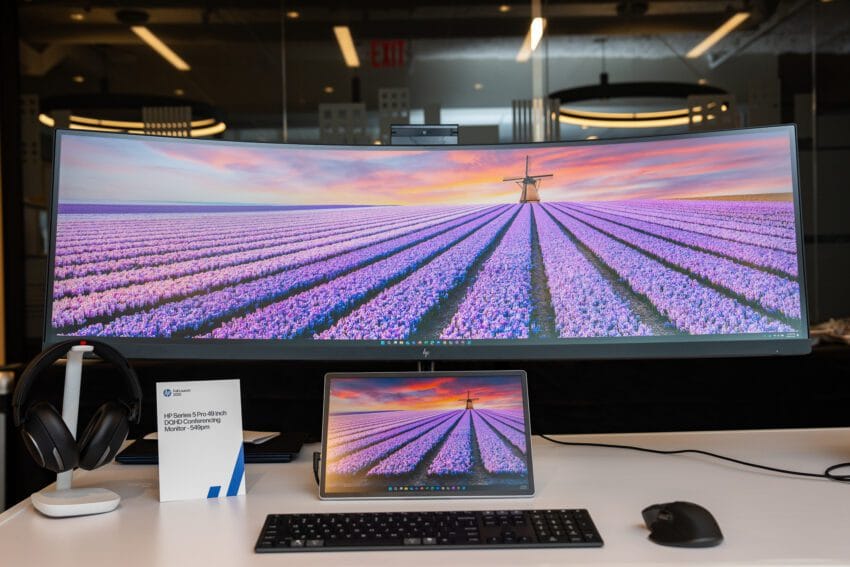
Overview of the HP Series 5 Pro 49-Inch Conferencing Monitor
The HP Series 5 Pro 49-inch Conferencing Monitor is a significant addition to the market of ultrawide displays, catering specifically to professionals who require expansive screen real estate for multitasking. With a 32:9 aspect ratio, this monitor effectively simulates the experience of using two 27-inch monitors side by side, providing ample space for various applications, documents, and video conferencing tools.
Technical Specifications
This monitor features a VA IPS panel with a resolution of 5120 x 1440 pixels, ensuring that users can enjoy sharp and detailed visuals. The 165Hz refresh rate is particularly noteworthy, as it allows for smoother transitions and reduces motion blur, which can be beneficial for both productivity and entertainment. The 1800R curvature of the screen is designed to provide an immersive viewing experience, wrapping the display around the user’s field of vision.
In addition to its impressive size and resolution, the monitor includes a hidden 5-megapixel webcam that can be extended from the top of the display. This feature is particularly relevant in today’s remote work environment, where video conferencing has become a staple of professional communication. The pop-up design of the webcam not only saves space but also maintains a clean aesthetic when not in use.
Comparative Analysis
While other manufacturers such as Samsung, Dell, Lenovo, and LG have released similar ultrawide monitors, the HP Series 5 Pro distinguishes itself with its integrated webcam. Many competing models lack this feature, which can be a significant advantage for users who prioritize video conferencing capabilities. The convenience of having a built-in camera means that professionals can avoid the clutter of additional peripherals on their desks.
Performance and Usability
During a recent preview event, HP representatives demonstrated the monitor’s capabilities, showcasing software that allows it to function as two or three virtual displays. This feature is particularly useful for users who need to manage multiple applications simultaneously, as it can enhance workflow efficiency. The ability to split the screen into different workspaces means that users can have a video call on one side while working on a document or spreadsheet on the other.
Visual Quality
The monitor’s performance in terms of brightness and contrast was positively noted during the demonstration. In a well-lit office environment, the display appeared vibrant and clear, making it suitable for various tasks ranging from document editing to video streaming. The monitor covers 99 percent of the sRGB color space, which is crucial for tasks that require accurate color representation, although its 8-bit color depth may limit its appeal for professional content creators who require higher fidelity.
Connectivity Options
The rear of the monitor is equipped with a variety of connectivity options, including HDMI 2.1, DisplayPort 1.4, Ethernet, and multiple USB ports. The inclusion of KVM (Keyboard, Video, Mouse) functionality allows users to control multiple devices with a single keyboard and mouse setup, further enhancing the monitor’s versatility in a multi-device environment. This feature is particularly advantageous for professionals who may need to switch between a laptop and a desktop computer throughout the day.
Limitations and Considerations
Despite its many strengths, the HP Series 5 Pro is not without limitations. The 5ms response time, while adequate for general productivity tasks, may not meet the expectations of gamers or those involved in fast-paced content creation. For users who prioritize gaming performance or require rapid color transitions, this monitor may fall short compared to other options specifically designed for those purposes.
Furthermore, while the monitor’s features are tailored for productivity, the pricing details have yet to be announced. This uncertainty may affect potential buyers who are weighing their options against other monitors in the same category. As the November launch date approaches, more information regarding pricing will likely become available, allowing consumers to make informed decisions.
Market Implications
The introduction of the HP Series 5 Pro 49-inch Conferencing Monitor comes at a time when remote work and hybrid work models are becoming increasingly prevalent. As companies adapt to these changes, the demand for high-quality, multifunctional monitors is on the rise. HP’s offering is positioned to meet this demand, providing a solution that combines ample screen space with essential features for modern professionals.
Stakeholder Reactions
Initial reactions from industry analysts and potential users have been generally positive. Many see the integrated webcam as a thoughtful addition that addresses a common pain point for remote workers. The ability to seamlessly transition between multiple applications without the need for additional monitors is also viewed as a significant advantage.
However, some stakeholders have expressed concerns regarding the monitor’s gaming capabilities. As gaming continues to grow in popularity, especially among younger professionals, the response time and color depth may deter some users from considering this monitor as a viable option for both work and play.
Conclusion
In summary, the HP Series 5 Pro 49-inch Conferencing Monitor presents a compelling option for professionals seeking a large, versatile display for productivity and video conferencing. Its unique features, such as the pop-up webcam and virtual display capabilities, set it apart from competitors in the ultrawide monitor market. However, potential buyers should weigh its limitations in gaming performance and await further details on pricing before making a purchase decision.
As the launch date approaches, the HP Series 5 Pro will likely attract attention from both consumers and industry experts, making it a noteworthy addition to the evolving landscape of office technology.
Source: Original report
Was this helpful?
Last Modified: October 2, 2025 at 3:35 pm
6 views