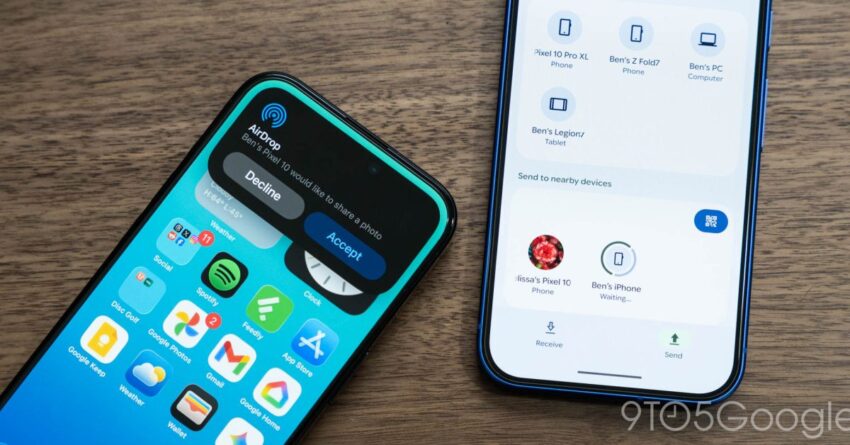
how to get quick share s new Google has officially announced that Quick Share on the Pixel 10 now supports AirDrop functionality for iPhone users, marking a significant enhancement in cross-platform file sharing capabilities.
how to get quick share s new
Introduction to Quick Share and AirDrop
File sharing has become an integral part of our digital lives, with various platforms offering unique solutions to facilitate this process. Google’s Quick Share, a feature designed to simplify file transfers between Android devices, has now taken a significant step forward by integrating with Apple’s AirDrop. This new functionality allows Pixel 10 users to share files seamlessly with iPhone users, enhancing the overall user experience and bridging the gap between the two ecosystems.
What is Quick Share?
Quick Share is Google’s proprietary file-sharing feature that enables users to send and receive files, photos, and videos quickly and efficiently. Initially designed for Android devices, Quick Share leverages Bluetooth and Wi-Fi Direct technology to facilitate fast transfers without the need for an internet connection. This feature has been particularly useful for users within the Android ecosystem, allowing for easy sharing among friends and family.
Understanding AirDrop
AirDrop is Apple’s file-sharing service that allows users to send files to other Apple devices using Bluetooth and Wi-Fi. Launched in 2011, AirDrop has become a staple feature for iPhone, iPad, and Mac users, providing a seamless way to share photos, documents, and other files without the need for third-party applications. The introduction of Quick Share’s compatibility with AirDrop represents a significant shift in the way users can interact across different platforms.
How the Integration Works
The integration of Quick Share with AirDrop allows Pixel 10 users to send files directly to iPhone users without any additional applications or complicated setups. Here’s how it works:
Step-by-Step Guide to Using Quick Share with AirDrop
- Enable Quick Share: On your Pixel 10, navigate to the settings menu and ensure that Quick Share is enabled. This can typically be found under the “Connected devices” section.
- Prepare Your File: Select the file you wish to share. This can be a photo, video, or document stored on your device.
- Initiate Sharing: Tap the share icon and select Quick Share from the list of available sharing options.
- Select the iPhone User: Ensure that the iPhone user has AirDrop enabled and is within range. Your Pixel 10 should detect their device, allowing you to select it for sharing.
- Confirm the Transfer: Once the iPhone user accepts the transfer, the file will be sent instantly.
Benefits of Cross-Platform Sharing
The ability to share files between Android and iOS devices is a game changer for many users. Here are some key benefits of this new functionality:
- Enhanced Collaboration: Users can collaborate more effectively, especially in mixed-device environments where team members may use different operating systems.
- Simplified User Experience: The integration reduces the need for third-party applications or complicated workarounds, making file sharing more straightforward.
- Increased Connectivity: This feature fosters greater connectivity between friends and family who may own different devices, enhancing social interactions.
Implications for Users and Stakeholders
The integration of Quick Share with AirDrop has broader implications for both users and stakeholders in the tech industry. For users, this development means a more cohesive experience when interacting with friends and family across different platforms. It reduces the friction that often accompanies cross-platform interactions, making it easier to share important files and memories.
For stakeholders, this move signals a growing trend towards interoperability among major tech companies. As users increasingly demand seamless experiences across devices, companies may need to prioritize cross-platform compatibility in their future developments. This could lead to more collaborative features and services that cater to a diverse user base.
Stakeholder Reactions
The announcement has garnered mixed reactions from various stakeholders in the tech community. Some industry analysts view this integration as a positive step towards fostering collaboration and enhancing user experience. They argue that by breaking down barriers between ecosystems, companies can create a more inclusive digital environment.
On the other hand, some critics express concerns about potential security implications. File sharing, especially across different platforms, can raise questions about data privacy and security. Users may worry about the safety of their files when transferring between devices with differing security protocols. Google and Apple will need to address these concerns to ensure users feel confident in utilizing this new feature.
Future Developments
As technology continues to evolve, the integration of Quick Share and AirDrop may pave the way for further advancements in cross-platform functionality. Future updates could enhance the user experience by introducing additional features, such as:
- Improved Transfer Speeds: Ongoing enhancements in Bluetooth and Wi-Fi technology could lead to faster transfer speeds, making file sharing even more efficient.
- Expanded File Types: Future updates may allow for a wider range of file types to be shared, including larger files and different formats.
- Enhanced Security Features: To address user concerns, both companies may implement additional security measures to protect shared files during the transfer process.
Conclusion
The integration of Quick Share with AirDrop on the Pixel 10 represents a significant advancement in cross-platform file sharing. By allowing users to share files seamlessly between Android and iOS devices, Google is enhancing the user experience and fostering greater connectivity among users. As this feature rolls out, it will be interesting to observe how it impacts user behavior and the broader tech landscape.
For Pixel 10 users eager to take advantage of this new functionality, following the outlined steps will enable them to start sharing files with iPhone users immediately. This development not only simplifies the sharing process but also signifies a shift towards more collaborative and interconnected digital experiences.
Source: Original report
Was this helpful?
Explore more: Mobile App Development More Mobile Technology Tech News
Last Modified: November 21, 2025 at 12:39 pm
18 views