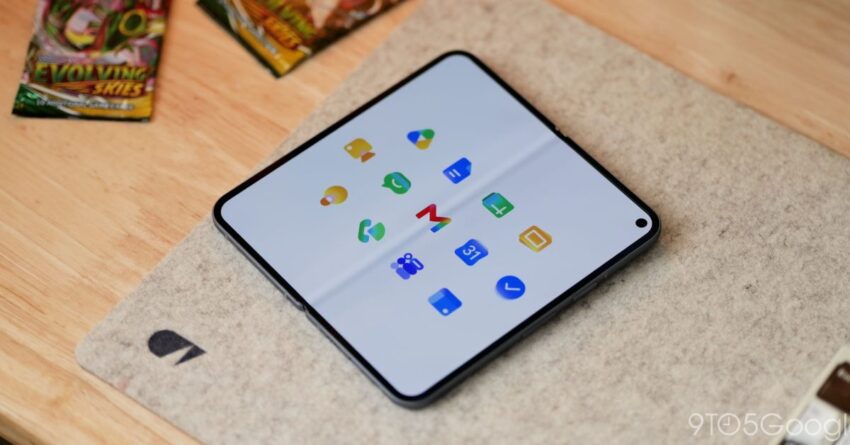
google s new gradient icons for gmail Google has unveiled a significant redesign of its icons for several key applications, introducing a vibrant gradient aesthetic that marks a departure from its previous flat design.
google s new gradient icons for gmail
Overview of the Redesign
The redesign affects five major Google icons, including Gmail, Calendar, Drive, and other Google Workspace applications. This shift to gradient icons is part of a broader trend within the tech industry, where companies are increasingly adopting more visually dynamic designs to enhance user engagement and brand identity.
Details of the Gradient Icons
The new icons feature a multi-colored gradient that adds depth and dimension, moving away from the flat, monochromatic designs that have characterized Google’s interface for years. This change is not merely cosmetic; it reflects a strategic decision to modernize the user experience across Google’s suite of applications.
Applications Affected
- Gmail: The iconic envelope has been transformed with a vibrant gradient, making it stand out on users’ screens.
- Google Calendar: The calendar icon now features a blend of colors that evoke a sense of organization and creativity.
- Google Drive: The drive icon has been updated to reflect a more dynamic and inviting look, encouraging users to engage more with their stored files.
- Google Docs: The document icon has also received a gradient makeover, aligning it with the new design language.
- Google Sheets: The spreadsheet icon completes the set, showcasing a fresh, colorful appearance.
Implications of the Redesign
This redesign is significant for several reasons. First, it aligns with current design trends that favor more vibrant and engaging visuals. As users become accustomed to dynamic interfaces, companies like Google must adapt to maintain user interest and satisfaction.
User Experience Enhancements
The introduction of gradients can enhance user experience by making icons more visually appealing and easier to distinguish. In a world where digital clutter is commonplace, a more colorful and engaging interface can help users navigate their applications more intuitively.
Brand Identity and Recognition
Moreover, the gradient icons contribute to a cohesive brand identity across Google’s services. As users interact with multiple Google applications, the consistent use of gradients can reinforce brand recognition and loyalty. This is particularly important for Google, which operates in a highly competitive landscape where user retention is crucial.
Stakeholder Reactions
The response to the new gradient icons has been mixed. Some users have expressed enthusiasm for the fresh look, appreciating the modern aesthetic. Others, however, have voiced concerns about the potential for visual overload, particularly for those who prefer a more minimalist design.
Positive Feedback
Many users have taken to social media to share their excitement about the redesign. Comments highlight the vibrancy of the new icons, with some users noting that the gradients make the applications feel more lively and engaging. This positive feedback indicates that the redesign may resonate well with a younger audience that values aesthetics in their digital interactions.
Concerns About Clarity
On the flip side, some users have raised concerns regarding the clarity of the new icons. Critics argue that the gradients may make it more difficult to quickly identify applications, especially for those who rely on visual cues for navigation. This feedback highlights the challenge of balancing aesthetic appeal with functional design.
Contextualizing the Redesign Within Industry Trends
The shift to gradient icons is not an isolated incident; it reflects a broader trend in the tech industry. Many companies are moving away from flat design towards more dynamic and visually engaging interfaces. This trend can be attributed to several factors, including advancements in display technology and changing user preferences.
Advancements in Display Technology
As display technology continues to improve, with higher resolutions and better color accuracy, designers are increasingly able to utilize gradients and other complex visual elements without compromising performance. This has opened the door for more creative and visually rich designs that can enhance user experience.
Changing User Preferences
Moreover, user preferences are evolving. Today’s consumers are more visually oriented than ever, often gravitating towards applications that offer engaging and aesthetically pleasing interfaces. This shift has prompted companies to rethink their design strategies, leading to the adoption of gradients and other dynamic elements.
Future of Google’s Design Language
The introduction of gradient icons may signal a larger shift in Google’s overall design language. As the company continues to innovate and adapt to user preferences, it is likely that we will see further updates to its applications, potentially incorporating more dynamic elements and interactive features.
Potential for Further Redesigns
In addition to the current updates, Google may explore additional redesigns for its other applications. This could include introducing gradients to icons that have remained unchanged for years or even rethinking the overall user interface to create a more cohesive and engaging experience across all platforms.
Integration with AI and Machine Learning
As Google continues to integrate artificial intelligence and machine learning into its applications, the design language may also evolve to reflect these advancements. For instance, AI could be used to personalize the user experience, adapting the interface to individual preferences and usage patterns. This could further enhance the relevance and appeal of Google’s applications.
Conclusion
The redesign of Google’s icons to feature vibrant gradients represents a significant shift in the company’s approach to user interface design. While the initial reactions have been mixed, the move aligns with broader industry trends and reflects changing user preferences. As Google continues to innovate, it will be interesting to see how these design changes impact user engagement and brand loyalty in the long term.
Source: Original report
Was this helpful?
Explore more: More Big Tech & Platforms Tech News Blog
Last Modified: April 26, 2026 at 10:36 pm
16 views