google s mixboard is an ai moodboard Google has unveiled Mixboard, an innovative AI-driven tool designed to assist users in creating moodboards for exploring various design concepts.
google s mixboard is an ai moodboard
Overview of Mixboard
Mixboard is part of Google Labs, a platform that allows the tech giant to experiment with new ideas and technologies. This particular tool enables users to create visually appealing moodboards using pre-populated templates or by inputting text prompts. At the core of Mixboard is Google’s Gemini 2.5 Flash model, which powers the AI capabilities behind the tool.
Public Beta Release
The Mixboard tool is currently available in a public beta phase in the United States, allowing users to test its features and provide feedback. This phase is crucial for Google as it seeks to refine the tool based on real-world usage and user input. By releasing Mixboard as a beta, Google aims to gather insights that can help enhance the user experience and functionality of the tool before a full launch.
Functionality and Features
Mixboard offers a variety of features that cater to both casual users and design professionals. The interface is visually reminiscent of popular design platforms such as FigJam and Adobe’s Firefly Boards, making it accessible for those familiar with these tools. While the concept of moodboarding is not entirely new, Mixboard introduces unique functionalities that set it apart.
Creating Moodboards
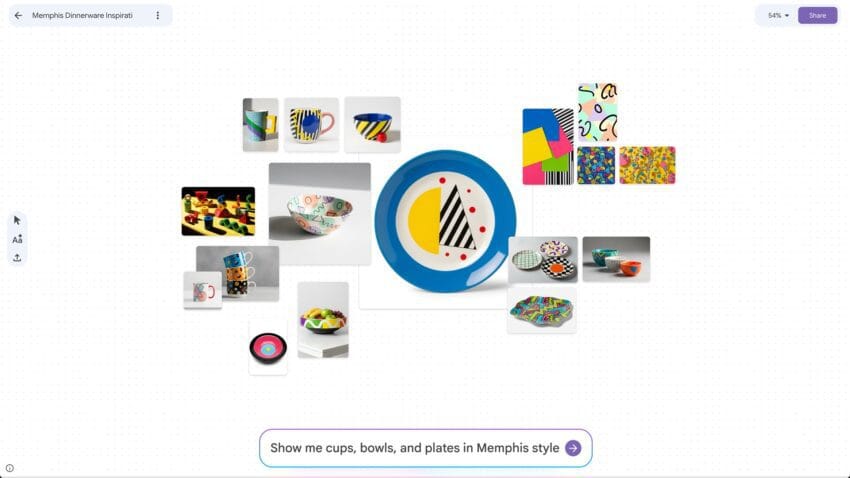
Users can start their creative journey by selecting from a range of pre-populated board templates or by using text prompts to generate their own unique boards. For instance, a user might type a prompt like “show me cups, bowls, and plates in Memphis style” to generate a selection of images that fit that description. This feature allows for a high degree of customization and creativity, enabling users to explore various design aesthetics.
Image Generation and Customization
One of the standout features of Mixboard is its ability to generate visuals based on user descriptions. This capability is particularly useful for those looking to brainstorm ideas for home decor, event planning, or even just for entertainment purposes. Users can create a moodboard for an autumn party in their living room, complete with images of decorations, color palettes, and furniture arrangements.
Moreover, users can edit their boards using natural language prompts. This means that if a user wants to adjust or combine images, they can simply type a request, and the AI will interpret it to make the necessary changes. This level of interactivity is designed to make the creative process more intuitive and user-friendly.
Regeneration and Similar Designs
Mixboard also features one-click options that allow users to quickly regenerate images or create similar-looking designs. This functionality is particularly beneficial for users who may want to explore different variations of a design without starting from scratch. By simply clicking a button, users can see alternative options that align with their original vision, thereby streamlining the design process.
Use Cases and Applications
The versatility of Mixboard makes it suitable for a wide range of applications. Whether users are looking to decorate their homes, plan events, or simply engage in creative exploration, Mixboard provides a platform for these activities.
Home Decor
For individuals interested in home decor, Mixboard can serve as a valuable tool for visualizing different design styles and arrangements. Users can create boards that reflect their personal tastes, experiment with color schemes, and visualize how various elements will look together in their space. This can be particularly helpful for those who may struggle to envision how different pieces will complement one another.
Event Planning
Event planners can also benefit from Mixboard’s capabilities. Whether planning a birthday party, wedding, or corporate event, users can create moodboards that capture the desired atmosphere and theme. By generating images of decorations, table settings, and color palettes, planners can ensure that all elements align with their vision, making the planning process more cohesive and organized.
Creative Exploration
Beyond practical applications, Mixboard can be a source of inspiration and entertainment. Users can create boards filled with amusing images or explore design ideas purely for fun. This aspect of the tool aligns with the growing trend of using digital platforms for creative expression and social sharing, similar to how Pinterest operates.
Comparative Analysis with Other Tools
While Mixboard shares similarities with existing platforms like FigJam and Adobe’s Firefly Boards, it distinguishes itself through its integration of AI capabilities. The ability to generate images based on text prompts and edit boards using natural language sets Mixboard apart from its competitors.
AI Integration
The incorporation of Google’s Gemini 2.5 Flash model enhances the user experience by providing intelligent suggestions and generating relevant images based on user input. This level of AI integration is not commonly found in traditional moodboarding tools, which often rely on static templates and user-uploaded images. By leveraging AI, Mixboard offers a more dynamic and responsive design experience.
User Experience
The user interface of Mixboard is designed to be intuitive and visually engaging. This focus on user experience is essential for attracting a broad audience, from casual users to professional designers. The familiar layout, combined with innovative features, encourages users to explore their creativity without feeling overwhelmed by complex tools.
Stakeholder Reactions
As with any new technology, reactions to Mixboard have varied among stakeholders. Early users have expressed excitement about the tool’s potential for enhancing creativity and simplifying the design process. Many appreciate the ease of generating images and the ability to customize boards quickly.
Feedback from Designers
Professional designers have noted that while Mixboard offers valuable features, it may not fully replace traditional design tools. However, they recognize its utility as a supplementary tool for brainstorming and ideation. The ability to quickly generate and manipulate visuals can enhance the creative process, allowing designers to focus on refining their ideas.
General User Sentiment
Casual users have responded positively to Mixboard’s user-friendly interface and the fun aspect of creating moodboards. Many have found it to be a refreshing way to explore design concepts without the pressure of creating a polished final product. This sentiment aligns with the growing interest in DIY projects and personal expression through design.
Future Implications
The launch of Mixboard signals Google’s commitment to expanding its presence in the design and creative technology space. As AI continues to evolve, tools like Mixboard may pave the way for more advanced applications that further blur the lines between human creativity and machine assistance.
Potential for Further Development
As user feedback is collected during the beta phase, Google may introduce additional features and enhancements to Mixboard. This could include more advanced AI capabilities, integration with other Google services, or expanded collaboration features that allow multiple users to work on a moodboard simultaneously.
Impact on the Design Community
The introduction of AI-driven tools like Mixboard could also influence the broader design community. As more individuals gain access to powerful design tools, the barriers to entry for creative expression may diminish. This democratization of design could lead to a surge in innovative ideas and projects, fostering a more inclusive creative landscape.
Conclusion
Google’s Mixboard represents a significant step forward in the realm of AI-assisted design tools. By combining user-friendly features with advanced AI capabilities, Mixboard empowers users to explore their creativity and visualize their ideas in new and exciting ways. As the tool continues to evolve, it has the potential to reshape how individuals and professionals approach design, making the creative process more accessible and engaging for all.
Source: Original report
Was this helpful?
Explore more: AI Automation Services More AI & Automation Tech News
Last Modified: September 24, 2025 at 1:39 am
19 views