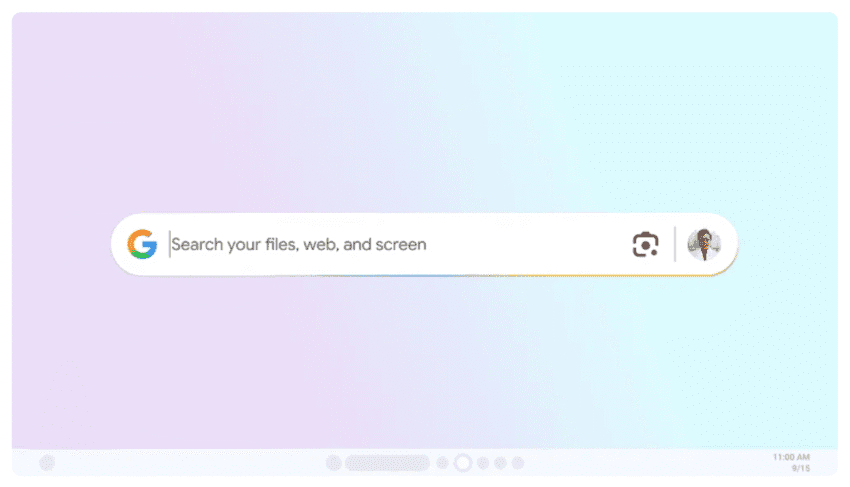
google rolls out new windows desktop app Google has introduced a new Windows desktop application that features a Spotlight-like search tool, enhancing user experience by streamlining access to information across various platforms.
google rolls out new windows desktop app
Overview of the New Application
The newly launched application is designed to improve productivity by allowing users to quickly search for information using a simple keyboard shortcut. By pressing Alt + Space, users can access a search interface that aggregates results from multiple sources, including local computer files, installed applications, Google Drive files, and web content. This integration aims to create a seamless experience for users who frequently switch between different types of information and applications.
Key Features
The app’s primary feature is its search functionality, which is reminiscent of Apple’s Spotlight tool. However, Google has tailored this application to fit its ecosystem, providing unique advantages for users who are already embedded within Google’s suite of services. Here are some of the key features:
- Unified Search: The application allows users to search across various domains, including local files, applications, and cloud storage, thereby reducing the time spent switching between different platforms.
- Instant Access: The Alt + Space shortcut enables immediate access to the search tool, making it easy for users to find what they need without navigating through multiple menus.
- Web Integration: Users can also pull in results from the web, making it a versatile tool for research and information gathering.
- File Preview: The app provides previews of files, allowing users to quickly identify the content they are looking for without needing to open each file individually.
Implications for Users
The introduction of this application is likely to have significant implications for users, particularly those who rely heavily on Google services. The ability to quickly search for and access information can enhance productivity, especially in work environments where time is of the essence. Here are some potential implications:
Enhanced Productivity
In an age where multitasking is the norm, the ability to quickly locate information can save valuable time. Users can avoid the frustration of searching through multiple folders or applications to find what they need. This streamlined approach can lead to more efficient workflows, particularly for professionals who juggle various tasks simultaneously.
Integration with Google Ecosystem
For users who are already utilizing Google Drive, Gmail, and other Google services, this new application offers a cohesive experience. The integration of these services into a single search interface means that users can access their entire digital workspace without needing to switch contexts. This can be particularly beneficial for remote workers and teams who rely on cloud-based tools for collaboration.
Potential Challenges
While the new application presents numerous advantages, it may also pose challenges for some users. For instance, those who are accustomed to traditional file navigation may find the new search tool disorienting at first. Additionally, users who do not utilize Google services extensively may not fully benefit from the app’s capabilities.
Stakeholder Reactions
The rollout of this new application has garnered mixed reactions from various stakeholders, including tech enthusiasts, industry analysts, and everyday users. Here’s a closer look at some of the feedback received:
Positive Reception from Tech Enthusiasts
Many tech enthusiasts have praised the application for its intuitive design and functionality. The ability to search across multiple platforms with a single shortcut has been highlighted as a game-changer for productivity. Users have expressed excitement about the potential for improved efficiency, particularly in fast-paced work environments.
Concerns from Privacy Advocates
On the other hand, privacy advocates have raised concerns regarding data security and user privacy. The integration of web search capabilities means that user queries may be processed through Google’s servers, leading to potential privacy implications. Critics argue that users should be informed about how their data is being used and stored, especially when utilizing a tool that aggregates information from various sources.
Feedback from Business Users
Business users have also weighed in on the new application. Many have expressed interest in its potential to enhance team collaboration and information sharing. However, some have voiced concerns about the learning curve associated with adopting a new tool, particularly for employees who may be less tech-savvy. Training and support will be crucial in ensuring that all team members can effectively utilize the application.
Comparative Analysis with Existing Tools
The introduction of Google’s new desktop application invites comparisons with existing search tools, particularly Apple’s Spotlight and Microsoft’s Windows Search. Each of these tools offers unique features and capabilities, catering to different user needs.
Apple’s Spotlight
Apple’s Spotlight has long been regarded as a leading search tool for macOS users. It allows users to search for files, applications, and web content seamlessly. However, it is primarily limited to the Apple ecosystem, which may restrict its usability for those who also use Windows or other platforms. Google’s new application, by contrast, aims to bridge the gap between different operating systems and services, making it a versatile option for a broader audience.
Microsoft’s Windows Search
Microsoft’s Windows Search has made significant strides in recent years, offering improved search capabilities within the Windows operating system. However, it often lacks the integration with cloud services that Google provides. Users who rely on Google Drive and other cloud-based tools may find Google’s new application to be a more comprehensive solution for their search needs.
Future Developments and Updates
As with any new application, future developments and updates will play a crucial role in its success. Google has a history of iterating on its products based on user feedback, and it is likely that the company will continue to enhance this application in response to user needs and technological advancements.
Potential Features on the Horizon
Some potential features that could be introduced in future updates include:
- Advanced Filtering Options: Users may benefit from more granular filtering options to refine search results based on specific criteria.
- Integration with Third-Party Applications: Expanding the app’s capabilities to include third-party applications could further enhance its utility.
- Customization Options: Allowing users to customize the search interface and functionality could improve user satisfaction and engagement.
Community Engagement
Google’s approach to community engagement will also be critical in shaping the future of this application. Actively seeking user feedback and incorporating suggestions into updates can foster a sense of ownership among users and encourage widespread adoption.
Conclusion
The rollout of Google’s new Windows desktop application with a Spotlight-like search tool marks a significant step forward in enhancing user productivity and streamlining access to information. While the application presents numerous advantages, it also raises important questions about privacy and user experience. As Google continues to refine and develop this tool, it will be essential for the company to address stakeholder concerns and adapt to the evolving needs of its user base. The success of this application will ultimately depend on its ability to integrate seamlessly into users’ workflows and provide tangible benefits in their daily tasks.
Source: Original report
Was this helpful?
Explore more: Software Development More Software Development Tech News
Last Modified: September 16, 2025 at 11:40 pm
8 views