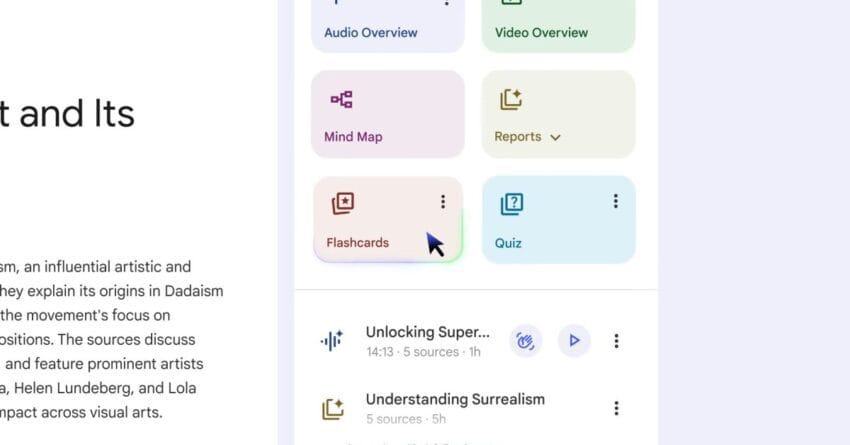
google rolling out flashcards quizzes and redesigned Google is enhancing its NotebookLM platform with the introduction of Flashcards, Quizzes, and redesigned Reports, aimed at improving user engagement and learning efficiency.
google rolling out flashcards quizzes and redesigned
Overview of NotebookLM Enhancements
NotebookLM, Google’s innovative note-taking and learning tool, has recently announced a series of updates that promise to enrich the user experience. Following the introduction of new Audio Overview formats last week, the platform is now rolling out features such as Flashcards, Quizzes, and redesigned Reports. These enhancements are designed to facilitate more interactive learning and better organization of information, catering to the needs of students, educators, and lifelong learners alike.
Flashcards: A New Way to Retain Information
The introduction of Flashcards is a significant step in making learning more interactive. Flashcards have long been a staple in educational settings, allowing users to memorize information through active recall. With NotebookLM’s new Flashcard feature, users can create digital flashcards directly from their notes, making it easier to study key concepts and terms.
Users can customize their flashcards by adding text, images, and even audio clips, which can enhance the learning experience. This flexibility allows for a more personalized approach to studying, catering to different learning styles. For instance, visual learners can benefit from incorporating images, while auditory learners can use audio clips to reinforce their understanding.
Moreover, the Flashcards feature integrates seamlessly with existing notes, allowing users to pull information from their notes without having to switch between different applications. This integration not only saves time but also helps maintain focus, which is crucial for effective studying.
Quizzes: Testing Knowledge in Real-Time
Alongside Flashcards, the new Quizzes feature allows users to test their knowledge in real-time. This tool is particularly beneficial for students preparing for exams or anyone looking to assess their understanding of a subject. Users can create quizzes based on their notes, which can include multiple-choice questions, true/false statements, and short answer questions.
The ability to create quizzes directly from notes encourages active engagement with the material. Users can identify areas where they may need further study, making their learning process more efficient. Additionally, the quizzes can be shared with peers, fostering collaborative learning. This social aspect can enhance motivation and accountability, as users can support one another in their educational journeys.
Redesigned Reports: Enhanced Data Visualization
Another notable update is the redesign of the Reports feature. Reports are essential for users who want to track their progress over time. The new design aims to provide clearer insights into learning patterns and areas for improvement. Enhanced data visualization tools allow users to see their performance metrics in a more digestible format, making it easier to identify strengths and weaknesses.
The redesigned Reports feature includes graphs and charts that illustrate performance trends, helping users to visualize their learning journey. This can be particularly useful for educators who want to monitor their students’ progress or for individuals who are self-studying and want to keep track of their achievements.
Context and Implications of the Updates
The rollout of these features comes at a time when digital learning tools are becoming increasingly important. With the rise of remote learning and the growing reliance on technology in education, platforms like NotebookLM are positioning themselves to meet the evolving needs of users. The integration of Flashcards, Quizzes, and redesigned Reports aligns with a broader trend towards interactive and personalized learning experiences.
These updates also reflect Google’s commitment to enhancing educational technology. By providing tools that promote active learning, Google is not only improving the functionality of NotebookLM but also contributing to the overall landscape of digital education. The ability to create and customize learning materials directly within a note-taking app streamlines the study process, making it more efficient and user-friendly.
Stakeholder Reactions
Reactions from educators and students alike have been largely positive. Many educators have expressed enthusiasm about the potential for these new features to enhance student engagement. The ability to create interactive materials directly from notes can help students take ownership of their learning, making it more meaningful and effective.
Students have also welcomed the updates, particularly the Flashcards and Quizzes features. The interactive nature of these tools can make studying feel less daunting and more enjoyable. Users have noted that the integration of these features into a single platform reduces the need to juggle multiple apps, which can often lead to distractions and decreased productivity.
Potential Challenges
Despite the positive feedback, there are potential challenges that Google may face as it rolls out these features. One concern is the learning curve associated with new tools. While the updates aim to enhance usability, some users may find it challenging to adapt to the new features initially. Effective onboarding and user support will be crucial in ensuring that users can fully leverage the new capabilities.
Additionally, privacy and data security are ongoing concerns in the realm of educational technology. As users create and store personal study materials within NotebookLM, ensuring that their data is protected will be paramount. Google has a history of prioritizing user privacy, but continued transparency about data handling practices will be essential to maintain user trust.
Future Directions for NotebookLM
Looking ahead, the updates to NotebookLM may pave the way for further enhancements. The introduction of AI-driven features could be a logical next step, providing users with personalized recommendations based on their study habits and performance. For instance, an AI tool could analyze a user’s quiz results and suggest areas for further study, tailoring the learning experience to individual needs.
Moreover, the potential for collaboration tools within NotebookLM could be expanded. Features that allow users to work together on projects or share resources could foster a more community-oriented learning environment. This could be particularly beneficial for group studies or collaborative projects, where shared resources and collective input can enhance the learning experience.
Conclusion
The rollout of Flashcards, Quizzes, and redesigned Reports in NotebookLM marks a significant advancement in Google’s educational technology offerings. These features are designed to enhance user engagement, promote active learning, and provide valuable insights into learning progress. As the landscape of education continues to evolve, tools like NotebookLM are well-positioned to meet the needs of modern learners, making education more accessible and effective.
Source: Original report
Was this helpful?
Explore more: AI Automation Services More AI & Automation Tech News
Last Modified: September 9, 2025 at 3:57 pm
2 views