google expands dark mode across android as Google has announced significant updates to Android 16 QPR2, focusing on enhancing accessibility features while also expanding dark mode across the platform.
google expands dark mode across android as
Introduction to Android 16 QPR2
Android 16 QPR2 marks a pivotal update for Google, as the company continues to refine its mobile operating system. This update is not just about introducing new features; it also emphasizes making the platform more accessible to a broader range of users. Accessibility has become a critical focus for technology companies, and Google is no exception. With this update, users can expect improvements that cater to individuals with varying needs, ensuring a more inclusive experience.
Key Accessibility Enhancements
One of the standout features of Android 16 QPR2 is its commitment to enhancing accessibility. Google has introduced several improvements aimed at users with hearing impairments, visual challenges, and other disabilities. These changes are designed to make everyday tasks easier and more manageable for all users.
Improvements for Hearing Aid Users
For users who rely on hearing aids, Android 16 QPR2 brings significant advancements. Google has worked closely with hearing aid manufacturers to improve compatibility and functionality. This includes better audio streaming capabilities, which allow users to connect their hearing aids directly to their Android devices. The update also introduces enhanced sound quality, reducing latency and improving clarity during calls and media playback.
Enhanced Captioning Features
Another notable improvement is the enhancement of captioning features. Google has integrated more robust captioning options that allow users to customize their viewing experience. This includes adjustable text size, color, and background options, making it easier for users to read captions while watching videos or participating in video calls. These features are particularly beneficial for individuals who are deaf or hard of hearing, as they provide a more inclusive way to engage with content.
Smart Dictation and Guided Frame Integration
In addition to the accessibility features mentioned above, Google is integrating its Gemini models into Smart Dictation and Guided Frame functionalities on Pixel devices. This integration aims to improve the responsiveness and accuracy of voice commands and guided photography features.
Smart Dictation Enhancements
Smart Dictation allows users to compose messages and notes using voice commands. With the integration of Gemini models, users can expect a more intuitive experience. The AI-driven enhancements will enable the system to better understand context, leading to more accurate transcriptions and suggestions. This is particularly useful for users who may have difficulty typing due to physical limitations.
Guided Frame Improvements
Guided Frame is another feature benefiting from the Gemini integration. This tool assists users in framing their photos correctly, ensuring that subjects are well-positioned within the shot. The updated version will provide real-time feedback and suggestions, making it easier for users to capture high-quality images without needing extensive photography skills. This is especially advantageous for individuals with visual impairments, as it simplifies the process of taking photos.
Dark Mode Expansion
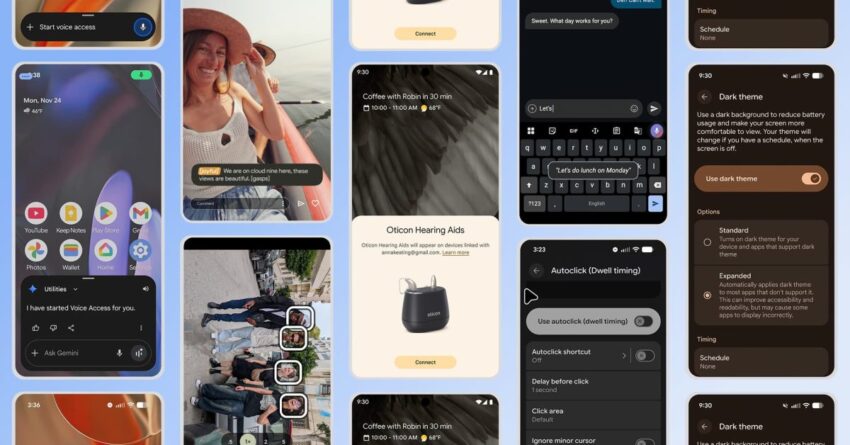
Alongside the accessibility improvements, Google is also expanding dark mode across Android. Dark mode has gained popularity among users for its aesthetic appeal and potential benefits for eye strain, especially in low-light environments. The update aims to provide a more cohesive experience across apps and interfaces.
Benefits of Dark Mode
Dark mode offers several advantages, including:
- Reduced Eye Strain: Dark mode can help reduce eye strain, particularly in dimly lit settings, by minimizing the amount of blue light emitted from screens.
- Improved Battery Life: For devices with OLED screens, dark mode can extend battery life, as black pixels consume less power compared to their white counterparts.
- Enhanced Readability: Many users find that dark mode enhances readability, making text easier to read against a darker background.
Implementation Across Applications
Google’s expansion of dark mode will be implemented across various applications, including system settings, Google apps, and third-party applications that support the feature. This ensures a consistent experience for users, regardless of the app they are using. Developers are encouraged to adopt dark mode in their applications to align with this update, promoting a unified look and feel across the Android ecosystem.
Stakeholder Reactions
The response to these updates has been largely positive among stakeholders, including users, developers, and accessibility advocates. Many users have expressed appreciation for the focus on accessibility, noting that these enhancements will significantly improve their experience with Android devices.
User Feedback
Users who rely on accessibility features have shared their excitement about the improvements. Feedback has highlighted the importance of making technology accessible to everyone, and many believe that Google’s efforts will set a precedent for other tech companies to follow. Users have particularly praised the enhancements to Smart Dictation and Guided Frame, noting that these features will empower them to communicate and capture moments more effectively.
Developer Community Response
Developers have also welcomed the dark mode expansion, recognizing its potential to enhance user engagement. Many developers are already working on updates to their applications to ensure compatibility with dark mode, understanding that a cohesive user experience can lead to increased satisfaction and retention. The accessibility improvements are seen as a valuable addition, encouraging developers to prioritize inclusive design in their future projects.
Accessibility Advocates
Accessibility advocates have commended Google for its commitment to inclusivity. They argue that these updates are essential for ensuring that technology serves all users, regardless of their abilities. The enhancements to hearing aids, captioning, and Smart Dictation are viewed as significant steps toward bridging the accessibility gap in technology.
Implications for the Future
The updates in Android 16 QPR2 signal a broader trend in the tech industry towards prioritizing accessibility and user experience. As technology continues to evolve, the need for inclusive design will become increasingly important. Google’s efforts may inspire other companies to invest in similar enhancements, fostering a more inclusive digital landscape.
Long-Term Accessibility Goals
Google’s focus on accessibility aligns with its long-term goals of making technology accessible to everyone. By continuously improving features that cater to users with disabilities, the company is setting a standard for other tech giants. This commitment not only benefits users but also enhances Google’s reputation as a leader in accessibility innovation.
Future Updates and Features
As Android continues to evolve, users can expect further updates that build on the foundation laid by Android 16 QPR2. Future releases may introduce additional features aimed at improving accessibility, as well as enhancements to existing functionalities. Google is likely to continue leveraging AI and machine learning to create more intuitive experiences for all users.
Conclusion
Android 16 QPR2 represents a significant step forward in enhancing accessibility and user experience on the platform. With improvements to hearing aids, captioning, Smart Dictation, and Guided Frame, Google is making strides toward creating a more inclusive environment for all users. The expansion of dark mode further enhances the overall experience, catering to user preferences and needs. As the tech landscape evolves, Google’s commitment to accessibility will likely influence future developments across the industry.
Source: Original report
Was this helpful?
Last Modified: December 3, 2025 at 7:42 am
3 views