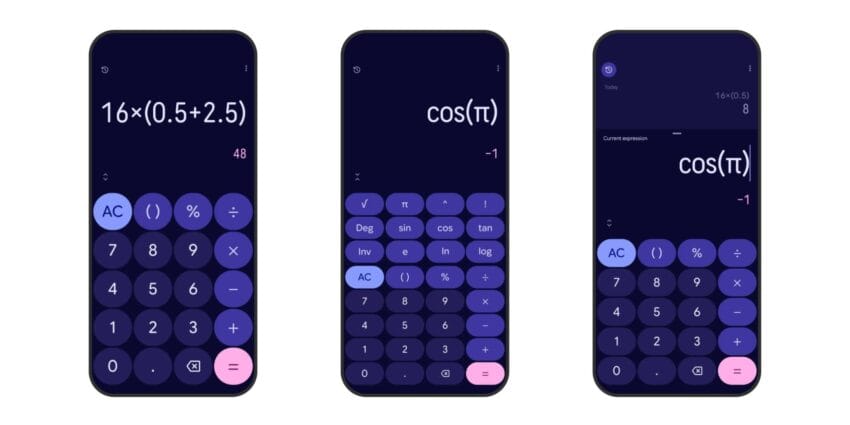
google calculator 9 0 brings material 3 Google Calculator has received a substantial update with the launch of version 9.0, featuring a redesign that embraces Material 3 Expressive, enhancing its visual appeal and user experience.
google calculator 9 0 brings material 3
Overview of the Redesign
Google has a long-standing tradition of updating its applications to align with evolving design philosophies, and the latest version of Google Calculator, version 9.0, is no exception. The Material 3 Expressive redesign introduces a fresh aesthetic that not only modernizes the interface but also aims to improve usability. This update is part of Google’s broader initiative to enhance user interaction across its suite of applications, ensuring that they remain intuitive and visually engaging.
Key Features of Material 3 Expressive
The Material 3 Expressive design language emphasizes personalization, accessibility, and a more vibrant aesthetic. Here are some of the notable features included in the Google Calculator 9.0 update:
- Redesigned Interface: The layout has been streamlined, with buttons and functions rearranged for easier access. This change is particularly beneficial for users who rely on the calculator for quick calculations.
- Enhanced Color Palette: The new color scheme is more vibrant and expressive, allowing users to customize their experience. This aligns with the Material You design philosophy, which encourages personalization based on user preferences.
- Improved Accessibility: The redesign incorporates features that enhance accessibility for users with disabilities. This includes better contrast ratios and larger touch targets, making it easier for all users to interact with the app.
- Dynamic Themes: Users can expect dynamic theming options that adapt to their device settings, creating a cohesive look across all applications.
Implications of the Update
The redesign of Google Calculator is not merely cosmetic; it reflects a shift in how Google approaches user experience across its platforms. By adopting Material 3 Expressive, Google is reinforcing its commitment to creating applications that are not only functional but also aesthetically pleasing. This shift is indicative of a larger trend in technology where user experience is becoming a critical factor in application design.
User Experience Enhancements
One of the primary goals of the Material 3 Expressive redesign is to enhance user experience. The rearrangement of elements aims to reduce the cognitive load on users, allowing them to perform calculations more efficiently. This is particularly important for users who rely on the calculator for everyday tasks such as budgeting, shopping, or academic work.
Furthermore, the vibrant color palette and dynamic themes contribute to a more engaging user experience. Users are more likely to enjoy using an application that feels personalized and visually appealing. This can lead to increased usage and, ultimately, a stronger user base for Google’s suite of applications. The emphasis on user experience aligns with a growing recognition in the tech industry that aesthetics and functionality must go hand in hand.
Accessibility Considerations
With the redesign, Google has placed a significant emphasis on accessibility. The improved contrast ratios and larger touch targets are crucial for users with visual impairments or motor difficulties. By making these adjustments, Google is ensuring that the calculator is usable by a broader audience, aligning with best practices in inclusive design.
Accessibility is not just a regulatory requirement; it is a fundamental aspect of user-centered design. By prioritizing accessibility in the Google Calculator update, Google is setting a standard for other applications to follow. This commitment to inclusivity can foster loyalty among users who may have previously felt marginalized by technology that did not consider their needs.
Stakeholder Reactions
The response to the Material 3 Expressive redesign of Google Calculator has been largely positive. Users have expressed appreciation for the new look and feel, noting that the changes make the application more enjoyable to use. Feedback from accessibility advocates has also been encouraging, highlighting the importance of inclusive design in technology.
User Feedback
Many users have taken to social media and forums to share their thoughts on the redesign. Common sentiments include:
- Visual Appeal: Users have praised the new color scheme and layout, noting that it feels fresh and modern.
- Usability: Feedback indicates that the rearrangement of buttons has made it easier to perform calculations quickly.
- Accessibility Features: Users with disabilities have highlighted the improvements in accessibility, expressing gratitude for the larger touch targets and better contrast.
This positive feedback is crucial for Google as it seeks to maintain its competitive edge in the technology market. User satisfaction can significantly impact the adoption rate of new features and updates, making it essential for Google to listen to its user base.
Industry Expert Opinions
Industry experts have also weighed in on the redesign. Many see it as a positive step toward aligning Google’s applications with contemporary design standards. The emphasis on personalization and accessibility is viewed as a necessary evolution in a competitive market where user experience is paramount.
Experts have noted that the Material 3 Expressive redesign positions Google Calculator as a leader in the field of user-friendly applications. As more companies focus on enhancing user experience, Google’s commitment to design excellence may serve as a benchmark for others in the industry.
Context of Material 3 Expressive
The Material 3 Expressive design language is part of Google’s ongoing efforts to create a cohesive and user-friendly ecosystem across its products. Launched in 2021, Material You aimed to provide a more personalized experience by allowing users to customize their interfaces based on their preferences and device settings. This approach has been well-received, and the latest updates to Google applications, including Google Calculator, reflect this philosophy.
Material 3 Expressive builds upon the foundation laid by Material You, further enhancing the ability for users to tailor their experiences. By integrating these design principles into Google Calculator, Google is not only modernizing the application but also reinforcing its commitment to user-centric design.
Historical Perspective
Google Calculator has seen various updates since its inception, but the shift to Material 3 Expressive marks a significant milestone. Previous versions focused primarily on functionality, often at the expense of aesthetics. The latest redesign indicates a shift in priorities, where visual appeal is now considered equally important as functionality.
This historical context is essential for understanding the evolution of Google Calculator. As technology has advanced, user expectations have also changed. Users now demand applications that are not only functional but also visually appealing and easy to use. The transition to Material 3 Expressive is a response to these evolving expectations.
Future Developments
As Google continues to refine its applications, users can expect further enhancements to the Calculator and other tools. The Material 3 Expressive redesign sets a precedent for future updates, suggesting that Google will continue to prioritize user experience, accessibility, and personalization.
Potential Features on the Horizon
While specific future features for Google Calculator have not been announced, there are several areas where enhancements could be beneficial:
- Advanced Calculation Features: Users may appreciate the addition of more complex mathematical functions or graphing capabilities, which could cater to students and professionals alike.
- Integration with Other Google Services: Enhanced integration with Google Sheets or Google Assistant could streamline workflows for users who frequently switch between applications, making the calculator an even more valuable tool.
- AI-Powered Suggestions: Incorporating AI to provide suggestions or shortcuts based on user behavior could further enhance the user experience, making calculations quicker and more intuitive.
Conclusion
The Material 3 Expressive redesign of Google Calculator 9.0 represents a significant step forward in enhancing user experience through improved aesthetics, usability, and accessibility. As Google continues to innovate and adapt its applications, users can look forward to a more personalized and engaging experience. The positive feedback from users and industry experts alike underscores the importance of these updates in maintaining Google’s competitive edge in the technology landscape.
Source: Original report
Was this helpful?
Explore more: Software Development More Software Development Tech News
Last Modified: September 6, 2025 at 4:33 am
17 views