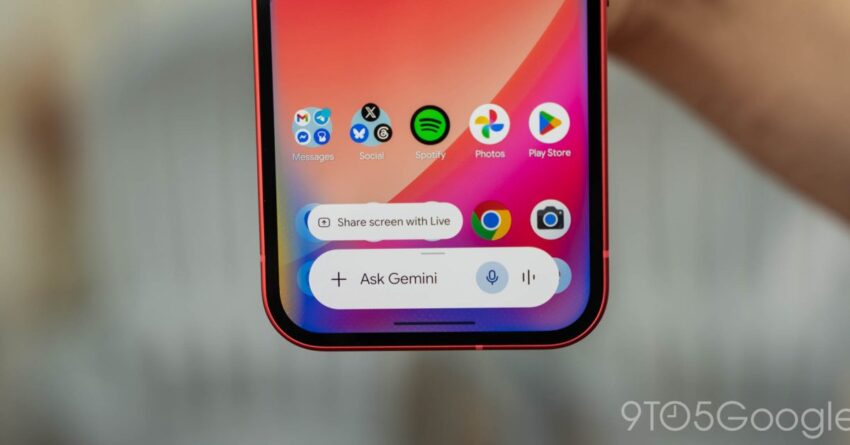
gemini for android using bubbles to let Google’s Gemini overlay for Android has recently integrated Bubbles functionality, enhancing multitasking capabilities and streamlining user interactions.
gemini for android using bubbles to let
Introduction to Gemini and Bubbles
Google’s Gemini project, which aims to redefine user experience on Android devices, has made significant strides in recent months. Following the introduction of Dynamic Color earlier this month, the latest update incorporates Bubbles, a feature designed to facilitate seamless multitasking. This enhancement allows users to keep conversations active while engaging with other applications, thereby improving overall efficiency and user satisfaction.
What are Bubbles?
Bubbles are a feature that allows applications to display floating windows on the screen, enabling users to interact with them without fully switching away from their current task. Initially popularized by messaging apps, Bubbles have expanded their utility to various applications, providing a more integrated and fluid user experience. With the introduction of Bubbles in the Gemini overlay, users can now manage conversations more effectively, ensuring that important chats remain accessible at all times.
Enhancements in User Experience
The integration of Bubbles into the Gemini overlay marks a significant improvement in user experience on Android devices. Users can now multitask more efficiently, as they can respond to messages or notifications without losing their place in other applications. This is particularly beneficial in a world where users often juggle multiple tasks simultaneously, such as working on documents, browsing the internet, or watching videos.
Dynamic Color and Its Role
Prior to the introduction of Bubbles, the Gemini overlay already showcased the Dynamic Color feature, which adapts the user interface based on the colors of the user’s wallpaper. This personalization aspect not only enhances aesthetics but also contributes to a more immersive experience. The combination of Dynamic Color and Bubbles creates a cohesive environment where users can enjoy a visually appealing interface while maintaining functionality.
Practical Applications of Bubbles
The practical applications of the Bubbles feature are vast. For instance, users can engage in a chat while simultaneously browsing social media or checking emails. This is particularly useful for professionals who need to stay connected with colleagues while managing other responsibilities. Additionally, Bubbles can be utilized for video calls, allowing users to continue their conversations while accessing other apps or information.
Implications for Developers
The introduction of Bubbles within the Gemini overlay presents new opportunities and challenges for app developers. As more applications adopt this feature, developers must ensure that their apps are optimized for Bubbles functionality. This means creating interfaces that are not only visually appealing but also responsive and user-friendly when displayed in a floating format.
Adapting to User Needs
Developers will need to consider user needs when designing their applications. The ability to multitask is increasingly becoming a priority for users, and applications that do not support Bubbles may risk falling behind in a competitive market. By embracing this feature, developers can enhance user engagement and satisfaction, ultimately leading to increased app usage and retention.
Stakeholder Reactions
The response from stakeholders regarding the integration of Bubbles into the Gemini overlay has been largely positive. Users have expressed excitement about the enhanced multitasking capabilities, while developers are recognizing the potential for increased engagement. However, some concerns have been raised regarding the potential for clutter on the screen, which could detract from the user experience if not managed properly.
User Feedback
User feedback has highlighted the importance of intuitive design in the implementation of Bubbles. Many users appreciate the ability to keep conversations accessible but have also noted that excessive use of Bubbles can lead to confusion. As such, it is crucial for Google to continue refining this feature based on user input to ensure it meets the needs of a diverse audience.
Developer Perspectives
From a developer’s perspective, the introduction of Bubbles presents both opportunities and challenges. While many developers are eager to adopt this feature, they must also navigate the complexities of ensuring compatibility across various devices and screen sizes. This requires a commitment to ongoing testing and updates to maintain a seamless user experience.
Future Developments
Looking ahead, the integration of Bubbles into the Gemini overlay is likely to pave the way for further innovations in multitasking on Android devices. As user expectations evolve, Google will need to continue enhancing the functionality of Bubbles and exploring new features that can further improve user experience.
Potential Enhancements
Future enhancements could include more customization options for Bubbles, allowing users to choose how they appear and behave on their screens. Additionally, integrating artificial intelligence could lead to smarter Bubbles that prioritize important conversations or notifications based on user behavior and preferences.
Broader Implications for Android Ecosystem
The successful implementation of Bubbles within the Gemini overlay could have broader implications for the Android ecosystem. As more applications adopt this feature, it could lead to a shift in how users interact with their devices, prioritizing multitasking and fluidity over traditional app-switching methods. This shift could encourage developers to innovate further, resulting in a more dynamic and responsive app landscape.
Conclusion
The integration of Bubbles into the Gemini overlay represents a significant advancement in Android’s multitasking capabilities. By allowing users to maintain conversations while engaging with other applications, Google is enhancing the overall user experience and setting new standards for mobile interaction. As developers adapt to this change and users provide feedback, the potential for further innovation in this area remains vast. The future of multitasking on Android looks promising, with Bubbles leading the charge toward a more interconnected and efficient mobile experience.
Source: Original report
Was this helpful?
Explore more: Mobile App Development More Mobile Technology Tech News
Last Modified: June 18, 2026 at 8:35 am
10 views