capcut pad promises desktop-level video editing for CapCut Pad has launched as a new video editing application for Android tablets, aiming to deliver “desktop-level” editing capabilities to mobile users.
capcut pad promises desktop-level video editing for
Introduction to CapCut Pad
CapCut Pad is the latest addition to the suite of video editing tools available for Android tablets, designed to cater to both amateur and professional content creators. Developed by ByteDance, the parent company of TikTok, CapCut has gained popularity for its user-friendly interface and robust features. With the introduction of CapCut Pad, the company aims to elevate the video editing experience on tablets, providing users with advanced functionalities that were previously reserved for desktop applications.
Features of CapCut Pad
CapCut Pad promises a range of features that enhance the video editing process, making it more intuitive and efficient. Below are some of the key functionalities that users can expect:
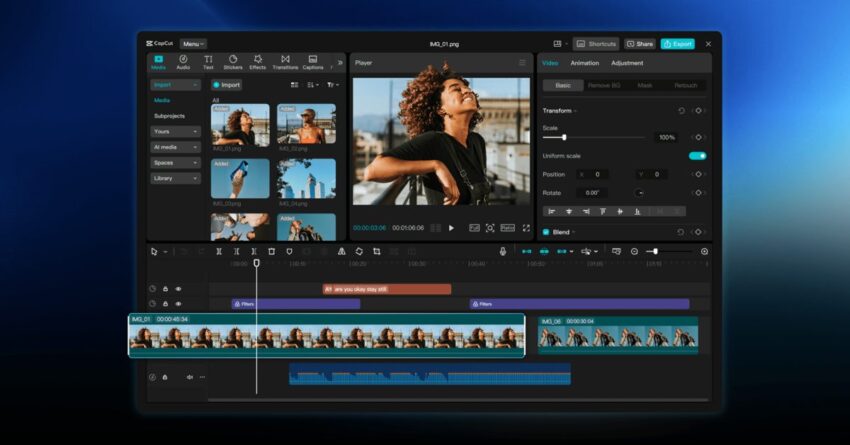
- Multi-Track Editing: One of the standout features of CapCut Pad is its multi-track editing capability. This allows users to layer multiple video and audio tracks, enabling more complex and dynamic edits.
- Advanced Effects and Filters: The app includes a variety of effects and filters that can be applied to videos, enhancing visual appeal. Users can experiment with different styles to create unique content.
- AI-Powered Tools: CapCut Pad utilizes artificial intelligence to streamline the editing process. Features such as automatic scene detection and smart audio syncing help users save time and effort.
- High-Resolution Export: Users can export their edited videos in high resolution, ensuring that the final product meets professional standards.
- Intuitive User Interface: Designed with user experience in mind, CapCut Pad boasts an intuitive interface that makes it easy for users to navigate through various editing tools.
Target Audience
CapCut Pad is aimed at a diverse audience, including:
- Content Creators: With the rise of platforms like TikTok and YouTube, content creators are constantly looking for tools that can help them produce high-quality videos quickly. CapCut Pad is designed to meet these needs.
- Social Media Managers: Professionals managing social media accounts can utilize CapCut Pad to create engaging content that captures audience attention.
- Casual Users: Even those who are not professional editors can benefit from the app’s user-friendly design, making video editing accessible to everyone.
Comparison with Other Video Editing Apps
In a crowded market of video editing applications, CapCut Pad distinguishes itself through its combination of advanced features and ease of use. Here’s how it compares to other popular video editing apps:
CapCut vs. Adobe Premiere Rush
Adobe Premiere Rush is a well-known video editing tool that offers a range of professional features. However, it often comes with a steeper learning curve. In contrast, CapCut Pad focuses on simplicity without sacrificing functionality, making it more appealing to novice users.
CapCut vs. FilmoraGo
FilmoraGo is another popular video editing app that provides a variety of features. While it offers many similar functionalities, CapCut Pad’s integration of AI tools gives it an edge in terms of efficiency and ease of use.
Implications for the Video Editing Landscape
The launch of CapCut Pad signifies a shift in the video editing landscape, particularly for mobile devices. As more users turn to tablets for content creation, the demand for robust editing tools has increased. CapCut Pad’s entry into this space could encourage other developers to enhance their offerings, leading to a more competitive market.
Stakeholder Reactions
The introduction of CapCut Pad has garnered attention from various stakeholders, including content creators, industry analysts, and competitors. Here are some notable reactions:
Content Creators
Many content creators have expressed excitement about the new app, particularly its promise of desktop-level features on a mobile platform. Influencers and videographers are eager to experiment with the multi-track editing and AI-powered tools, which they believe will streamline their workflow.
Industry Analysts
Industry analysts view CapCut Pad as a strategic move by ByteDance to solidify its position in the video editing market. By offering advanced features at no cost, the app could attract a significant user base, potentially challenging established players in the industry.
Competitors
Competitors are likely to take note of CapCut Pad’s features and user-friendly design. Some may feel pressured to innovate and enhance their own offerings to retain their user base. This could lead to a wave of updates and new features across various video editing applications.
Future Prospects
Looking ahead, CapCut Pad has the potential to evolve further. Future updates could include:
- Collaboration Features: As remote work and collaboration become more common, integrating features that allow multiple users to edit a video simultaneously could enhance the app’s appeal.
- Cloud Storage Integration: Offering cloud storage options would enable users to save and access their projects from multiple devices, increasing flexibility.
- Expanded Asset Library: Continuously updating the library of effects, transitions, and audio tracks could keep users engaged and encourage them to return to the app for new content.
Conclusion
CapCut Pad represents a significant advancement in mobile video editing, bringing features that were once exclusive to desktop applications to Android tablets. With its user-friendly interface and powerful editing tools, it stands to benefit a wide range of users, from casual creators to professional videographers. As the app gains traction, its impact on the video editing landscape will likely prompt other developers to innovate, ultimately enriching the options available to content creators.
Source: Original report
Was this helpful?
Explore more: Mobile App Development More Mobile Technology Tech News
Last Modified: May 28, 2026 at 2:52 am
25 views