you can turn off ios 26 s iOS 26 introduces a new screenshot feature that has sparked discussions among users regarding its usability and impact on the overall user experience.
you can turn off ios 26 s
Overview of the New Screenshot Feature
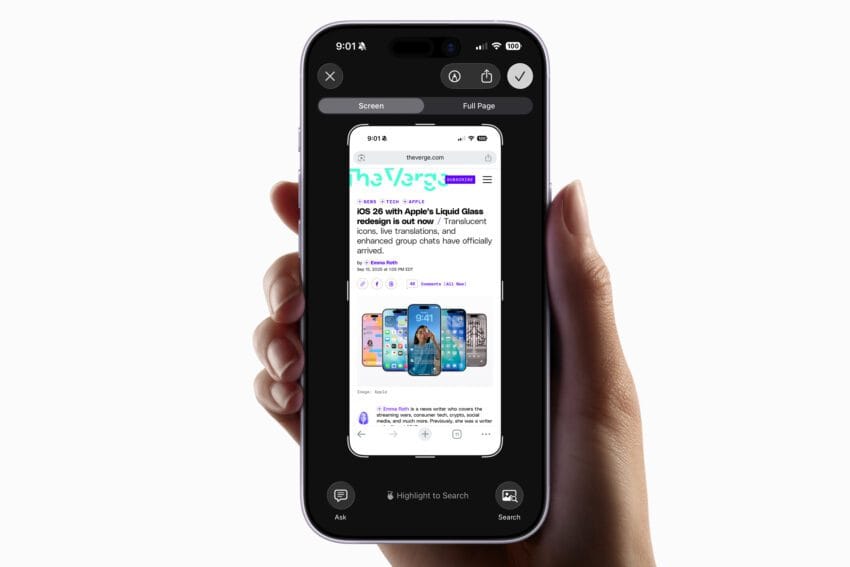
With the release of iOS 26 earlier this week, Apple has implemented a significant change in how screenshots are handled on iPhones. Upon capturing a screenshot, users are now greeted with a full-screen preview that takes over the entire display. This shift from the previous method, where screenshots appeared as small thumbnails in the lower-left corner, has raised eyebrows among users who find the new approach somewhat intrusive.
The full-screen preview offers immediate access to a suite of editing tools, allowing users to annotate, crop, or modify their screenshots right after capturing them. However, the change has led to complaints about the overwhelming nature of the full-screen display, which can interrupt the flow of tasks users are engaged in at the moment of capture.
How to Disable Full-Screen Previews
Fortunately for those who prefer the older, less obtrusive method, reverting to the traditional thumbnail display is straightforward. Users can easily disable the full-screen preview feature by following these steps:
- Open the Settings app on your iPhone.
- Navigate to General.
- Scroll down and select Screen Capture.
- At the top of the page, locate the Full-Screen Previews toggle and switch it off.
By disabling this feature, users will no longer see screenshots displayed in full view. Instead, they will revert to the familiar thumbnail format, which many find less disruptive.
Understanding the Implications of the Change
The introduction of full-screen previews in iOS 26 is part of Apple’s ongoing effort to enhance user experience by providing more immediate access to editing tools. However, this change raises several implications for users:
User Experience
The full-screen preview can be seen as a double-edged sword. On one hand, it allows for quick edits and adjustments, which can be beneficial for users who frequently take screenshots for work or personal use. The editing tools available include options to:
- Crop the image to focus on specific content.
- Annotate the screenshot with text, arrows, or highlights.
- Search for similar images using Google.
- Utilize AI tools like ChatGPT for additional context or summaries.
On the other hand, the interruption caused by the full-screen display can be frustrating, particularly for users who take screenshots as part of their workflow. The sudden appearance of a large preview can disrupt concentration and lead to unintended distractions.
Potential Benefits
Despite the drawbacks, there are potential benefits to the new feature. The full-screen preview can facilitate a more streamlined editing process, allowing users to make necessary adjustments immediately after capturing an image. This can be particularly useful in scenarios such as:
- Taking screenshots of important information or documents that require immediate sharing.
- Capturing images for social media posts that need quick edits.
- Documenting processes or steps in tutorials where clarity is essential.
For users who appreciate the convenience of having editing tools readily available, the full-screen preview can enhance productivity.
Stakeholder Reactions
The response to the new screenshot feature has been mixed among users and tech commentators. Some users have expressed their dissatisfaction with the full-screen previews, citing that they find the change unnecessary and cumbersome. Others, however, appreciate the additional editing capabilities and the ease of access to these tools.
Tech commentators have weighed in on the change, noting that while Apple aims to improve user experience, the implementation of new features should also consider the diverse preferences of its user base. The ability to disable the feature has been welcomed, as it allows users to tailor their experience according to their needs.
Comparative Analysis with Previous iOS Versions
To understand the impact of this change, it is helpful to compare it with how screenshots were handled in previous iOS versions. Prior to iOS 26, screenshots were displayed as small thumbnails, which allowed users to continue their tasks without interruption. This method was particularly favored by users who took frequent screenshots as part of their daily routines.
In earlier versions, users could still access editing tools by tapping on the thumbnail, but the temporary nature of the thumbnail meant that it did not dominate the screen. This approach allowed for a more seamless workflow, as users could quickly dismiss the thumbnail and return to their previous activity.
Future Considerations for Apple
As Apple continues to refine its iOS platform, the feedback from users regarding the new screenshot feature will likely play a crucial role in shaping future updates. The company has a history of responding to user feedback, and the ability to disable intrusive features is a testament to its commitment to user-centric design.
Moving forward, Apple may consider implementing additional customization options for screenshot handling. For instance, users could be given the ability to choose between different display modes for screenshots, allowing for a more personalized experience. Such options could include:
- A setting to adjust the size of the thumbnail.
- A choice between full-screen previews and thumbnails based on user preference.
- Enhanced editing tools that can be accessed without the need for a full-screen display.
Conclusion
The introduction of full-screen previews for screenshots in iOS 26 has sparked a conversation about user experience and functionality. While the new feature offers immediate access to editing tools, it has also raised concerns about its intrusive nature. Fortunately, the option to disable this feature allows users to revert to a more familiar and less disruptive method of handling screenshots.
As Apple continues to evolve its iOS platform, user feedback will be essential in guiding future enhancements. The balance between innovation and usability remains a critical consideration for the tech giant as it seeks to meet the diverse needs of its user base.
Source: Original report
Was this helpful?
Last Modified: September 18, 2025 at 7:36 pm
3 views