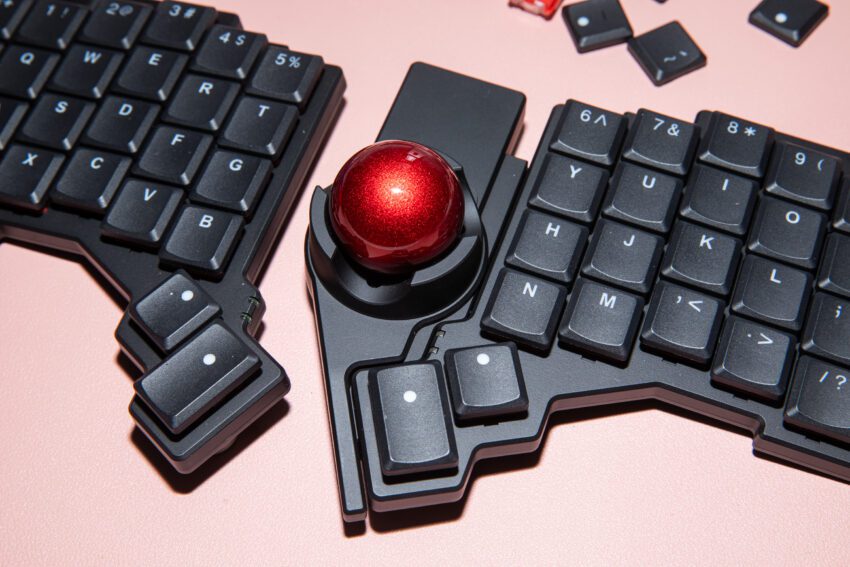
this keyboard and trackball combo are for The ZSA Voyager keyboard, paired with the innovative Navigator trackball, offers a unique solution for those who enjoy customizing their computing experience.
this keyboard and trackball combo are for
Introduction to the ZSA Voyager and Navigator
In a world where ergonomic design and personalized setups are becoming increasingly important, ZSA Technology Labs has introduced a compelling combination: the Voyager keyboard and its accompanying Navigator trackball. This duo is particularly appealing to tech enthusiasts and tinkerers who are always on the lookout for ways to enhance their productivity and comfort.
The Voyager keyboard is a low-profile, wired, split mechanical keyboard that boasts 52 hot-swappable keys arranged in a columnar-staggered layout. This design not only caters to ergonomics but also allows users to customize their key switches according to their preferences. The addition of the Navigator trackball, which magnetically attaches to the keyboard, presents an intriguing option for those who prefer trackballs over traditional mice.
Features of the Voyager Keyboard
Ergonomic Design
The Voyager’s split design is aimed at reducing strain on the wrists and forearms. By allowing users to position each half of the keyboard at a comfortable angle, it minimizes the risk of repetitive strain injuries, which are common in prolonged computer use. The low-profile keys further enhance comfort, making typing less taxing on the fingers.
Hot-Swappable Keys
One of the standout features of the Voyager is its hot-swappable keys. This means that users can easily replace key switches without soldering, allowing for a high degree of customization. Whether you prefer tactile, linear, or clicky switches, the Voyager accommodates your choices, making it a versatile option for different typing styles.
Columnar-Staggered Layout
The columnar-staggered layout is designed to align with the natural positioning of the fingers, which can lead to a more comfortable typing experience. This layout deviates from traditional keyboard designs, aiming to improve typing efficiency and reduce finger movement.
Introducing the Navigator Trackball
Design and Functionality
The Navigator trackball is designed to attach magnetically to the Voyager keyboard, providing a seamless integration that is both functional and aesthetically pleasing. The trackball allows for precise cursor control without the need for extensive hand movement, which can be beneficial for users who experience discomfort with traditional mice.
Customization Options
Similar to the Voyager keyboard, the Navigator trackball offers customization options. Users can adjust settings such as sensitivity and button mapping, allowing for a tailored experience that meets individual needs. This level of personalization can significantly enhance productivity, especially for users who rely heavily on specific applications or workflows.
Implications for Users
The combination of the Voyager keyboard and Navigator trackball represents a shift in how users can approach their computing setups. For those who are willing to invest time and resources into customizing their equipment, this duo offers the potential for significant improvements in comfort and efficiency. However, it is essential to consider whether the benefits outweigh the costs and adjustments required.
Potential Benefits
- Increased Comfort: The ergonomic design of both the keyboard and trackball can lead to a more comfortable computing experience, particularly for users who spend long hours at their desks.
- Enhanced Productivity: With customizable features and a unique layout, users may find that they can work more efficiently, reducing the time spent on repetitive tasks.
- Personalization: The ability to swap key switches and adjust trackball settings allows users to create a setup that aligns with their specific preferences and needs.
Considerations and Caveats
While the Voyager and Navigator offer numerous advantages, there are also considerations to keep in mind. Users should be aware of the following:
- Learning Curve: Transitioning to a new keyboard layout and input method can require an adjustment period. Users may need time to adapt to the columnar-staggered layout and the trackball’s functionality.
- Cost: Investing in high-quality ergonomic equipment can be expensive. Users should weigh the potential benefits against the financial commitment required.
- Setup Changes: Integrating the Voyager and Navigator into an existing setup may require adjustments to desk space and organization, particularly if users are accustomed to traditional keyboards and mice.
Stakeholder Reactions
The introduction of the Voyager keyboard and Navigator trackball has garnered attention from various stakeholders, including tech enthusiasts, ergonomic experts, and productivity advocates. Many users have expressed excitement about the potential for increased comfort and efficiency, particularly those who have experienced discomfort with traditional input devices.
Ergonomic experts have praised the design choices made by ZSA, highlighting the importance of reducing strain on the wrists and forearms. They note that the split design and low-profile keys could contribute to better long-term health for users who spend extended periods typing.
However, some skeptics have raised concerns about the practicality of the trackball attachment. While trackballs can offer precision, they may not be suitable for all users, particularly those who are accustomed to the fluid motion of a traditional mouse. This divergence in opinion underscores the importance of individual preferences when it comes to input devices.
Conclusion
The ZSA Voyager keyboard and Navigator trackball represent a significant advancement in customizable ergonomic solutions. For users who are willing to explore new setups and invest in their comfort, this combination offers a promising avenue for enhancing productivity and reducing strain. However, potential buyers should carefully consider their own needs and preferences before making a commitment.
As technology continues to evolve, the demand for personalized and ergonomic solutions is likely to grow. The Voyager and Navigator may serve as a benchmark for future innovations in keyboard and input device design, paving the way for even more customizable and user-friendly options.
Source: Original report
Was this helpful?
Last Modified: December 3, 2025 at 7:37 pm
10 views