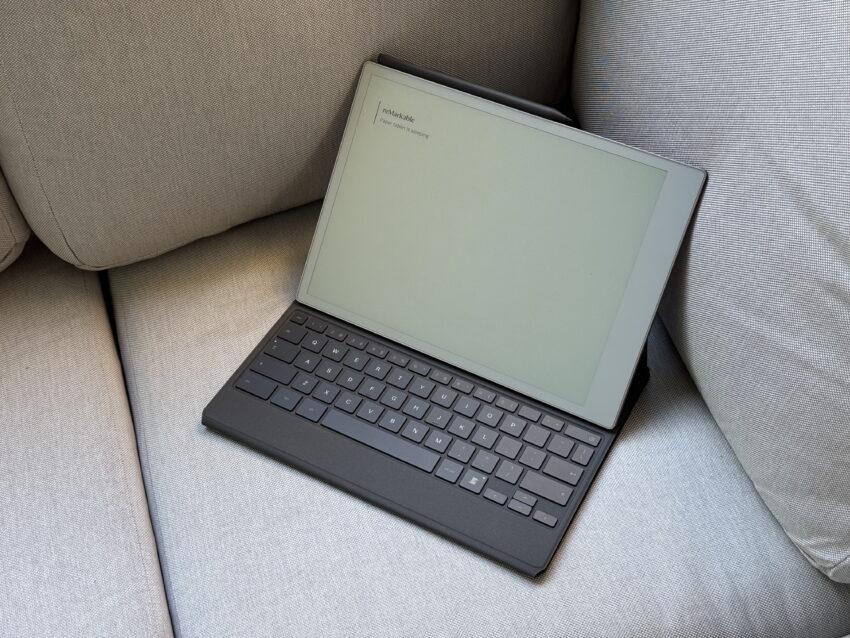
the best thing i bought this year The Remarkable Paper Pro and Type Folio keyboard case have emerged as a surprisingly effective combination for productivity enthusiasts.
the best thing i bought this year
Introduction to the Remarkable Paper Pro
About a year ago, the consensus was that the Remarkable Paper Pro might not be a necessary investment for most users. This e-ink device, while innovative, is often perceived as both extravagant and impractical for everyday tasks. It is not particularly suited for consuming books, and its screen can sometimes feel sluggish, which detracts from the user experience. Moreover, the starting price of $629—recently increased from $579 due to tariffs—raises eyebrows. When you factor in the additional cost of the Type Folio, priced at $229, the total investment becomes substantial.
Given these considerations, many would likely opt for more conventional alternatives, such as Apple’s MacBook Air, which has been seen priced as low as $738. This makes it a more financially appealing choice compared to the combined cost of the Remarkable Paper Pro and Type Folio keyboard case. However, despite these factors, I found myself purchasing the Paper Pro, and it has quickly become my go-to device for productivity tasks, including writing this very blog post.
The Allure of a Single-Purpose Device
What sets the Remarkable Paper Pro apart is not its status as the best tablet on the market—because it certainly isn’t—but rather its focused functionality. The device is designed to serve a specific purpose: facilitating writing and note-taking without the distractions that plague most modern devices. In a world where notifications, social media, and endless apps vie for our attention, the Paper Pro provides a sanctuary for focused thought and creativity.
There are no Slack notifications to interrupt my flow, no social media feeds to scroll through mindlessly, and no algorithms pushing content my way. Instead, the Paper Pro invites me to engage in actual human thought and curation. This ability to create a distraction-free environment feels like a small miracle in today’s hyper-connected world. The device establishes a narrow lane for my focus, allowing me to stay on task without veering off into the rabbit holes of YouTube or social media.
The Type Folio: A Worthy Companion
To enhance the experience, the Type Folio keyboard case is an essential accessory. While its price tag of $229 may seem steep, the quality and functionality it offers make it a worthwhile investment. The Type Folio attaches seamlessly to the tablet, providing both protection and a comfortable typing experience. Its thin and lightweight design makes it easy to carry around, adding to the overall portability of the setup.
Keyboard Performance
As someone who primarily uses Apple’s Magic Keyboard, I was pleasantly surprised by the Type Folio’s performance. While it may not be the most spacious keyboard available, it offers a comfortable typing experience. The keys feature a satisfying clickiness, providing tactile feedback that enhances the writing process. Additionally, some keys are backlit, allowing me to type comfortably even in low-light conditions.
However, I did find the folding and unfolding mechanism a bit tricky at times. Despite this minor inconvenience, the keyboard remains stable enough to use on my lap, which is a crucial feature for those who prefer to work in various environments.
Writing Experience on the Canvas Color Display
The 11.8-inch Canvas Color display of the Remarkable Paper Pro is another standout feature. Writing directly on the screen using the upgraded Marker Plus stylus—available for an additional $129 or $50 when bundled with the tablet—provides an exceptional paper-like feel. The textured glass surface mimics the sensation of writing on actual paper, making the experience enjoyable and engaging.
I can scribble notes on a blank page or annotate PDFs, and the device includes built-in productivity templates that allow me to use the Paper Pro as a daily planner. This versatility enhances its functionality, making it suitable for various tasks beyond simple note-taking. Furthermore, every note I write or type is seamlessly synced across Remarkable’s mobile and desktop applications, although this feature requires a $2.99 monthly subscription.
Maximizing the Device’s Potential
While I appreciate the capabilities of the Paper Pro, I must admit that I do not utilize it to its fullest potential. I often overlook the color display, and the Marker Plus stylus tends to remain magnetically attached to the side of the tablet. However, I am making a conscious effort to incorporate it more into my workflow. It’s worth noting that there are other tablets on the market that are more affordable and offer a broader range of features. Yet, for me, the distraction-free approach and the Type Folio keyboard justify the investment.
Implications for Productivity
The implications of using the Remarkable Paper Pro extend beyond mere functionality. In an age where digital distractions are rampant, the Paper Pro serves as a tool for mindfulness and focused productivity. It encourages users to step away from the noise of notifications and social media, allowing for deeper engagement with tasks at hand. This shift in focus can lead to improved creativity and productivity, as the device fosters an environment conducive to thoughtful work.
Comparative Analysis with Other Devices
When comparing the Remarkable Paper Pro to other tablets and laptops, it’s essential to consider the unique niche it occupies. Unlike traditional tablets that offer a multitude of apps and functionalities, the Paper Pro is designed specifically for writing and note-taking. This singular focus can be both a strength and a limitation. While it may not replace a full-fledged laptop for tasks such as video editing or gaming, it excels in providing a dedicated space for writing and organization.
For users who find themselves overwhelmed by the myriad of options available on conventional tablets, the Remarkable Paper Pro offers a refreshing alternative. It strips away the distractions and delivers a straightforward, user-friendly experience that prioritizes productivity. This makes it particularly appealing for students, professionals, and creatives seeking a focused workspace.
Community and Stakeholder Reactions
The reception of the Remarkable Paper Pro within the tech community has been mixed. Some users praise its unique approach to productivity, highlighting the benefits of a distraction-free environment. Others, however, argue that the price point is too high for what it offers, especially when compared to more versatile devices. The debate often centers around whether the benefits of focused functionality outweigh the limitations of a single-purpose device.
Feedback from users has also highlighted the importance of the accompanying Type Folio. Many agree that while the Paper Pro is a solid device on its own, the keyboard case significantly enhances its usability. The combination of the two products has garnered a loyal following among those who prioritize writing and organization over multimedia capabilities.
Conclusion: A Worthwhile Investment?
In conclusion, the Remarkable Paper Pro and Type Folio keyboard case present a compelling option for those seeking a focused, distraction-free writing experience. While the initial investment may seem steep, the benefits of enhanced productivity and creativity make it a worthwhile consideration for many users. The Paper Pro’s unique approach to note-taking and organization, combined with the Type Folio’s comfortable typing experience, creates an ecosystem that fosters deep engagement with tasks.
For anyone looking to take a break from the constant barrage of notifications and digital distractions, the Remarkable Paper Pro and Type Folio offer an excellent setup. It may not be the best tablet on the market, but its singular focus on writing and productivity makes it a valuable tool for those who appreciate the art of focused thought.
Source: Original report
Was this helpful?
Last Modified: December 9, 2025 at 7:36 pm
5 views