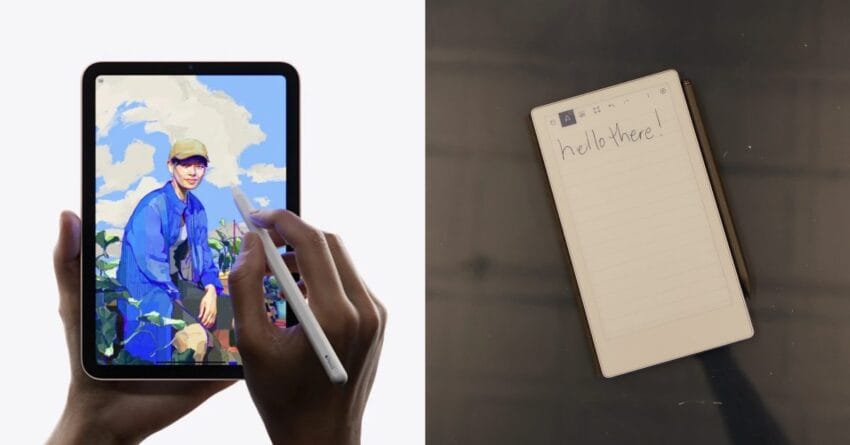
remarkable paper pro move vs ipad mini The recent launch of the reMarkable Paper Pro Move has sparked a compelling comparison with the iPad mini, particularly in the realm of digital minimalism.
remarkable paper pro move vs ipad mini
Introduction to the Devices
Earlier this month, the reMarkable Paper Pro Move made its debut, capturing attention with its compact design and affordability. This new iteration of the reMarkable tablet offers a smaller form factor that closely resembles the iPad mini, making it an intriguing alternative for users seeking a balance between functionality and portability. As digital minimalism gains traction among consumers, the question arises: is the reMarkable Paper Pro Move a worthy contender against the established iPad mini?
Design and Build Quality
Form Factor
The reMarkable Paper Pro Move is designed to be lightweight and portable, weighing significantly less than its predecessor. Its dimensions make it easy to hold in one hand, which is a crucial feature for users who often take notes or read on the go. In contrast, the iPad mini, while also compact, offers a slightly bulkier feel due to its additional features and hardware.
Materials and Aesthetics
Both devices boast high-quality materials, but they cater to different aesthetic preferences. The reMarkable Paper Pro Move features a minimalist design with a matte finish that mimics the feel of paper, appealing to users who prioritize a tactile experience. The iPad mini, on the other hand, showcases a sleek, modern look with a glass front and aluminum back, which may attract users who prefer a more contemporary style.
Display Technology
Screen Quality
The display technology in both devices plays a significant role in user experience. The reMarkable Paper Pro Move utilizes a monochrome E Ink display, which is designed to replicate the look of paper. This technology is particularly beneficial for reading and writing, as it reduces eye strain and provides excellent visibility in various lighting conditions. However, it lacks color and is not suitable for multimedia consumption.
In contrast, the iPad mini features a vibrant Liquid Retina display that supports a wide color gamut and high resolution. This makes it ideal for a range of activities, from watching videos to editing photos. Users who prioritize multimedia capabilities may find the iPad mini’s display more appealing.
Writing Experience
One of the standout features of the reMarkable Paper Pro Move is its writing experience. The tablet comes with a stylus that offers low latency and high precision, making it feel like writing on paper. This is particularly advantageous for students and professionals who take handwritten notes or sketch ideas. The reMarkable’s software is designed to enhance this experience, providing tools for organization and easy access to notes.
While the iPad mini also supports stylus input through the Apple Pencil, the experience is different. The iPad mini’s screen is glass, which can alter the tactile feel of writing. However, the Apple Pencil offers additional functionalities, such as pressure sensitivity and tilt support, making it suitable for artists and designers.
Software and Ecosystem
User Interface
The software experience on both devices is tailored to their respective audiences. The reMarkable Paper Pro Move runs on a proprietary operating system that focuses on note-taking and document management. Its interface is straightforward and minimalistic, allowing users to concentrate on their work without distractions. This aligns well with the principles of digital minimalism, as it encourages users to focus on essential tasks.
In contrast, the iPad mini operates on iPadOS, which offers a more versatile and feature-rich environment. Users can access a wide range of applications, from productivity tools to entertainment options. While this flexibility is a significant advantage, it may also lead to distractions, which some users may find counterproductive to their minimalist goals.
App Ecosystem
The app ecosystem is another critical factor to consider. The reMarkable Paper Pro Move supports a limited selection of applications, primarily focused on productivity and note-taking. This limitation can be seen as a positive aspect for those who prefer a distraction-free environment. However, it may not meet the needs of users who require a broader range of functionalities.
On the other hand, the iPad mini benefits from the extensive App Store, offering thousands of applications across various categories. This includes everything from educational tools to creative software, making it a versatile device for a wide range of users. However, the abundance of options can sometimes lead to decision fatigue and distractions, which may detract from the minimalist experience.
Price and Value
Affordability
Price is often a deciding factor for consumers when choosing between devices. The reMarkable Paper Pro Move is positioned as a more affordable option compared to the iPad mini. This lower price point makes it accessible to a broader audience, particularly students and professionals who may not want to invest heavily in a tablet.
In contrast, the iPad mini, while offering a premium experience, comes with a higher price tag. This cost reflects its advanced features, including a powerful processor, high-resolution display, and extensive app ecosystem. For users who require these capabilities, the investment may be justified. However, for those focused on digital minimalism, the reMarkable Paper Pro Move presents a compelling alternative.
Long-Term Value
When considering long-term value, it is essential to evaluate how each device aligns with user needs. The reMarkable Paper Pro Move is designed for users who prioritize note-taking and document management, making it a valuable tool for students and professionals in these fields. Its focus on simplicity and functionality may lead to increased productivity and satisfaction over time.
Conversely, the iPad mini offers a broader range of functionalities, which may appeal to users with diverse needs. However, this versatility can also lead to a more complex user experience, which may not align with the principles of digital minimalism. Users must weigh the benefits of advanced features against the potential for distraction and overwhelm.
Stakeholder Reactions
Consumer Feedback
Initial consumer feedback for the reMarkable Paper Pro Move has been largely positive, with users praising its lightweight design and exceptional writing experience. Many have noted that the device effectively fulfills their needs for note-taking and document management without the distractions often associated with more feature-rich tablets.
On the other hand, the iPad mini continues to receive accolades for its versatility and performance. Users appreciate its ability to handle a wide range of tasks, from productivity to entertainment. However, some have expressed concerns about the potential for distraction, particularly when using apps that are not directly related to their primary tasks.
Expert Opinions
Experts in the tech industry have also weighed in on the comparison between the two devices. Many agree that the reMarkable Paper Pro Move is an excellent choice for those who prioritize a minimalist approach to digital tools. Its focus on writing and note-taking aligns well with the growing trend of digital minimalism.
Conversely, experts recognize the iPad mini’s strengths in versatility and performance. They suggest that it may be better suited for users who require a multifunctional device capable of handling various tasks. Ultimately, the choice between the two devices depends on individual preferences and priorities.
Conclusion
The comparison between the reMarkable Paper Pro Move and the iPad mini highlights the diverse needs of consumers in today’s digital landscape. While the reMarkable offers a focused, minimalist approach that appeals to users seeking simplicity and functionality, the iPad mini provides a versatile platform for a broader range of activities. As digital minimalism continues to gain traction, the decision between these two devices will largely depend on individual priorities and how users envision integrating technology into their lives.
Source: Original report
Was this helpful?
Last Modified: September 27, 2025 at 10:37 pm
30 views