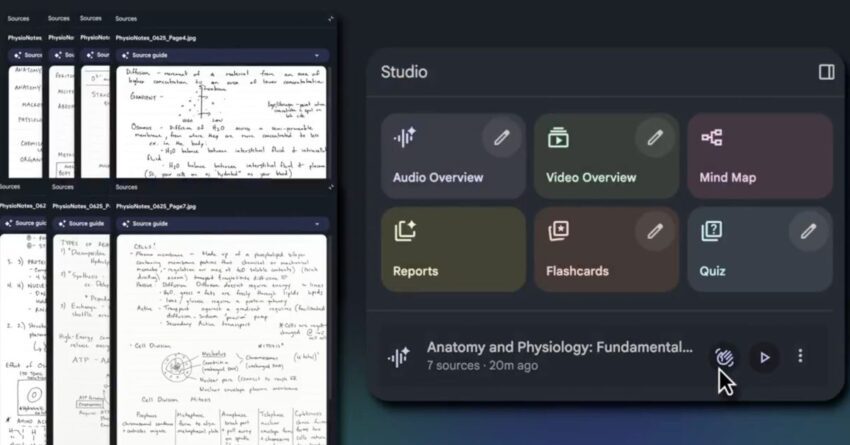
notebooklm app adds built-in camera for image Google has introduced a built-in camera feature to its NotebookLM app, enhancing the way users can upload images and utilize them as sources.
notebooklm app adds built-in camera for image
Overview of NotebookLM
NotebookLM is part of Google’s suite of productivity tools designed to streamline note-taking and information management. Launched as an innovative solution for users looking to organize their thoughts and resources, the app integrates various functionalities that cater to both casual users and professionals. With its intuitive interface and advanced features, NotebookLM aims to facilitate better information retention and retrieval.
Key Features of NotebookLM
Before delving into the new camera feature, it is essential to understand the core functionalities that NotebookLM offers:
- Text Recognition: The app utilizes optical character recognition (OCR) technology to convert images of text into editable and searchable content.
- Cloud Integration: Users can seamlessly sync their notes and images across devices, ensuring that their information is always accessible.
- Collaboration Tools: NotebookLM allows multiple users to collaborate on notes in real-time, making it ideal for team projects and group studies.
- Tagging and Organization: Users can categorize their notes and images with tags, making it easier to locate specific information later.
Introduction of the Built-in Camera
The latest update to NotebookLM introduces a built-in camera feature, allowing users to capture images directly within the app. This functionality is designed to streamline the process of adding visual content to notes, making it easier for users to reference images as sources for their information.
How the Camera Feature Works
With the built-in camera, users can take photos or upload images directly from their device’s gallery. The process is straightforward:
- Open the NotebookLM app and navigate to the note where you want to add an image.
- Select the camera icon to activate the built-in camera.
- Capture the image or choose an existing one from your gallery.
- Once uploaded, the image can be annotated, tagged, or linked to relevant notes.
This feature not only enhances the user experience but also encourages the integration of multimedia elements into note-taking, which can improve comprehension and retention of information.
Benefits of the Built-in Camera
The addition of a camera feature brings several advantages:
- Efficiency: Users can quickly capture and upload images without needing to switch between apps, saving time and effort.
- Enhanced Learning: Visual aids can significantly enhance understanding, especially for complex subjects. The ability to include images directly in notes allows for a more comprehensive learning experience.
- Improved Organization: By linking images to specific notes, users can create a more organized and context-rich information repository.
- Accessibility: The built-in camera makes it easier for users to document information on-the-go, which is particularly beneficial for students and professionals who often work in dynamic environments.
Implications for Users
The integration of a camera feature into NotebookLM has several implications for its user base, which includes students, educators, and professionals.
For Students
Students can benefit significantly from this feature. The ability to capture images of whiteboard notes, textbook pages, or diagrams directly into their digital notebooks can enhance their study habits. This feature allows them to create a more interactive and engaging study experience, as they can combine text and images to reinforce learning.
For Educators
Educators can utilize the camera feature to create more dynamic lesson plans. By incorporating images into their notes, they can provide students with a richer context for the material being taught. Additionally, this can facilitate better feedback on student projects, as teachers can annotate images directly within the app.
For Professionals
Professionals in various fields can leverage this feature for project management, research, and documentation. The ability to quickly capture and annotate images can streamline workflows and improve collaboration among team members. For instance, architects and designers can document site visits or design sketches, while researchers can capture data from experiments or fieldwork.
Stakeholder Reactions
The introduction of the camera feature has garnered mixed reactions from users and industry experts alike. Many users have expressed enthusiasm about the added functionality, citing its potential to enhance productivity and creativity. However, some have raised concerns regarding privacy and data security.
User Feedback
Initial feedback from users has been largely positive. Many appreciate the convenience of having a built-in camera, noting that it simplifies the process of adding visual content to their notes. Users have reported that the feature encourages them to be more visually oriented in their note-taking, which can lead to better retention of information.
Concerns About Privacy
Despite the positive feedback, some users have voiced concerns about privacy. The ability to capture images raises questions about how data is stored and whether it is adequately protected. Google has not provided extensive details regarding the security measures in place for images captured through the app, leading to apprehension among privacy-conscious users.
Future Developments
As Google continues to develop NotebookLM, the company is likely to explore additional features that enhance user experience. Potential future developments could include:
- Advanced Image Editing: Users may benefit from built-in image editing tools that allow for cropping, filtering, and annotating images before adding them to notes.
- Integration with Other Google Services: Enhanced integration with other Google services, such as Google Drive or Google Photos, could streamline the process of managing images and notes.
- AI-Powered Features: The incorporation of artificial intelligence could lead to smarter organization and retrieval of notes and images, making it easier for users to find relevant information quickly.
Conclusion
The addition of a built-in camera to the NotebookLM app represents a significant enhancement in the way users can interact with their notes. By allowing for the quick capture and integration of images, Google is not only improving the functionality of the app but also promoting a more engaging and effective note-taking experience. As users adapt to this new feature, it will be interesting to see how it influences their study habits, teaching methods, and professional workflows. The future of NotebookLM looks promising, with potential developments that could further revolutionize how we manage and interact with information.
Source: Original report
Was this helpful?
Last Modified: December 5, 2025 at 4:43 am
1 views