google s new windows desktop app brings Google has introduced a new search application for Windows that aims to enhance user productivity by integrating a Spotlight-like search bar into the operating system.
google s new windows desktop app brings
Overview of the New Search App
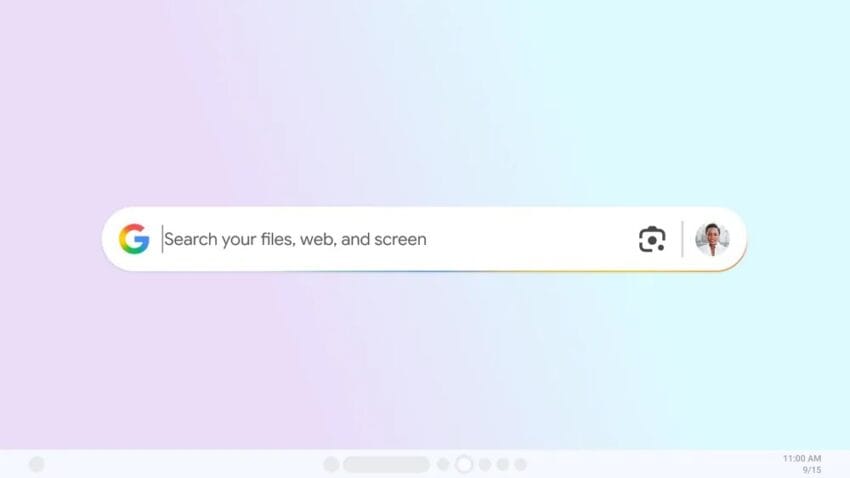
On Tuesday, Google announced a new search app specifically designed for Windows users, currently available through Google’s Search Labs. This initiative is part of Google’s ongoing efforts to expand its ecosystem beyond traditional web services and into desktop applications. The app allows users to access a wide range of information using a simple keyboard shortcut—Alt + Space. This functionality enables users to search for files stored on their computers, documents in Google Drive, and information available on the web.
Installation and User Experience
The installation process for the new app is reminiscent of Google Chrome, requiring users to download and sign in to their Google accounts. This seamless integration is designed to provide a familiar experience for users who are already accustomed to Google’s suite of applications. Once installed, the app offers a streamlined interface that allows users to quickly access various types of content.
Key Features
One of the standout features of the new app is the inclusion of Google Lens, a visual search tool that enhances the search capabilities of the application. With Google Lens, users can select images displayed on their screens and conduct searches based on those images. This feature also allows for text translation, making it easier for users to understand foreign language content. For instance, if a user highlights a math problem from their homework, they can leverage Google’s AI Mode to assist in finding the solution.
Comparison with Existing Tools
The functionality of Google’s new app draws parallels to Apple’s Spotlight feature, which has long been a staple for Mac users. Spotlight allows users to search through files, applications, and web content, streamlining the process of finding information on their devices. Google’s new app aims to replicate this efficiency for Windows users, providing a unified search experience that combines local and online resources.
Search Capabilities
Similar to Google’s web search engine, the new app allows users to switch between various result categories, including AI Mode, Images, Videos, and more. This versatility ensures that users can find the information they need quickly and efficiently, regardless of the source. The incorporation of AI Mode is particularly noteworthy, as it leverages Google’s advanced machine learning algorithms to provide contextual answers and suggestions based on user queries.
Current Availability and Limitations
As of now, the app is in an experimental phase and is only available in English for users located in the United States. This limited rollout suggests that Google is seeking to gather user feedback and make necessary adjustments before a broader launch. Users interested in trying out the app can enable the experiment within Google’s Labs, allowing them to explore its features and provide feedback to the development team.
Potential Implications for Users
The introduction of this search app could have significant implications for productivity, particularly for users who frequently juggle multiple tasks and applications. By consolidating search functionalities into a single interface, Google aims to reduce the time spent switching between different applications and searching for information. This could lead to a more efficient workflow, especially for professionals and students who rely heavily on digital resources.
Stakeholder Reactions
The response from the tech community has been largely positive, with many praising Google for its innovative approach to enhancing desktop productivity. Analysts have noted that the app could serve as a valuable tool for users who are accustomed to Google’s ecosystem, providing them with a familiar interface and robust search capabilities.
Concerns and Criticisms
However, some concerns have been raised regarding privacy and data security. As users are required to sign in with their Google accounts, questions about data collection and usage may arise. Critics argue that while the app offers convenience, it also raises potential privacy issues, particularly for users who may be wary of sharing their information with large tech companies. Google will need to address these concerns transparently to maintain user trust.
Future Developments
Looking ahead, Google’s new search app for Windows could pave the way for further innovations in desktop applications. As the company continues to refine its offerings, users can expect additional features and enhancements that leverage artificial intelligence and machine learning. The integration of AI into everyday tools has the potential to revolutionize how users interact with their devices, making tasks more intuitive and efficient.
Broader Context in the Tech Landscape
The launch of this app also reflects a broader trend in the tech industry, where companies are increasingly focusing on creating integrated ecosystems that enhance user experience. As competition intensifies among tech giants, the ability to offer seamless cross-platform functionalities will be crucial for attracting and retaining users. Google’s foray into desktop applications is a strategic move that aligns with this trend, positioning the company as a key player in the evolving landscape of productivity tools.
Conclusion
Google’s new search app for Windows represents a significant step forward in enhancing user productivity through innovative search capabilities. By integrating features like Google Lens and AI Mode, the app aims to provide a comprehensive solution for users seeking to streamline their workflows. While the current availability is limited, the potential implications for productivity and user experience are substantial. As Google continues to develop this application, it will be interesting to see how it evolves and what additional features may be introduced in the future.
Source: Original report
Was this helpful?
Last Modified: September 16, 2025 at 9:35 pm
6 views