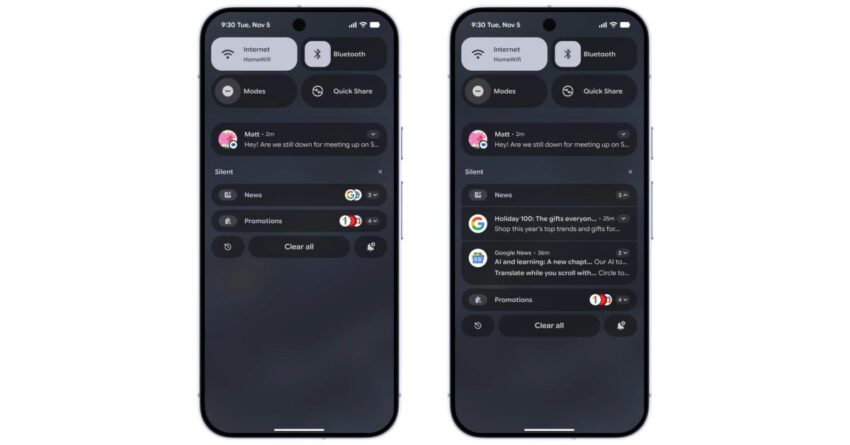
Google has announced the rollout of its new Notification Organizer feature for Pixel devices, enhancing user experience with Android 16 QPR2.
Overview of the Notification Organizer
The Notification Organizer is a significant addition to Google’s suite of features aimed at improving user interaction with notifications on Pixel devices. This tool is designed to streamline the way notifications are displayed and managed, making it easier for users to prioritize important alerts while minimizing distractions from less critical notifications.
Key Features of the Notification Organizer
The Notification Organizer introduces several functionalities that enhance the overall notification management system. Some of the key features include:
- Smart Grouping: Notifications are automatically grouped based on their relevance and type. For instance, messages from the same app or conversations can be clustered together, allowing users to view related notifications at a glance.
- Customizable Settings: Users can customize how notifications are organized, including options to prioritize certain apps or types of notifications. This feature allows for a tailored experience that aligns with individual preferences.
- Quick Actions: The Notification Organizer provides quick action buttons for common tasks, such as replying to messages or dismissing notifications, directly from the notification shade.
- AI-Powered Suggestions: Leveraging AI technology, the Notification Organizer can suggest which notifications to prioritize based on user behavior and historical data.
Background on Notification Management in Android
Notification management has been a critical aspect of the Android operating system since its inception. As smartphones have evolved, so too have the ways in which users interact with notifications. The sheer volume of notifications can often lead to user frustration, making it essential for developers to create systems that enhance usability.
Historically, Android has offered various notification management tools, but the introduction of the Notification Organizer marks a significant advancement. This feature builds on previous efforts, such as the introduction of notification channels and the ability to snooze notifications, which aimed to give users more control over their notification experience.
Implications of the Notification Organizer
The rollout of the Notification Organizer is expected to have several implications for users and the broader Android ecosystem:
- Enhanced User Experience: By organizing notifications more effectively, users can expect a more streamlined experience, reducing the cognitive load associated with managing multiple alerts.
- Increased Productivity: With the ability to prioritize notifications, users may find themselves more productive, as they can focus on what matters most without being distracted by less important alerts.
- Developer Opportunities: App developers may need to adapt their notification strategies to align with the new organization system, potentially leading to innovations in how notifications are utilized within apps.
Stakeholder Reactions
The introduction of the Notification Organizer has garnered attention from various stakeholders, including users, developers, and industry analysts. Feedback has been largely positive, with many users expressing excitement about the potential for improved notification management.
User Feedback
Early adopters of the Notification Organizer have reported a more organized notification experience, highlighting the benefits of smart grouping and customizable settings. Users appreciate the ability to tailor their notification preferences, allowing them to focus on what is most important to them.
However, some users have raised concerns about the learning curve associated with the new feature. While the AI-powered suggestions are designed to enhance usability, there may be an adjustment period as users become accustomed to the new organization methods.
Developer Perspectives
Developers are also weighing in on the implications of the Notification Organizer. Many see it as an opportunity to enhance user engagement through more effective notification strategies. By understanding how the Notification Organizer operates, developers can create notifications that align better with user preferences, potentially increasing the effectiveness of their apps.
On the flip side, some developers express concern about the need to adapt to the new system. Changes in how notifications are managed may require updates to existing apps, which could be resource-intensive for smaller development teams.
Future Developments and Considerations
As Google continues to roll out the Notification Organizer, the company is likely to gather user data and feedback to refine the feature further. This iterative process is crucial for ensuring that the Notification Organizer meets the evolving needs of users.
Potential Enhancements
Looking ahead, several enhancements could be considered for future iterations of the Notification Organizer:
- Integration with Other Google Services: Further integration with services like Google Assistant could provide users with even more personalized notification experiences, allowing for voice-activated management of alerts.
- Advanced AI Features: As AI technology continues to evolve, future updates could include more sophisticated algorithms for predicting user preferences and behaviors, leading to even smarter notification management.
- Cross-Device Synchronization: Enabling synchronization of notification preferences across multiple devices could enhance user experience, allowing for seamless management of notifications whether on a smartphone, tablet, or wearable device.
Conclusion
The rollout of the Notification Organizer represents a significant step forward in notification management for Pixel devices. By leveraging AI and offering customizable settings, Google aims to enhance user experience and productivity. As users and developers adapt to this new feature, it will be interesting to observe how it influences notification strategies across the Android ecosystem.
As the technology landscape continues to evolve, the Notification Organizer is poised to play a crucial role in shaping how users interact with their devices, making it an essential feature for those looking to optimize their smartphone experience.
Source: Original report
Was this helpful?
Last Modified: December 10, 2025 at 12:56 am
0 views