
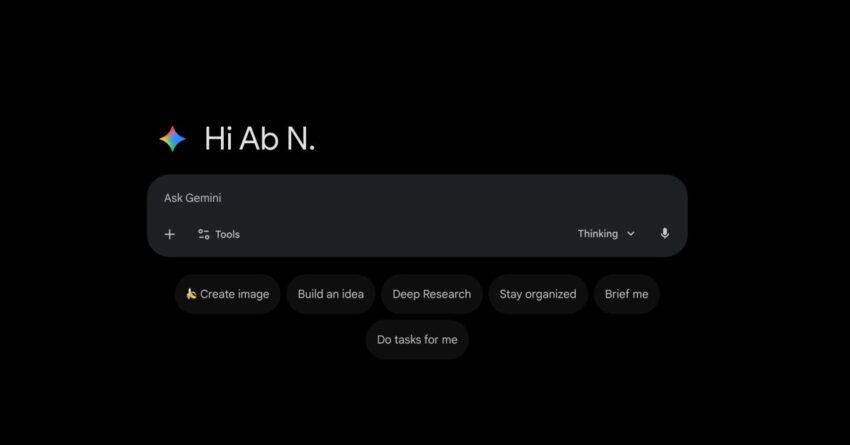
gemini gets web redesign with new dark Google’s Gemini web app is undergoing a significant redesign, introducing a fresh dark theme and a new ‘My Stuff’ folder feature aimed at enhancing user experience.
gemini gets web redesign with new dark
Overview of the Redesign
Following the updates rolled out for Android and iOS platforms last month, the Gemini web app is now receiving its own makeover. Google has emphasized the goal of achieving a “clean, modern look” that aligns with contemporary design trends. This redesign is part of Google’s broader strategy to unify its user interface across various platforms, ensuring that users have a consistent experience whether they are on mobile or desktop.
Key Features of the Redesign
The redesign introduces several notable features that aim to improve usability and accessibility:
- Dark Theme: The new dark theme is designed to reduce eye strain, especially in low-light environments. This feature has become increasingly popular among users who prefer a darker interface for aesthetic reasons or for comfort during extended use.
- ‘My Stuff’ Folder: This new organizational feature allows users to save and categorize their favorite items, making it easier to access frequently used tools and resources. The ‘My Stuff’ folder is expected to enhance productivity by streamlining the user experience.
- Improved Navigation: The redesign also focuses on simplifying navigation. Users can expect a more intuitive layout that makes it easier to find features and tools without unnecessary clicks.
Implications of the Redesign
The redesign of the Gemini web app carries several implications for users and the broader tech landscape. As Google continues to refine its applications, the changes reflect a growing trend towards user-centered design. Here are some potential impacts:
User Experience Enhancements
With the introduction of the dark theme and the ‘My Stuff’ folder, users can expect a more personalized and efficient experience. The dark theme not only caters to aesthetic preferences but also contributes to battery savings on OLED screens, which is an important consideration for many users today. The ‘My Stuff’ folder allows for greater customization, enabling users to tailor their workspace according to their needs.
Competitive Landscape
As Google enhances its Gemini web app, it is also positioning itself more competitively against other productivity tools in the market. Applications like Microsoft Office 365 and Notion have set high standards for user experience and customization. By implementing these changes, Google aims to attract users who may be considering alternatives due to the lack of similar features in previous versions of Gemini.
Feedback from Users and Stakeholders
Reactions to the redesign have been mixed, with some users expressing excitement over the new features while others remain skeptical about the overall effectiveness of the changes. Early feedback indicates that the dark theme is particularly well-received, with many users appreciating the option to switch from a traditional light interface.
However, some users have raised concerns regarding the transition process. Changes in user interface can often lead to confusion, especially for those who have become accustomed to the previous layout. Google has acknowledged this feedback and is working on providing comprehensive guides and tutorials to help users navigate the new design.
Context of the Redesign
The redesign of the Gemini web app is not an isolated event; it is part of a larger trend within Google to enhance its suite of applications. Over the past few years, Google has invested heavily in improving user experience across its platforms. This includes updates to Google Workspace, which encompasses tools like Google Docs, Sheets, and Slides.
Furthermore, the redesign aligns with Google’s commitment to accessibility. By focusing on a clean and modern look, Google aims to make its applications more usable for individuals with varying levels of tech proficiency. This is particularly important as more users, including those from non-technical backgrounds, adopt digital tools for work and personal use.
Historical Context
Historically, Google has undergone several redesigns across its applications, often in response to user feedback and changing design trends. The introduction of Material Design in 2014 marked a significant shift in how Google approached user interface design. This design philosophy emphasizes bold colors, grid-based layouts, and responsive animations, which have influenced many of Google’s subsequent updates.
In recent years, the tech giant has also faced criticism regarding the usability of its applications. Users have called for more intuitive designs that prioritize functionality without sacrificing aesthetics. The latest redesign of the Gemini web app appears to be a direct response to these calls, aiming to strike a balance between form and function.
Future Developments
Looking ahead, the redesign of the Gemini web app may pave the way for additional features and improvements. Google has a history of iterating on its products based on user feedback, and it is likely that the company will continue to refine the Gemini platform in the coming months.
Potential Features on the Horizon
While specific future features have not been officially announced, speculation suggests that Google may explore the following enhancements:
- Integration with Other Google Services: As users increasingly rely on a suite of Google applications, further integration between Gemini and other services like Google Drive and Google Calendar could enhance productivity.
- AI-Powered Features: Given Google’s advancements in artificial intelligence, future updates may incorporate AI-driven tools to assist users in organizing their tasks and managing their time more effectively.
- Collaboration Tools: Enhancements to collaborative features could make Gemini a more attractive option for teams, allowing for real-time editing and sharing capabilities similar to those found in Google Docs.
Stakeholder Reactions
Industry analysts have noted that the redesign could have significant implications for Google’s market share in productivity tools. As more businesses and individuals seek efficient solutions for remote work, the demand for user-friendly applications is likely to grow. Analysts suggest that if Google successfully addresses user concerns and continues to innovate, Gemini could become a leading option in the productivity software market.
Conclusion
The redesign of the Gemini web app marks an important step in Google’s ongoing efforts to enhance user experience across its platforms. With the introduction of a dark theme and the ‘My Stuff’ folder, users can expect a more streamlined and personalized interface. As Google continues to evolve its applications, the tech giant is poised to remain a key player in the competitive landscape of productivity tools.
Source: Original report
Was this helpful?
Last Modified: December 3, 2025 at 11:46 pm
3 views














