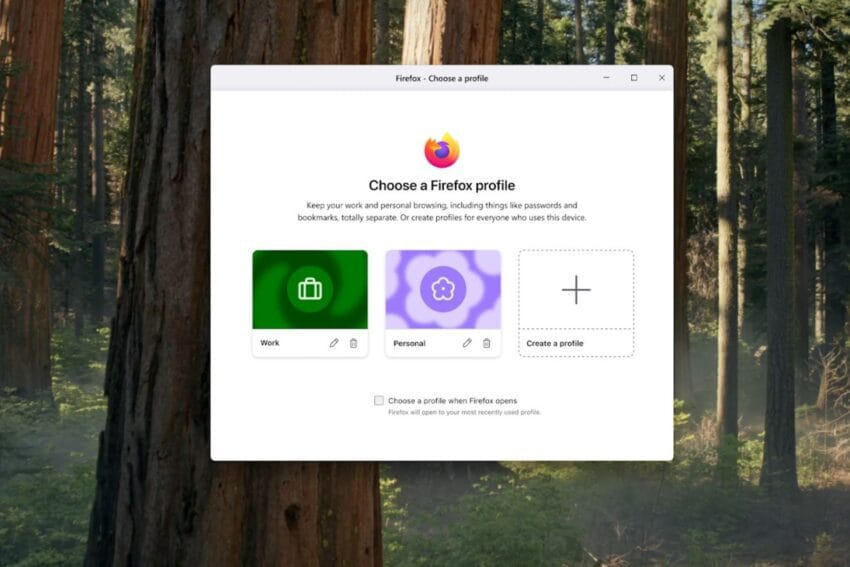
firefox is adding profiles to separate your Mozilla is set to enhance the Firefox web browser by introducing a new profiles feature that allows users to better manage and separate their online activities.
firefox is adding profiles to separate your
Overview of the New Profiles Feature
Starting October 14th, Mozilla will roll out a significant update to Firefox that introduces customizable profiles, enabling users to create distinct browsing environments tailored to their specific needs. This feature aims to streamline the organization of bookmarks, logins, browsing history, extensions, and themes, thereby enhancing the overall user experience.
Customization Options
One of the standout features of the new profiles is the ability to customize each profile with unique avatars, colors, and themes. This customization makes it easier for users to quickly identify and select the appropriate profile at a glance. For instance, a user might choose a professional theme for work-related tasks and a more casual theme for personal browsing. This visual differentiation can reduce confusion and improve efficiency, especially for those who juggle multiple online identities.
Comparison with Multi-Account Containers
Firefox has long supported multi-account containers, an extension that helps users organize their browsing history, cookies, and tracking information into dedicated tabs. While this feature has been beneficial for maintaining privacy and managing digital footprints, the new profiles feature takes organization a step further. Profiles allow users to compartmentalize not just their browsing history but also a broader range of browser functionalities.
Enhanced Privacy Features
Both profiles and multi-account containers serve to keep users’ online activities separate, but profiles offer a more comprehensive solution. Each profile maintains its own set of browsing data, which means that users can keep their work-related activities completely distinct from personal browsing. This separation is particularly important in an era where online privacy concerns are paramount. By using profiles, users can minimize the risk of inadvertently exposing sensitive information, such as personal plans showing up during a work presentation.
Practical Applications of Profiles
The introduction of profiles in Firefox opens up a variety of practical applications for users. Here are some scenarios where profiles can significantly enhance the browsing experience:
- Work vs. Personal Browsing: Users can create a dedicated work profile that includes all necessary bookmarks, logins, and extensions for professional tasks. This separation helps to maintain focus and reduces distractions from personal activities.
- Project Management: For individuals managing multiple projects, profiles can be tailored to each project, allowing users to keep relevant resources and information organized without the clutter of unrelated tabs.
- Family Use: Families sharing a single device can create individual profiles for each member, ensuring that bookmarks, history, and settings remain private and personalized.
- Testing and Development: Developers can create profiles to test websites or applications in different environments, making it easier to switch between various configurations without affecting their main browsing experience.
User Experience and Mental Clarity
Mozilla emphasizes that the introduction of profiles is not merely about organizing tabs but also about enhancing mental clarity. “Profiles in Firefox aren’t just a way to clean up your tabs. They’re a way to set boundaries, protect your information, and make the internet a little calmer,” the company stated in its announcement blog. This perspective highlights the psychological benefits of compartmentalizing online activities, allowing users to focus on the task at hand without the mental burden of navigating through unrelated information.
Avoiding Awkward Surprises
One of the key advantages of using profiles is the ability to avoid “awkward surprises,” such as personal information appearing during professional interactions. For instance, a user might accidentally display their weekend plans in a work presentation if they are not careful about which profile they are using. By maintaining clear boundaries between different roles online, users can navigate their digital lives with greater confidence and less anxiety.
Stakeholder Reactions
The announcement of the profiles feature has garnered positive reactions from various stakeholders, including privacy advocates and everyday users. Privacy advocates have long championed the need for better tools to manage online identities, and the profiles feature aligns well with this goal. By providing users with the ability to compartmentalize their online activities, Mozilla is taking a proactive step toward enhancing user privacy and control.
User Feedback and Anticipation
Early feedback from beta testers of the profiles feature has been largely favorable. Users have expressed appreciation for the intuitive design and the ease of switching between profiles. Many have noted that the visual customization options make it not only functional but also enjoyable to use. As the rollout date approaches, anticipation is building among the broader Firefox user base, with many eager to explore the new capabilities.
Implications for the Future of Browsing
The introduction of profiles in Firefox may have broader implications for the future of web browsing. As users become increasingly aware of privacy concerns and the need for better organization in their digital lives, features like profiles could become a standard expectation across all major browsers. Mozilla’s commitment to enhancing user privacy and experience may set a precedent for other companies to follow suit.
Potential Challenges
While the profiles feature offers numerous benefits, it may also present some challenges. For instance, users who are accustomed to a single browsing environment may initially find the transition to multiple profiles confusing. Mozilla will need to provide clear guidance and support to help users adapt to this new functionality. Additionally, the success of the profiles feature will depend on how well it integrates with existing Firefox features and extensions.
Conclusion
The upcoming profiles feature in Firefox represents a significant advancement in how users can manage their online activities. By allowing for customizable browsing environments, Mozilla is addressing the growing demand for better organization and privacy in the digital age. As the rollout date approaches, users are encouraged to consider how they might utilize profiles to enhance their browsing experience and maintain clearer boundaries between different aspects of their online lives.
Source: Original report
Was this helpful?
Last Modified: October 8, 2025 at 4:37 pm
11 views