figma adds more photoshop-like ai tools for Figma has introduced three new AI-powered tools aimed at enhancing image editing capabilities directly within its platform, streamlining the creative process for users.
figma adds more photoshop-like ai tools for
Introduction to Figma’s New AI Tools
Figma, a leading collaborative design platform, has made significant strides in integrating artificial intelligence into its suite of tools. The latest update introduces three innovative AI-powered features designed to simplify image editing tasks that traditionally required users to switch between multiple applications. These tools are now available in both Figma Design and Figma Draw, allowing users to edit images more efficiently and effectively.
Overview of the New Features
The new AI tools include:
- Erase Object: This tool enables users to remove unwanted elements from an image seamlessly.
- Isolate Object: Users can separate specific objects from their backgrounds, making it easier to reposition them as needed.
- Extend Image: This feature allows users to expand images beyond their original dimensions, providing more flexibility in design.
Erase Object Tool
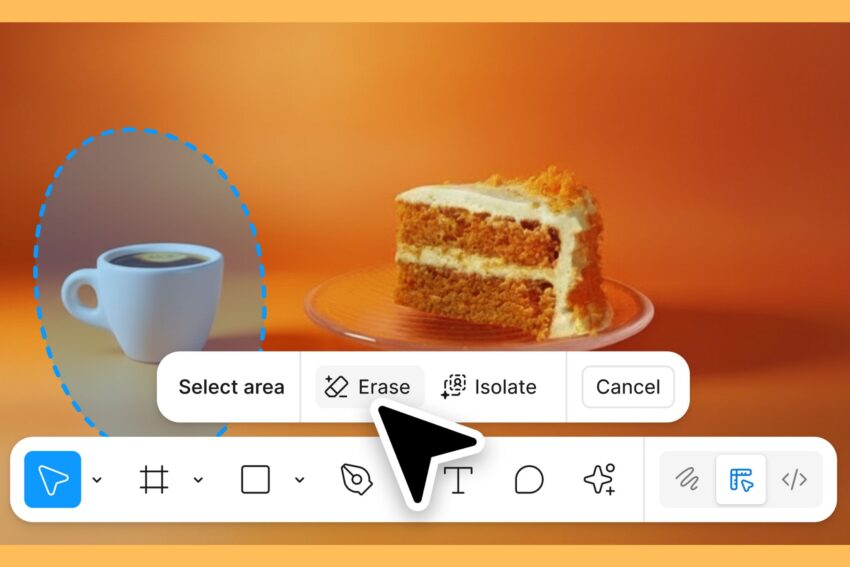
The Erase Object tool is particularly noteworthy for its simplicity and effectiveness. Users can utilize Figma’s existing lasso tool to draw around the object they wish to remove. Once selected, a simple click on the Erase button will eliminate the chosen object from the image. The AI technology behind this tool intelligently fills in the background, ensuring that the image remains cohesive and visually appealing after the object has been removed.
This feature is especially beneficial for designers who often work with images that contain distracting elements or require a cleaner presentation. By allowing users to quickly erase unwanted objects, Figma enhances the overall efficiency of the design process.
Isolate Object Tool
The Isolate Object tool complements the Erase Object feature by enabling users to separate specific elements from their backgrounds. This is particularly useful for designers who want to reposition objects within a layout or create new compositions without the constraints of the original background.
To use this tool, users again utilize the lasso tool to select the desired object. After making the selection, clicking on the Isolate button will separate the object from its background. This functionality not only saves time but also allows for greater creative freedom, as designers can experiment with different placements and arrangements without the need for extensive manual editing.
Extend Image Tool
The Extend Image tool is another significant addition to Figma’s capabilities. This feature allows users to expand the dimensions of an image, providing more space for design elements or backgrounds. By extending an image, designers can create more dynamic layouts and ensure that their visuals fit seamlessly into various formats, whether for web, print, or mobile applications.
This tool is particularly useful for projects that require specific dimensions or for designers who need to adapt images to fit different screen sizes. The ability to extend images without losing quality or clarity is a game-changer for many professionals in the design field.
Implications for Designers
The introduction of these AI-powered tools marks a significant shift in how designers can approach image editing. Traditionally, designers would need to rely on external software, such as Adobe Photoshop, to perform similar tasks. This often resulted in a fragmented workflow, where users had to switch between applications, potentially losing focus and efficiency.
With Figma’s new tools, users can now perform complex image edits directly within the platform, streamlining their design process. This integration not only saves time but also enhances collaboration among team members, as all edits can be made in real-time within the same environment.
Stakeholder Reactions
The response from the design community has been largely positive. Many users have expressed excitement about the potential of these new tools to simplify their workflows and enhance their creative capabilities. Designers have noted that the ability to perform advanced image edits without leaving Figma is a significant advantage, particularly for teams that prioritize collaboration and efficiency.
Industry experts have also weighed in on the implications of Figma’s new features. Some have highlighted the growing trend of integrating AI into design tools, suggesting that this could lead to a new era of creativity where designers can focus more on conceptualization and less on technical execution.
Context and Future Developments
Figma’s move to incorporate AI tools aligns with broader trends in the technology and design industries. As artificial intelligence continues to evolve, its applications in creative fields are becoming increasingly sophisticated. Companies are recognizing the potential for AI to enhance productivity and creativity, leading to a surge in demand for tools that leverage this technology.
Figma’s commitment to innovation is evident in its continuous updates and feature enhancements. The introduction of AI-powered tools is just one example of how the platform is adapting to meet the needs of modern designers. As user expectations evolve, Figma is likely to continue exploring new ways to integrate AI into its offerings, potentially expanding its capabilities even further.
Conclusion
The launch of Figma’s new AI-powered tools—Erase Object, Isolate Object, and Extend Image—represents a significant advancement in the realm of image editing for designers. By enabling users to perform complex edits directly within the platform, Figma is streamlining workflows and enhancing creative possibilities. The positive reception from the design community underscores the importance of these tools in modern design practices.
As Figma continues to innovate and expand its capabilities, it will be interesting to see how these tools evolve and what new features may be introduced in the future. The integration of AI into design workflows is still in its early stages, and Figma is well-positioned to lead the charge in this transformative landscape.
Source: Original report
Was this helpful?
Last Modified: December 10, 2025 at 7:38 pm
3 views